1. Introduction
This manual provides essential information for the safe and efficient installation, operation, and maintenance of your KLUDI BALANCE Electronic Basin-fitting Low Pressure Faucet, Model 5220205. Please read these instructions carefully before beginning installation or use to ensure proper function and to prevent damage.
The KLUDI BALANCE electronic basin-fitting is designed for low-pressure water systems and features a touchless operation with an integrated power supply, offering convenience and hygiene in your bathroom or kitchen.
2. Safety Instructions
- Electrical Safety: This product operates with an external power supply. Ensure the power supply is installed by a qualified electrician in accordance with local electrical codes. Do not expose the power supply or electrical connections to water. Disconnect power before any maintenance or installation work.
- Water Pressure: This faucet is specifically designed for low-pressure systems. Do not connect to high-pressure water supplies as this may cause damage to the faucet and plumbing.
- Water Temperature: Ensure the water heater settings are appropriate to prevent scalding. The faucet may include a temperature mixing handle; adjust carefully.
- Installation: Installation should be performed by a qualified professional to ensure correct plumbing and electrical connections.
- Cleaning: Use only mild cleaning agents. Abrasive cleaners or solvents can damage the polished chrome finish and internal components.
3. Product Overview
The KLUDI BALANCE electronic basin-fitting combines modern design with touchless functionality. It features a polished chrome finish and is equipped with a sensor for automatic water flow activation.

Figure 3.1: Front view of the KLUDI BALANCE Electronic Basin-fitting. This image displays the sleek, polished chrome finish of the faucet, highlighting the integrated sensor for touchless operation and the side-mounted lever for temperature adjustment.
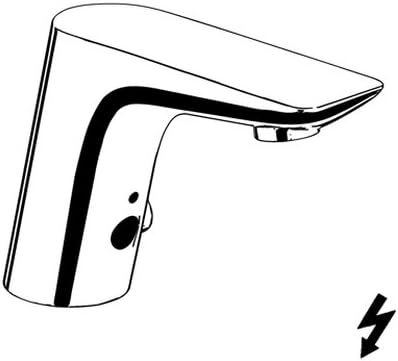
Figure 3.2: Line drawing illustrating the general form and key features of the KLUDI BALANCE Faucet. This diagram provides a simplified view, emphasizing the sensor location and the overall profile of the unit.
4. Setup and Installation
Before installation, ensure you have all necessary tools and that the water supply and electrical connections are prepared according to local regulations.
4.1 Pre-installation Checklist
- Verify that the water supply is low pressure.
- Ensure a suitable power outlet or connection point is available for the power supply unit.
- Confirm the basin has a single hole for deck mounting.
- Gather necessary tools: adjustable wrench, screwdriver, sealant tape, measuring tape.
4.2 Installation Steps
- Prepare the Mounting Surface: Ensure the basin surface is clean and dry around the faucet hole.
- Mount the Faucet: Insert the faucet body into the single hole on the basin. Secure it from underneath using the provided mounting hardware (washer and nut). Tighten firmly but do not overtighten.
- Connect Water Lines: Connect the flexible supply hoses from the faucet to the hot and cold low-pressure water supply lines. Use sealant tape on threaded connections to prevent leaks. Ensure correct hot and cold connections if a temperature mixing function is present.
- Connect Power Supply: Connect the faucet's electrical cable to the provided power supply unit. Plug the power supply unit into a suitable electrical outlet or connect it to the electrical system as per local codes.
- Test for Leaks and Functionality: Slowly turn on the water supply and check all connections for leaks. Activate the faucet to ensure proper water flow and sensor operation.

Figure 4.1: Technical drawing of the KLUDI BALANCE Faucet, showing dimensions in millimeters and the G3/8 water connection. The diagram also illustrates the recommended maximum height for the power supply unit (max 700mm from the floor) and the 230V~ 50Hz electrical connection requirement.
5. Operating Instructions
The KLUDI BALANCE electronic faucet is designed for intuitive, touchless operation.
5.1 Activating Water Flow
- Place your hands within the sensor's detection range (typically directly below the spout).
- Water will begin to flow automatically.
- Remove your hands from the sensor's range, and the water flow will stop automatically after a short delay.
5.2 Adjusting Water Temperature
The faucet features a single lever on the side for manual temperature adjustment.
- Move the lever to the left for hotter water.
- Move the lever to the right for colder water.
- Adjust the lever to achieve your desired water temperature.
6. Maintenance
Regular maintenance ensures the longevity and optimal performance of your faucet.
6.1 Cleaning the Faucet
- Clean the polished chrome surface regularly with a soft cloth and mild soap or a non-abrasive cleaner specifically designed for chrome finishes.
- Do not use abrasive sponges, scouring pads, or cleaners containing alcohol, ammonia, or phosphoric acid, as these can damage the finish.
- Wipe the sensor area gently with a soft, damp cloth to ensure it remains free of obstructions.
6.2 Sensor Care
Keep the sensor lens clean and free from soap residue, dirt, or water spots to ensure reliable operation.
6.3 Power Supply Check
Periodically check the power supply unit and its connections for any signs of damage or loose wiring. Ensure it is securely plugged in and not exposed to moisture.
7. Troubleshooting
If you encounter issues with your faucet, refer to the following common problems and solutions.
| Problem | Possible Cause | Solution |
|---|---|---|
| No water flow when sensor is activated. |
|
|
| Water flows continuously. |
|
|
| Weak water flow. |
|
|
| Temperature not adjusting. |
|
|
If these troubleshooting steps do not resolve the issue, please contact a qualified plumber or the manufacturer's customer support.
8. Specifications
Detailed technical specifications for the KLUDI BALANCE Electronic Basin-fitting Low Pressure Faucet.
- Brand: Kludi
- Model Number: 5220205
- Mounting Type: Deck Mount
- Installation Type: Single Hole
- Finish Type: Polished Chrome
- Number of Handles: 1 (for temperature adjustment)
- Power Supply: External power supply unit (230V~ 50Hz recommended)
- Water Pressure: Low Pressure System
- Item Weight: 5.51 pounds (approx. 2.5 kg)
- Package Dimensions: 12.2 x 8.98 x 4.88 inches (approx. 31 x 22.8 x 12.4 cm)
- Batteries Required: No
- Global Trade Identification Number (GTIN): 04021344065995
9. Warranty and Support
For warranty information, please refer to the documentation provided with your purchase or visit the official Kludi website. Keep your proof of purchase for warranty claims.
For technical support or service inquiries, please contact Kludi customer service or your authorized dealer.
Manufacturer: Kludi


