
1. Introduction
Thank you for choosing the JL-Audio PWM110-WX Enclosed Subwoofer System. This manual provides essential information for the proper installation, operation, and maintenance of your new car audio component. Please read this manual thoroughly before attempting installation or operation to ensure optimal performance and safety.
The PWM110-WX system features a 10-inch (25 cm) 10WX subwoofer housed in a durable, grey carpet-finished enclosed cabinet, powered by a J2-250.1 mono amplifier. It is designed to deliver powerful and accurate bass reproduction in your vehicle.
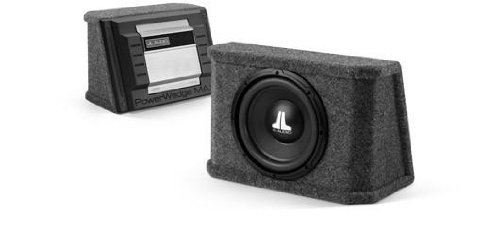
Image 1.1: JL-Audio PWM110-WX Enclosed Subwoofer System. This image shows the compact, grey carpeted enclosure with the JL Audio logo, indicating a robust and ready-to-install unit.
2. Safety Information
Always observe the following safety precautions to prevent injury or damage to the product:
- Professional Installation Recommended: Installation of car audio equipment can be complex. If you are unsure about any part of the installation process, seek assistance from a qualified professional installer.
- Disconnect Battery: Before beginning any wiring, disconnect the vehicle's negative battery terminal to prevent electrical shorts and damage.
- Proper Wiring: Ensure all wiring is correctly routed and secured to prevent pinching, chafing, or short circuits. Use appropriate gauge wire for power and ground connections.
- Ventilation: Ensure the subwoofer enclosure and amplifier have adequate ventilation. Do not block cooling vents or place the unit in an enclosed space without airflow.
- Volume Levels: Prolonged exposure to high sound pressure levels can cause permanent hearing damage. Operate your audio system at safe listening levels.
- Secure Mounting: The enclosure must be securely mounted within the vehicle to prevent it from becoming a projectile during sudden stops or collisions.
3. Setup and Installation
3.1 Unpacking
Carefully remove the subwoofer system from its packaging. Inspect the unit for any signs of damage that may have occurred during shipping. If damage is present, contact your dealer immediately.
3.2 Placement and Mounting
The PWM110-WX is an enclosed system designed for flexible placement within your vehicle's trunk or cargo area. Choose a location that:
- Allows for adequate ventilation around the amplifier section.
- Does not obstruct vehicle controls or safety equipment.
- Can be securely fastened to prevent movement. Use straps, brackets, or other appropriate hardware (not included) to secure the enclosure to the vehicle's chassis or floor.
3.3 Wiring Connections
The PWM110-WX system includes a J2-250.1 mono amplifier integrated into the enclosure. Follow these general wiring guidelines:
- Power Wire (B+): Connect a suitable gauge power wire (e.g., 8 AWG or 4 AWG, depending on total system power and wire length) from the vehicle's positive battery terminal to the amplifier's B+ terminal. Install an appropriate fuse holder (e.g., ANL or Mini-ANL) within 18 inches (45 cm) of the battery.
- Ground Wire (GND): Connect a short (less than 3 feet / 1 meter), same-gauge ground wire from the amplifier's GND terminal to a clean, unpainted metal surface of the vehicle's chassis. Ensure a solid electrical connection.
- Remote Turn-On Wire (REM): Connect a small gauge wire (e.g., 18 AWG) from your head unit's remote turn-on output to the amplifier's REM terminal. This wire tells the amplifier to turn on and off with your head unit.
- Audio Input (RCA): Connect RCA cables from your head unit's subwoofer pre-out (or full-range pre-out if no dedicated subwoofer output is available) to the amplifier's RCA input jacks.
- Speaker Output: The subwoofer is pre-wired internally to the amplifier. Do not attempt to connect external speakers to this system.
4. Operating Instructions
Once the system is installed and wired correctly, you can begin to adjust its settings for optimal performance.
4.1 Initial Power-Up
After all connections are made and verified, reconnect the vehicle's negative battery terminal. Turn on your head unit. The amplifier should power on, indicated by an LED on the amplifier panel.
4.2 Gain Adjustment
The gain control on the amplifier matches the output voltage of your head unit to the amplifier's input. It is not a volume control. To set the gain:
- Turn the amplifier's gain control all the way down (minimum).
- Set your head unit's volume to about 75% of its maximum level.
- Play a dynamic piece of music with strong bass.
- Slowly increase the amplifier's gain control until you hear distortion, then back it off slightly until the sound is clean.
4.3 Crossover and Bass Boost
The integrated J2-250.1 amplifier typically includes adjustable crossover and bass boost controls. Refer to the specific amplifier's manual for detailed instructions on these settings. Generally:
- Low-Pass Filter (LPF): Adjust the LPF to filter out frequencies above the desired subwoofer range (e.g., 80-120 Hz). This ensures the subwoofer only plays bass frequencies.
- Bass Boost: Use bass boost sparingly, if at all. Excessive bass boost can lead to distortion and potential damage to the subwoofer.
5. Maintenance
The JL-Audio PWM110-WX system requires minimal maintenance to ensure long-lasting performance.
- Cleaning: Use a soft, dry cloth to clean the enclosure and amplifier. Do not use harsh chemicals or abrasive cleaners.
- Inspection: Periodically check all wiring connections to ensure they are secure and free from corrosion. Inspect the enclosure for any signs of damage or wear.
- Ventilation: Ensure the amplifier's heatsink remains free of dust and debris to maintain proper cooling.
6. Troubleshooting
If you experience issues with your JL-Audio PWM110-WX system, consult the following table before contacting support.
| Problem | Possible Cause | Solution |
|---|---|---|
| No sound from subwoofer |
|
|
| Distorted sound |
|
|
| Amplifier overheating |
|
|
7. Specifications
| Feature | Specification |
|---|---|
| Model Number | PWM110-WX |
| Speaker Type | Subwoofer (Enclosed System) |
| Speaker Size | 10 Inches (25 cm) |
| Maximum Speaker Output Power | 250 Watts |
| Impedance | 4 Ohms |
| Audio Output Mode | Mono |
| Enclosure Finish | Grey Carpet |
| Item Weight | 35.27 Pounds (approx. 16 kg) |
| Manufacturer | JL-Audio |
8. Warranty and Support
JL-Audio products are designed and manufactured to the highest quality standards. For specific warranty information regarding your PWM110-WX Enclosed Subwoofer System, please refer to the warranty card included with your purchase or visit the official JL Audio website. Warranty terms and conditions may vary by region and retailer.
For technical support, service, or further inquiries, please contact your authorized JL Audio dealer or visit the support section of the official JL Audio website. Please have your product model number (PWM110-WX) and purchase information ready when seeking support.


