
Airmaster 30" Oscillating Pedestal Fan
Airmaster 30" Oscillating Pedestal Fan
User Manual
1. Product Overview
The Airmaster 30-inch Oscillating Pedestal Fan is a powerful industrial-grade fan designed for efficient air circulation in various settings. Featuring a robust 1/3 HP motor and a 30-inch blade diameter, it delivers up to 7,800 CFM of airflow. Its adjustable height and oscillating function ensure wide coverage and optimal air distribution.
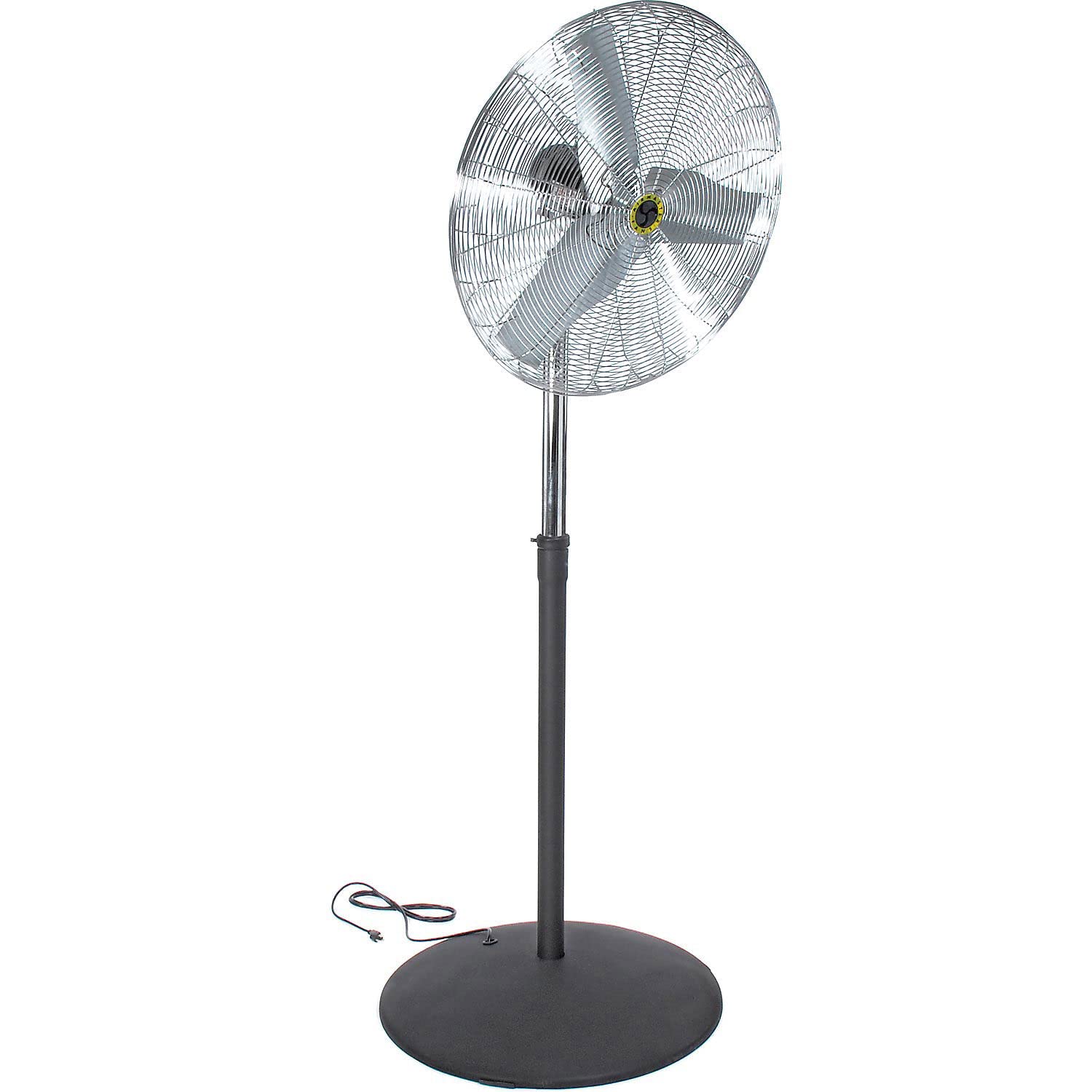
Figure 1: Fully assembled Airmaster 30" Oscillating Pedestal Fan, showcasing its large fan head, adjustable pole, and sturdy base.
2. Important Safety Instructions
Please read and save these important safety instructions before using this fan. Failure to follow these instructions may result in electric shock, fire, or serious personal injury.
- Always unplug the fan from the power outlet before cleaning, servicing, or moving it.
- Do not operate any fan with a damaged cord or plug. Discard fan or return to an authorized service facility for examination and/or repair.
- Do not run cord under carpeting. Do not cover cord with throw rugs, runners, or similar coverings. Do not route cord under furniture or appliances. Arrange cord away from traffic area and where it will not be tripped over.
- To reduce the risk of fire or electric shock, do not use this fan with any solid-state speed control device.
- This fan is intended for industrial use. Do not use outdoors.
- Do not insert fingers or any other objects through the grille when the fan is operating.
- Ensure the fan is placed on a stable, level surface to prevent tipping.
- Keep children and pets away from the fan during operation.
3. Package Contents
Carefully unpack your Airmaster Pedestal Fan and check that all components are present and in good condition. If any parts are missing or damaged, do not attempt to assemble or operate the fan. Contact customer support immediately.
- Fan Head Assembly (Motor, Blades, Front and Rear Grilles)
- Adjustable Height Pole (Upper and Lower Sections)
- Heavy-Duty Round Base
- Mounting Hardware (Screws, Washers, Nuts)
- Power Cord (pre-attached to motor)
- User Manual (this document)
4. Assembly Instructions
Follow these steps to assemble your Airmaster Pedestal Fan. It is recommended to have a second person assist with assembly due to the fan's size and weight.
- Attach Pole to Base: Secure the lower section of the adjustable height pole to the heavy-duty round base using the provided screws and washers. Ensure it is firmly tightened for stability.
- Insert Upper Pole: Slide the upper section of the adjustable height pole into the lower section. Adjust to your desired height and secure with the locking knob or pin.
- Mount Fan Head: Carefully place the fan head assembly onto the top of the upper pole. Align the mounting holes and secure with the remaining screws and nuts. Ensure the fan head is stable and does not wobble.
- Check Connections: Verify all screws and connections are tight before plugging in the fan.
Figure 2: Illustration of fan components, including the fan head, adjustable pole, and base, prior to assembly.
5. Operating Instructions
This section details how to operate your Airmaster Pedestal Fan.
- Power On/Off: Plug the fan into a standard 115 Volt AC outlet. Locate the power switch, typically on the motor housing or control panel, and turn it to the "ON" position.
- Speed Control: Adjust the fan speed using the rotary switch or push buttons on the control panel. This model typically features multiple speed settings (e.g., Low, Medium, High).
- Oscillation Function: To activate oscillation, pull up the oscillation knob located on top of the motor housing. To stop oscillation, push the knob down.
- Adjusting Fan Head Angle: The fan head can be tilted up or down to direct airflow. Loosen the adjustment knob on the side of the fan head, tilt to the desired angle, and then tighten the knob securely.
- Adjusting Height: To change the fan's height, loosen the locking knob on the adjustable pole, raise or lower the upper pole section, and then re-tighten the knob firmly.
6. Maintenance
Regular maintenance ensures optimal performance and extends the life of your fan.
- Cleaning:
- Always unplug the fan before cleaning.
- Use a soft, damp cloth to wipe the exterior surfaces of the fan. Do not use abrasive cleaners or solvents.
- To clean the fan blades, you may need to remove the front grille. Refer to the assembly section for grille removal if applicable. Carefully wipe the blades with a damp cloth.
- Ensure all parts are completely dry before plugging the fan back in.
- Storage: When not in use for extended periods, store the fan in a cool, dry place. Cover the fan to protect it from dust.
7. Troubleshooting
If your fan is not operating correctly, consult the following troubleshooting guide before contacting customer support.
| Problem | Possible Cause | Solution |
|---|---|---|
| Fan does not turn on. | No power to the outlet; Fan not plugged in; Power switch is off; Circuit breaker tripped. | Check power outlet with another device; Ensure fan is securely plugged in; Turn power switch to "ON"; Reset circuit breaker. |
| Low airflow. | Fan speed set too low; Grilles or blades are dirty; Obstruction blocking airflow. | Increase fan speed setting; Clean grilles and blades (refer to Maintenance section); Remove any obstructions. |
| Fan is noisy. | Loose parts; Fan not on a level surface; Debris in fan blades. | Check all screws and connections for tightness; Place fan on a stable, level surface; Unplug and inspect blades for debris, then clean. |
| Oscillation not working. | Oscillation knob is pushed down. | Pull the oscillation knob up to engage the oscillation function. |
8. Specifications
| Feature | Detail |
|---|---|
| Brand | Airmaster |
| Model | 30" Oscillating Pedestal Fan |
| Electric Fan Design | Floor Fan |
| Power Source | Corded Electric |
| Voltage | 115 Volts |
| Special Feature | Oscillating |
| Recommended Uses | Air Circulation |
| Number of Blades | 3 |
| Package Dimensions | 37.7 x 35.2 x 11.9 inches |
| Item Weight | 91.15 Pounds |
| ASIN | B005CZ9MOI |
| Date First Available | April 7, 2014 |
9. Warranty and Support
For warranty information or technical support, please contact Airmaster customer service. Keep your purchase receipt and product model number handy for faster service.
While specific warranty details are not provided in this manual, Airmaster typically offers a limited warranty against defects in materials and workmanship. Please refer to the official Airmaster website or contact their customer support for the most current warranty policy.
Online Support: Visit the Airmaster Store on Amazon for more product information and support resources.
Ask a question about this manual
Ask about setup, troubleshooting, compatibility, parts, safety, or missing instructions. Manuals+ will review the question and use this page’s manual context to help answer it.