
Introduction
This manual provides comprehensive instructions for the setup, operation, maintenance, and troubleshooting of your Polk Audio SurroundBar 4000 Instant Home Theater system. Please read this manual thoroughly before using the product to ensure proper functionality and to maximize your audio experience.
Important Safety Information
Always follow basic safety precautions when using this product to reduce the risk of fire, electric shock, and injury. Keep these instructions for future reference.
- Do not expose this appliance to rain or moisture.
- Do not block any ventilation openings.
- Do not install near any heat sources.
- Only use attachments/accessories specified by the manufacturer.
- Refer all servicing to qualified service personnel.
Package Contents
Verify that all items are present in the package:
- Polk Audio SurroundBar 4000 Soundbar
- Wireless Subwoofer
- Remote Control
- Power Cords
- Optical Cable
- Wall Mounting Template (if applicable)
- Quick Start Guide
Setup
1. Placement
The SurroundBar 4000 can be placed on a shelf below your television or mounted on a wall. Ensure the soundbar is centered with your TV for optimal audio imaging.
The wireless subwoofer can be placed anywhere in the room, ideally within 20-30 feet of the soundbar, for best performance. Avoid placing it directly against a wall or in a corner, which can cause excessive bass.
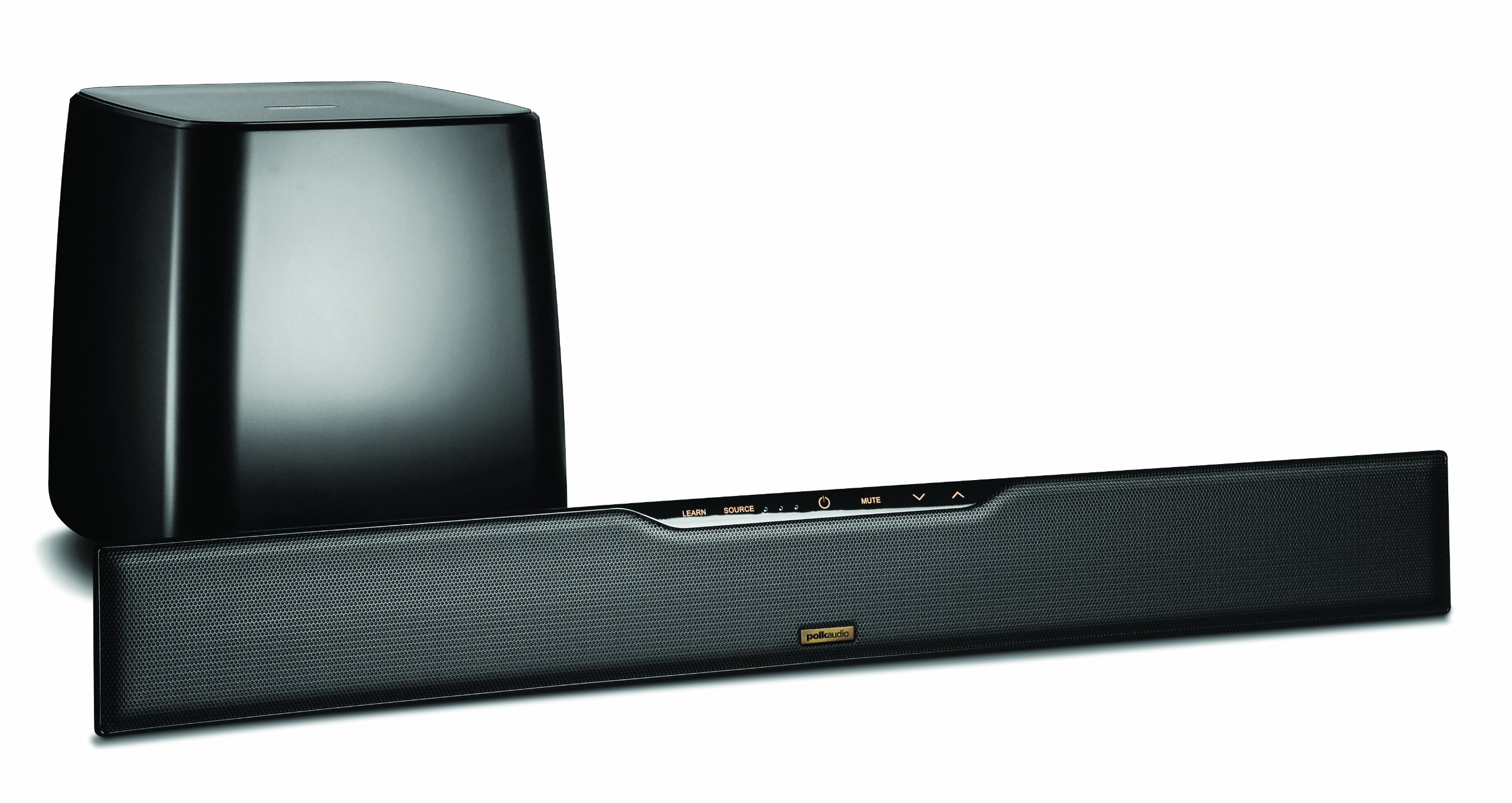
Image: Polk Audio SurroundBar 4000 IHT soundbar and wireless subwoofer. This image illustrates a typical setup with the soundbar positioned below a television and the wireless subwoofer placed nearby.
2. Connections
Connect the soundbar to your television or other audio sources using one of the following methods:
- Optical Digital Audio (Recommended): Connect one end of the optical cable to the "Optical Out" port on your TV and the other end to the "Optical In" port on the SurroundBar.
- Analog Audio (3.5mm or RCA): If your TV does not have an optical output, use an analog audio cable to connect the TV's audio output to the SurroundBar's analog input.
Connect the power cords to the soundbar and the wireless subwoofer, then plug them into a wall outlet.
3. Wireless Subwoofer Pairing
The subwoofer should automatically pair with the soundbar when both are powered on. If pairing does not occur, or if the connection is lost:
- Ensure both the soundbar and subwoofer are powered on.
- Press and hold the "Connect" button on the back of the subwoofer for a few seconds until the status light blinks.
- Press and hold the "Connect" button on the back of the soundbar (or on the remote, if available) until its status light also blinks.
- The lights should become solid once a connection is established.
Operating Instructions
1. Power On/Off
Press the Power button on the remote control or on the soundbar to turn the system on or off.
2. Input Selection
Use the "Source" button on the remote control or soundbar to cycle through available audio inputs (Optical, Analog, Bluetooth).
3. Volume Control
Adjust the master volume using the "Volume Up" and "Volume Down" buttons on the remote or soundbar. The subwoofer volume can be adjusted independently using the "Subwoofer Volume" buttons on the remote.
4. Bluetooth Pairing
To connect a Bluetooth device:
- Select the Bluetooth input on the soundbar.
- On your device, enable Bluetooth and search for "Polk SurroundBar 4000".
- Select the soundbar from the list to pair.
5. Remote Control Learning Feature
The SurroundBar 4000 can learn commands from your TV remote control for power, volume up, volume down, and mute. Refer to the quick start guide for detailed instructions on programming this feature.
Maintenance
To ensure the longevity and optimal performance of your Polk Audio SurroundBar 4000 IHT:
- Cleaning: Use a soft, dry cloth to clean the surfaces of the soundbar and subwoofer. Do not use liquid cleaners or abrasive materials.
- Ventilation: Ensure that the ventilation openings on the soundbar and subwoofer are not blocked to prevent overheating.
- Power Cords: Regularly inspect power cords for any damage. If damaged, discontinue use and contact customer support.
Troubleshooting
| Problem | Possible Cause | Solution |
|---|---|---|
| No sound from soundbar |
|
|
| No sound from subwoofer |
|
|
| Distorted or poor sound quality |
|
|
| Remote control not working |
|
|
Specifications
| Feature | Detail |
|---|---|
| Brand | Polk Audio |
| Model Name | SurroundBar 4000 IHT |
| Model Number | IHT 4000 |
| Speaker Type | Soundbar with Wireless Subwoofer |
| Speaker Maximum Output Power | 180 Watts |
| Connectivity Technology | Bluetooth |
| Audio Output Mode | Surround |
| Control Method | Remote |
| Power Source | Corded Electric |
| Compatible Devices | Gaming Console, Television |
| UPC | 747192121662 |
Warranty and Support
For warranty information and technical support, please refer to the warranty card included with your product or visit the official Polk Audio website. Keep your proof of purchase for warranty claims.
Polk Audio Website: www.polkaudio.com
Customer Service: Refer to the Polk Audio website for contact information specific to your region.


