
Introduction
The Bose Panaray 802 Basic Speaker System is designed to deliver high-performance audio for professional applications in clubs, and medium to large indoor and outdoor venues. This system features the 802 Series III speakers, equipped with eight proprietary full-range drivers for consistent sound dispersion, and the Panaray System Digital Driver II for precise spectral response and active equalization.
This manual provides essential information for setting up, operating, and maintaining your Bose Panaray 802 Basic Speaker System to ensure optimal performance and longevity.
Package Contents
Please verify that all components listed below are included in your package:
- Two (2) Bose 802 Panaray Series III Speakers
- One (1) Bose Panaray System Digital Driver II
- Two (2) Ultimate Support JS-TS50 Speaker Stands
- Two (2) Ultimate Support BMB-200K Mounting Brackets (for stands)
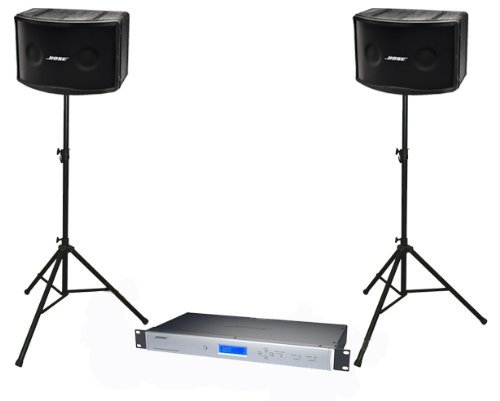
Image: Overview of the Bose Panaray 802 Basic Speaker System, showing two 802 Panaray Series III speakers mounted on Ultimate Support stands, and the Bose Panaray System Digital Driver II unit positioned centrally.
Setup Guide
1. Unpacking and Inspection
Carefully remove all components from their packaging. Inspect each item for any signs of damage. If any component is damaged or missing, contact your Bose dealer immediately.
2. Speaker Stand Assembly and Placement
- Extend the legs of the Ultimate Support JS-TS50 speaker stands to form a stable base. Ensure the locking mechanisms are securely engaged.
- Attach the Ultimate Support BMB-200K mounting brackets to the top of the speaker stands.
- Carefully lift each Bose 802 Panaray Series III speaker and mount it onto the assembled stand. Ensure the speaker is securely seated on the bracket.
- Position the speakers in your desired location, ensuring they are on a stable, level surface. For optimal sound dispersion, consider placing them at an appropriate height and angle relative to the audience area.
3. Connecting the Digital Driver
The Bose Panaray System Digital Driver II acts as the central processing unit for your speaker system.
- Audio Inputs: Connect your audio source (e.g., mixer, audio interface) to the balanced XLR analog inputs on the Digital Driver. The driver has two balanced XLR analog inputs.
- Audio Outputs: Connect the balanced XLR outputs of the Digital Driver to your power amplifiers. The driver has four balanced XLR outputs. Ensure correct left/right channel connections if running in stereo.
- Power Connection: Connect the power cable to the Digital Driver and then to a suitable electrical outlet.
4. Powering On
Once all connections are made, power on your equipment in the following sequence:
- Power on the Bose Panaray System Digital Driver II.
- Power on your power amplifiers.
- Power on your audio source (e.g., mixer).
When powering off, reverse this sequence: turn off audio source, then amplifiers, then the Digital Driver.
Operation
Basic Operation
The Bose Panaray System Digital Driver II is designed for ease of use. It provides smooth, precise spectral response for your Bose speakers without complex programming.
- Preset Selection: Access specific Bose professional speaker EQ settings by simply selecting the appropriate preset on the Digital Driver. No manual programming is required.
- Configuration: The driver can be configured to run two mono Bose EQ presets or a single stereo Bose equalizer, including preset crossover settings, depending on your system requirements.
Audio Adjustments
Fine-tune your sound using the controls on the Digital Driver and your audio source (mixer). Refer to the Digital Driver's specific user guide for detailed instructions on navigating its menu and adjusting parameters.
Maintenance and Care
- Cleaning: Use a soft, dry cloth to clean the exterior surfaces of the speakers and the digital driver. Do not use abrasive cleaners, waxes, or solvents.
- Protection: The 802 Series III speakers feature a robust, portable enclosure with a metal grille and protective cover. When transporting or storing, ensure the protective cover is in place to prevent damage.
- Environment: While suitable for outdoor use, avoid prolonged exposure to extreme weather conditions (e.g., heavy rain, direct sunlight, extreme temperatures) to maximize product lifespan.
- Cables: Regularly inspect all cables for wear and tear. Replace any damaged cables immediately to ensure safe and reliable operation.
Troubleshooting
This section addresses common issues you might encounter. For more complex problems, consult the full Digital Driver manual or contact Bose support.
| Problem | Possible Cause | Solution |
|---|---|---|
| No sound from speakers. |
|
|
| Distorted or poor sound quality. |
|
|
| System powers off unexpectedly. |
|
|
Technical Specifications
| Feature | Detail |
|---|---|
| Brand | Bose |
| Model Name | 802 Panaray Series III |
| Speaker Type | Professional, Full-Range (suitable for indoor/outdoor use) |
| Driver Configuration | Eight (8) proprietary full-range drivers per speaker |
| Sound Channel Configuration | 2.0 (Stereo) |
| Connectivity Technology | XLR (for Digital Driver inputs/outputs) |
| Mounting Type | Floor (via included stands) |
| Power Source | Electric Cable |
| Included Components | Speakers, Digital Driver, Speaker Stands, Mounting Brackets |
| Manufacturer Reference | BOSE802SYS5 |
Warranty and Support
Bose products are designed for durability and performance. For information regarding warranty coverage, product registration, or technical support, please visit the official Bose website or contact your authorized Bose dealer. Keep your purchase receipt as proof of purchase for warranty claims.
For the most up-to-date support resources, including detailed manuals for the Panaray System Digital Driver II, visit www.bose.com/support.


