
Important Safeguards
Before operating your KitchenAid Stand Mixer, please read all instructions carefully to ensure safe and efficient use. Keep this manual for future reference.
- Always unplug the mixer from the outlet before cleaning, assembling, or disassembling parts.
- Do not immerse the mixer base in water or other liquids.
- Avoid contact with moving parts. Keep hands, hair, and clothing, as well as spatulas and other utensils, away from the beater during operation to reduce the risk of injury to persons and/or damage to the mixer.
- Close supervision is necessary when any appliance is used by or near children.
- Do not use attachments not recommended or sold by KitchenAid.
- Do not operate any appliance with a damaged cord or plug, or after the appliance malfunctions or has been dropped or damaged in any manner.
Product Overview
The KitchenAid Professional 5 Plus Series Stand Mixer is a powerful kitchen appliance designed for various mixing tasks. It features a bowl-lift design, a 5-quart stainless steel bowl, and a 450-watt motor with 10 variable speeds.
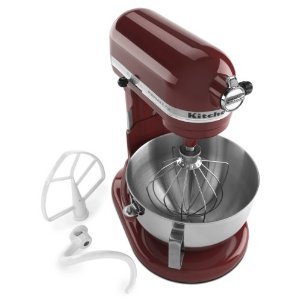
Image: The KitchenAid Professional 5 Plus Series Stand Mixer, model KV25GOXGC, in Gloss Cinnamon color. This image shows the complete mixer unit with the 5-quart stainless steel bowl and a beater attachment in place, ready for use. The bowl-lift mechanism is visible, indicating its professional design.
Setup Instructions
- Unpacking: Carefully remove the mixer and all accessories from the packaging. Dispose of packaging materials responsibly.
- Cleaning: Before first use, wash the stainless steel bowl, PowerKnead™ spiral dough hook, flat beater, and wire whip in warm, soapy water. Rinse thoroughly and dry. Wipe the mixer base with a damp cloth.
- Positioning the Mixer: Place the mixer on a dry, flat, stable surface. Ensure there is adequate space around the mixer for operation and ventilation.
- Attaching the Bowl:
- Lift the bowl-lift handle to the down position.
- Place the bowl supports over the locating pins on the mixer base.
- Press down on the back of the bowl until the rear pin snaps into place.
(Image would show how to attach the mixing bowl to the mixer base, highlighting the locating pins and the bowl supports.)
- Attaching an Accessory:
- Ensure the mixer is unplugged and the speed control is set to "OFF."
- Slide the accessory onto the beater shaft and push upward as far as possible.
- Turn the accessory to the right, engaging the pin on the shaft with the notch in the accessory.
(Image would show the process of attaching a beater or dough hook to the mixer shaft.)
- Lowering the Bowl: Lift the bowl-lift handle to the up position. The bowl should be securely locked in place.
- Power Connection: Plug the mixer into a grounded 3-prong outlet.
Operating Instructions
Your KitchenAid Stand Mixer is equipped with a powerful 450-watt motor and 10 variable speeds, allowing for precise control over your mixing tasks.
- Adding Ingredients: With the mixer unplugged and the bowl in the down position, add your ingredients to the mixing bowl.
- Raising the Bowl: Lift the bowl-lift handle to the up position to secure the bowl for mixing.
- Selecting Speed: Turn the speed control lever to the desired speed setting.
- Speed 1-2 (Stir/Slow Mix): For slow stirring, combining, mashing, and starting all mixing procedures.
- Speed 4 (Mixing/Beating): For medium speed mixing, beating, and creaming.
- Speed 6-8 (Fast Beating/Whipping): For fast beating, whipping, and aerating.
- Speed 10 (Fast Whip): For whipping small amounts of cream or egg whites.
(Image would show the speed control knob or lever with its various settings.)
- Mixing: Start the mixer at a low speed and gradually increase to the desired speed. Avoid sudden changes in speed, especially with heavy mixtures.
- Stopping the Mixer: Turn the speed control lever to "OFF" and unplug the mixer before removing the bowl or accessory.
- Using the Attachment Hub: The front of the mixer features a multipurpose attachment hub with a hinged cover.
- To use, loosen the attachment hub knob by turning it counter-clockwise.
- Remove the attachment hub cover.
- Insert the attachment shaft into the hub, ensuring the attachment power shaft fits into the square hub socket.
- Tighten the attachment hub knob clockwise until the attachment is securely fastened.
(Image would show the attachment hub with the cover open and an attachment being inserted.)
Maintenance and Cleaning
Proper maintenance ensures the longevity and optimal performance of your KitchenAid Stand Mixer.
- Mixer Base: Wipe the mixer base with a soft, damp cloth. Do not use abrasive cleaners or immerse the mixer in water.
- Stainless Steel Bowl: The 5-quart stainless steel bowl is dishwasher-safe. Alternatively, wash in warm, soapy water, rinse, and dry thoroughly.
- PowerKnead™ Spiral Dough Hook, Flat Beater: These coated accessories are dishwasher-safe. For hand washing, use warm, soapy water and a non-abrasive sponge.
- Wire Whip: The wire whip is made of stainless steel wires and an aluminum hub. It is dishwasher-safe.
- Storage: Store the mixer in a clean, dry place. Ensure all attachments are clean and dry before storing.
(Image would show a person cleaning the mixer base with a cloth, or the bowl and attachments being washed.)
Troubleshooting
If you encounter issues with your KitchenAid Stand Mixer, refer to the following common problems and solutions:
| Problem | Possible Cause | Solution |
|---|---|---|
| Mixer does not start. | Not plugged in; power outage; speed control not set to "OFF" before plugging in. | Ensure the mixer is securely plugged into a working outlet. Check circuit breaker. Turn speed control to "OFF" then back on. |
| Accessory hits the bottom of the bowl. | Beater-to-bowl clearance needs adjustment. | Refer to the "Beater-to-Bowl Clearance" section in the full manual for adjustment instructions. (Typically involves adjusting a screw on the mixer head.) |
| Mixer makes unusual noise or smells. | Overload; new motor "breaking in"; foreign object. | Reduce load. A slight electrical smell is normal for new motors. If noise persists or is severe, unplug and contact customer service. |
| Mixer stops during operation. | Overload protection activated. | Turn speed control to "OFF" and unplug. Remove some ingredients. Wait 10-15 minutes for the motor to cool, then plug in and restart at the lowest speed. |
Specifications
- Model: KV25GOXGC
- Brand: KitchenAid
- Wattage: 450 watts
- Speeds: 10 variable speeds
- Bowl Capacity: 5-quart
- Bowl Material: Polished Stainless Steel
- Construction: All-metal
- Controls Type: Knob
- Dimensions (approx.): 11.25" W x 14.625" D x 16.5" H
- Included Accessories: PowerKnead™ Spiral Dough Hook, Flat Beater, Stainless Steel Wire Whip
Warranty and Support
Limited Warranty: KitchenAid provides a limited warranty for this product. Specific warranty terms and conditions, including duration and coverage, are detailed in the warranty card included with your purchase or available on the official KitchenAid website. Please retain your proof of purchase for warranty claims.
Customer Support: For technical assistance, replacement parts, or service inquiries, please visit the official KitchenAid website or contact their customer service department. You can find contact information and frequently asked questions at www.kitchenaid.com/service-and-support.
When contacting support, please have your model number (KV25GOXGC) and serial number (if applicable) ready.