
Crown XTi2002
Crown XTi2002 Power Amplifier User Manual
Model: XTi2002
1. Introduction
This manual provides essential information for the proper setup, operation, and maintenance of your Crown XTi2002 Power Amplifier. The XTi2002 is a two-channel power amplifier designed for professional audio applications, offering robust performance and advanced digital signal processing capabilities. It is suitable for use in live sound reinforcement, studio monitoring, and fixed installations.
Key features include Peakx Plus™ Limiters for speaker protection, an Enhanced Subharmonic Synth section for low-frequency tuning, and user-defined fan modes for optimal thermal management. The amplifier also features integrated cast-aluminum handles for durability and ease of transport, and supports control via HiQnet System Architect™ software.
2. Safety Information
WARNING: To reduce the risk of fire or electrical shock, do not expose this appliance to rain or moisture. Do not remove cover. No user-serviceable parts inside. Refer servicing to qualified service personnel.
Proposition 65 Warning: This product may contain chemicals known to the State of California to cause cancer and birth defects or other reproductive harm.
- Power Source: Connect the amplifier only to the type of power source indicated on the unit. Ensure the voltage is within the specified range (120-240V AC).
- Grounding: Always use a power cord with a grounded plug. Do not defeat the safety purpose of the grounding-type plug.
- Ventilation: Ensure adequate ventilation around the amplifier. Do not block ventilation openings. Maintain at least 2 inches (5 cm) of clear space around the unit for proper airflow. Overheating can lead to malfunction or damage.
- Moisture: Do not expose the amplifier to dripping or splashing liquids. Do not place objects filled with liquids on the apparatus.
- Placement: Install the amplifier in a stable location, away from direct sunlight, heat sources, and excessive dust.
- Handling: The amplifier is heavy (approximately 18.48 lbs). Use caution when lifting or moving. Utilize the integrated cast-aluminum handles for secure transport.
- Servicing: Do not attempt to service this product yourself. Refer all servicing to qualified service personnel.
3. Setup
3.1 Unpacking and Inspection
Carefully remove the amplifier from its packaging. Inspect the unit for any signs of damage that may have occurred during shipping. The package should contain the amplifier, a user guide, and a power cord.
3.2 Rack Mounting
The Crown XTi2002 is designed for standard 19-inch equipment rack mounting. Ensure the rack is sturdy enough to support the amplifier's weight. Allow sufficient space for airflow, especially at the front and rear ventilation grilles.
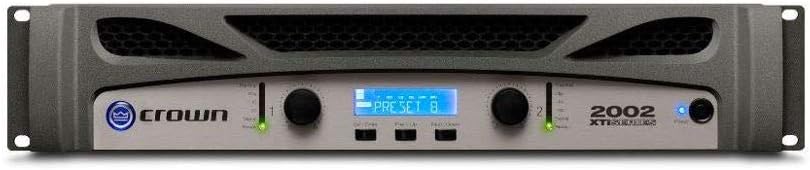
Figure 3.1: Front panel of the Crown XTi2002 amplifier, showing the display, control knobs, and indicators.
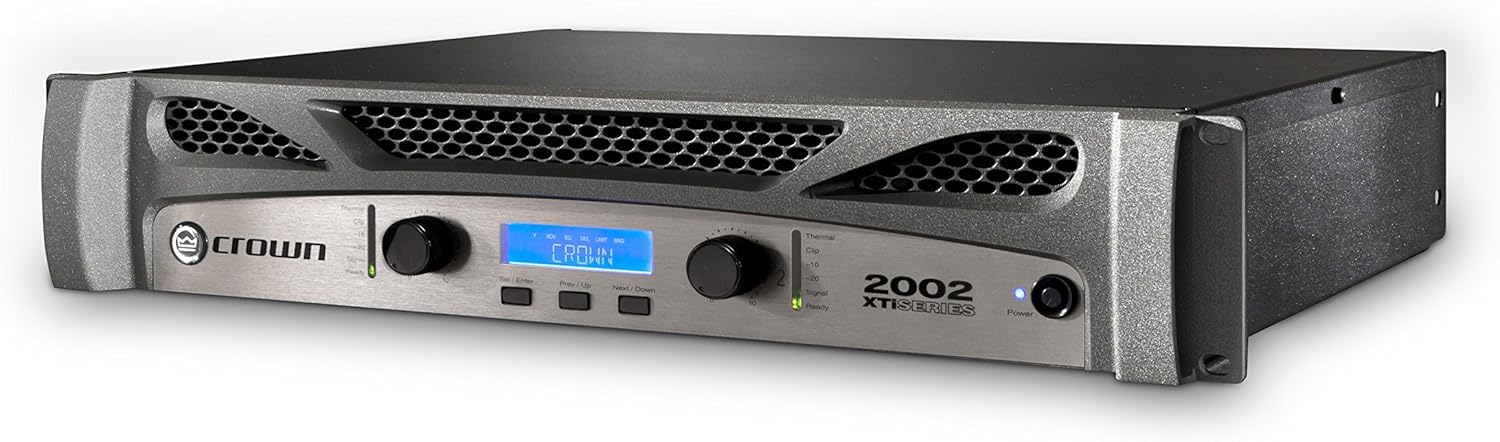
Figure 3.2: Angled view of the Crown XTi2002 amplifier, highlighting its robust chassis and ventilation.
3.3 Connecting Inputs
The XTi2002 features two XLR input connectors for audio signals. Connect your audio source (e.g., mixer, preamplifier) to these inputs using balanced XLR cables.

Figure 3.3: Rear panel of the Crown XTi2002 amplifier, showing input (XLR), output (Speakon, Binding Post), and power connections.
3.4 Connecting Outputs
The amplifier provides multiple output options:
- Speakon Connectors (x2): For connecting loudspeakers using Speakon cables. These are typically used for high-power connections.
- Binding Post Connectors (x2 pair): For connecting loudspeakers using bare wire or banana plugs. Ensure correct polarity (+/-).
- XLR Link/Out (x2): For daisy-chaining the audio signal to other amplifiers or devices.
Ensure that the impedance of your loudspeakers matches the amplifier's capabilities (2Ω, 4Ω, or 8Ω).
3.5 Power Connection
Connect the supplied power cord to the amplifier's AC inlet and then to a suitable grounded power outlet. The XTi2002 features a locking power cord clip to ensure a secure connection, preventing accidental disconnections.
4. Operating the Amplifier
4.1 Front Panel Controls and Indicators
The front panel provides access to all essential controls and monitoring features:
- Input Level Knobs: Adjust the input sensitivity for each channel.
- LCD Display: Shows operational status, menu navigation, and parameter settings.
- Menu Buttons: Navigate through the amplifier's internal menus for DSP settings, fan modes, and system monitoring.
- Indicators:
- Signal: Illuminates when an audio signal is present.
- Clip: Illuminates when the output signal is clipping, indicating potential distortion. Reduce input level if this light is consistently on.
- Thermal: Illuminates if the amplifier is overheating. The unit may reduce output or shut down to protect itself.
- Ready: Indicates the amplifier is powered on and ready for operation.
- Power: Indicates the unit is receiving power.
4.2 Peakx Plus™ Limiters
The Peakx Plus™ Limiters provide advanced protection for your loudspeakers by preventing excessive signal peaks. Through the amplifier's menu, you can control the threshold, attack, and release settings of these limiters to optimize performance and protection for your specific speaker system.
4.3 Enhanced Subharmonic Synth
This feature allows you to enhance the low-frequency content of your audio. You can adjust the frequency, gain, and filter type of the subharmonic synthesis to tailor the bass response to your preferences and system requirements.
4.4 Fan Mode Controls
The XTi2002 offers three user-defined fan modes to manage cooling performance:
- Normal: Standard fan operation for typical use.
- Early: Fans activate sooner and run at higher speeds, suitable for demanding applications or warmer environments.
- Full Speed: Fans run at maximum speed continuously, providing aggressive cooling for extreme conditions.
Select the appropriate fan mode to ensure optimal thermal performance for your application.
4.5 HiQnet System Architect™ Control Software
The XTi2002 can be controlled and monitored remotely using Crown's HiQnet System Architect™ software. This software provides comprehensive control over all amplifier parameters, including DSP settings, routing, and system monitoring. Refer to the HiQnet System Architect™ documentation for detailed instructions on its use.
4.6 Preset Management
The amplifier allows for storage of up to 49 user-definable presets. These presets can store various configurations, including DSP settings, limiter parameters, and fan modes, allowing for quick recall of optimized settings for different applications or speaker setups.
5. Maintenance
5.1 Cleaning
Regularly clean the exterior of the amplifier with a soft, dry cloth. Do not use abrasive cleaners, solvents, or waxes. Ensure ventilation grilles are free from dust and debris to maintain proper airflow.
5.2 Ventilation Maintenance
Periodically check the front and rear ventilation grilles for dust buildup. Use a soft brush or a vacuum cleaner with a brush attachment to gently remove any accumulated dust. Proper ventilation is crucial for the amplifier's longevity and stable operation.
5.3 System Monitoring
The XTi2002 provides software visibility of AC line voltage and power supply temperature. Regularly monitoring these parameters via the front panel display or HiQnet System Architect™ software can help identify potential issues before they lead to performance degradation or damage.
6. Troubleshooting
This section provides solutions to common issues you might encounter with your Crown XTi2002 amplifier. If the problem persists after attempting these steps, contact qualified service personnel.
| Problem | Possible Cause | Solution |
|---|---|---|
| No Power | Power cord disconnected; no AC power; amplifier fuse blown. | Check power cord connection and outlet. Verify power at the outlet. If fuse is suspected, contact service. |
| No Sound Output | Input cables disconnected; output cables disconnected; input level too low; amplifier in protect mode. | Check all cable connections. Increase input level. Check for Thermal or Clip indicators. Power cycle the unit. |
| Distorted Sound | Input signal too high (clipping); speaker impedance mismatch; damaged speaker. | Reduce input level (check Clip indicator). Verify speaker impedance. Test with a different speaker if possible. |
| Overheating (Thermal light on) | Insufficient ventilation; excessive load; high ambient temperature. | Ensure clear airflow around the unit. Reduce load. Move to a cooler environment. Check fan mode settings. |
7. Specifications
The following specifications apply to the Crown XTi2002 Power Amplifier:
| Feature | Specification |
|---|---|
| Model | XTi2002 |
| Channels | 2 |
| Output Power (per channel) | 1000W at 2Ω, 800W at 4Ω, 475W at 8Ω |
| Input Connectors | 2 x XLR (balanced) |
| Output Connectors | 2 x Speakon, 2 x Binding Post pairs, 2 x XLR Link/Out |
| Dimensions (L x W x H) | 12.25 x 19 x 3.5 inches (31.1 x 48.3 x 8.9 cm) |
| Weight | 18.48 pounds (8.38 kg) |
| Power Supply | 120-240V AC, 50/60 Hz |
| Material | Aluminum chassis |
| Certifications | CE, CSA, FCC, RoHS |
| Color | Gray |
| Mounting | Rack-mountable |
8. Warranty and Support
Crown products are designed for reliability and performance. For information regarding the warranty period and terms applicable to your XTi2002 amplifier, please refer to the warranty card included with your product or visit the official Crown website.
For technical support, service, or further assistance, please contact Crown customer service or an authorized service center. You can also find additional resources, including the full PDF user manual, on the Crown website or through the provided link: Crown XTi2002 User Manual (PDF).
Related documentsXTi2002


Ask a question about this manual
Ask about setup, troubleshooting, compatibility, parts, safety, or missing instructions. Manuals+ will review the question and use this page’s manual context to help answer it.