
Introduction
Thank you for purchasing the Akai AR10 Alarm Clock. This manual provides important information regarding the setup, operation, and maintenance of your device. Please read these instructions carefully before use and retain them for future reference.
Safety Instructions
- Do not expose the unit to rain or moisture to prevent fire or electric shock.
- Do not expose the unit to direct sunlight, heat sources, or excessive dust.
- Ensure proper ventilation around the unit.
- Use only the specified power adapter.
- Do not attempt to disassemble or modify the unit. Refer all servicing to qualified personnel.
- Keep out of reach of children.
Package Contents
Please check that the following items are included in your package:
- Akai AR10 Alarm Clock Unit
- Power Adapter
- User Manual (this document)
Product Overview
Familiarize yourself with the components of your Akai AR10 Alarm Clock.
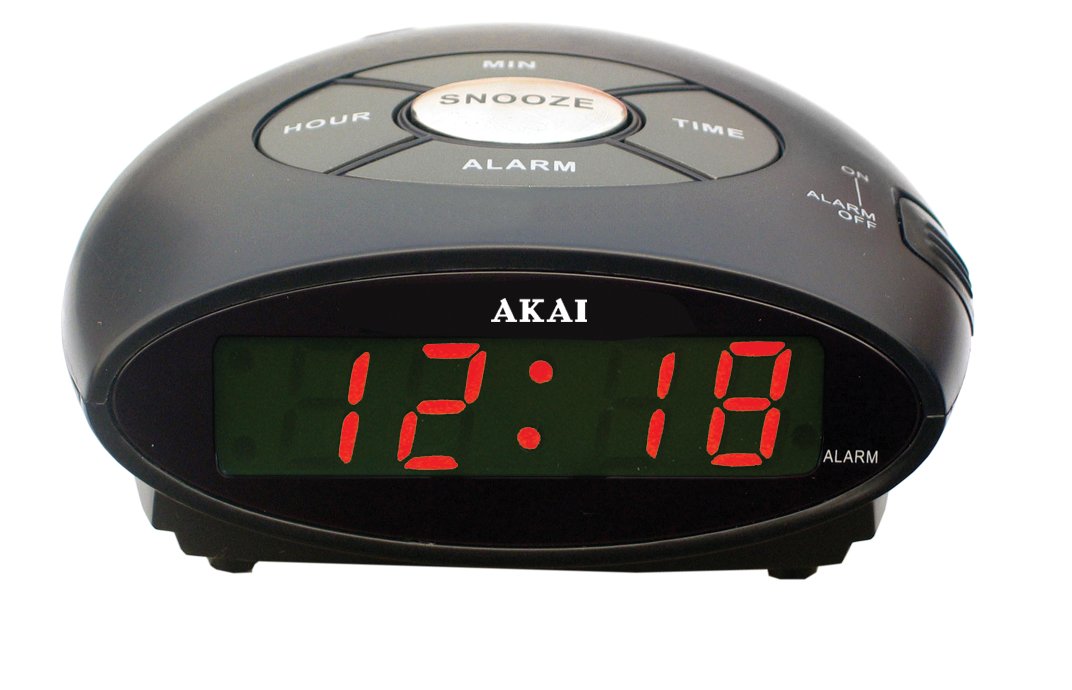
Figure 1: Front view of the Akai AR10 Alarm Clock. This image shows the digital time display and the primary control buttons located on the top or front panel of the device.
Controls and Indicators:
- Digital Time Display: Shows the current time.
- Time Set Button: Used to enter time setting mode.
- Alarm Set Button: Used to enter alarm setting mode.
- Hour/Minute Adjustment Buttons: Used to adjust hour and minute values.
- Snooze Button: Temporarily silences the alarm and activates snooze function.
- Alarm ON/OFF Switch: Activates or deactivates the alarm.
- Buzzer: The internal sound generator for the alarm.
- 9V Battery Compartment: Located on the bottom or rear for backup battery.
Setup
1. Power Connection:
- Connect the power adapter to the DC input jack on the back of the alarm clock.
- Plug the power adapter into a standard wall outlet. The digital display will light up.
2. Battery Backup Installation (Optional but Recommended):
The Akai AR10 features a 9V battery backup system to maintain time settings during power outages.
- Locate the battery compartment cover on the bottom or rear of the unit.
- Open the cover and insert a new 9V battery, observing the correct polarity (+/-).
- Close the battery compartment cover securely.
3. Setting the Current Time:
- Press and hold the Time Set button. The hour digits on the display will begin to flash.
- While holding the Time Set button, press the Hour Adjustment button repeatedly to set the correct hour.
- Release the Time Set button, then press and hold it again. The minute digits will flash.
- While holding the Time Set button, press the Minute Adjustment button repeatedly to set the correct minutes.
- Release the Time Set button to save the time.
Operating Instructions
1. Setting the Alarm:
- Press and hold the Alarm Set button. The alarm hour digits on the display will begin to flash.
- While holding the Alarm Set button, press the Hour Adjustment button repeatedly to set the desired alarm hour.
- Release the Alarm Set button, then press and hold it again. The alarm minute digits will flash.
- While holding the Alarm Set button, press the Minute Adjustment button repeatedly to set the desired alarm minutes.
- Release the Alarm Set button to save the alarm time.
2. Activating/Deactivating the Alarm:
- To activate the alarm, slide the Alarm ON/OFF switch to the "ON" position. An alarm indicator (e.g., a small light or icon) may appear on the display.
- To deactivate the alarm, slide the Alarm ON/OFF switch to the "OFF" position. The alarm indicator will disappear.
3. Using the Snooze Function:
When the alarm sounds, press the Snooze button. The alarm will temporarily stop and sound again after a few minutes (typically 9 minutes). You can repeat this process multiple times.
4. Stopping the Alarm:
To stop the alarm completely after it sounds (without using snooze), slide the Alarm ON/OFF switch to the "OFF" position, or press any other button besides the Snooze button (this may vary by model, refer to specific button functions if available).
Maintenance
- Cleaning: Wipe the unit with a soft, dry cloth. Do not use abrasive cleaners or solvents.
- Battery Replacement: If using the battery backup, replace the 9V battery annually or if you notice time settings being lost during power interruptions.
- Storage: If storing the unit for an extended period, disconnect it from power and remove the backup battery.
Troubleshooting
| Problem | Possible Cause | Solution |
|---|---|---|
| Display is blank. | No power. | Ensure the power adapter is securely plugged into the unit and a working wall outlet. |
| Alarm does not sound. | Alarm is not activated or set incorrectly. | Check if the Alarm ON/OFF switch is in the "ON" position. Verify the alarm time is set correctly. |
| Time/Alarm settings are lost after power outage. | Backup battery is dead or missing. | Install a new 9V backup battery or replace the existing one. |
Specifications
- Model: AR10
- Power Input: 9 Volts (via AC adapter)
- Battery Backup: 1 x 9V battery (not included)
- Alarm Type: Buzzer
- Dimensions: 5 x 11 x 10.3 cm (approximately 1.97 x 4.33 x 4.06 inches)
- Weight: 245 g (approximately 0.54 lbs)
Warranty and Support
For warranty information and technical support, please refer to the warranty card included with your product or visit the official Akai website. Keep your purchase receipt as proof of purchase.
Website: www.akai.com (Note: This is a placeholder URL. Please refer to your product documentation for the correct support website.)


