
Introduction
This manual provides essential information for the safe and efficient use of your Profoon PDX-6600 DECT phone. Please read these instructions carefully before operating the device and retain them for future reference. The Profoon PDX-6600 is a DECT cordless telephone designed for home or office use, featuring caller ID and a 20-entry phonebook.
Safety Information
- Use only the power adapter and telephone line cord supplied with the unit.
- Do not expose the phone to water or moisture.
- Avoid placing the base unit near heat sources or direct sunlight.
- Do not attempt to open or repair the device yourself. Refer all servicing to qualified personnel.
- Keep the handset and base unit away from strong electromagnetic fields.
Package Contents
Ensure all items are present in the package:
- Profoon PDX-6600 Handset
- Profoon PDX-6600 Base Unit
- Power Adapter for Base Unit
- Telephone Line Cord
- Rechargeable Batteries (typically 2x AAA NiMH)
- User Manual (this document)
Setup
1. Unpacking and Placement
Carefully remove all components from the packaging. Place the base unit on a flat, stable surface, away from other electronic devices that might cause interference. Ensure it is within reach of a power outlet and a telephone wall jack.
2. Battery Installation
- Open the battery compartment cover on the back of the handset.
- Insert the supplied rechargeable batteries, observing the correct polarity (+ and -).
- Close the battery compartment cover securely.
3. Connecting the Base Unit
- Connect one end of the telephone line cord to the 'LINE' port on the base unit.
- Connect the other end of the telephone line cord to your telephone wall jack.
- Plug the small end of the power adapter into the 'POWER' port on the base unit.
- Plug the large end of the power adapter into a wall power outlet.
Place the handset on the base unit to charge the batteries. Allow at least 15-20 hours for the initial charge.
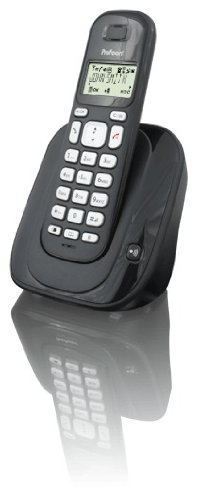
Image: The Profoon PDX-6600 DECT phone, showing the handset resting on its base unit. The phone is black with a clear display and keypad.
Operating Instructions
Making a Call
- Press the TALK button (usually a green phone icon).
- Dial the desired phone number using the keypad.
- Press the END button (usually a red phone icon) to hang up.
Receiving a Call
When the phone rings, press the TALK button to answer the call. Press the END button to terminate the call.
Adjusting Volume
During a call, use the UP and DOWN navigation buttons on the handset to adjust the earpiece volume.
Phonebook
Your PDX-6600 can store up to 20 entries in its phonebook.
- To add an entry: Press MENU, navigate to 'Phonebook', select 'Add New', enter the name and number, then save.
- To dial from phonebook: Press the PHONEBOOK button (or navigate via MENU), select the desired entry, then press TALK.
Caller ID
If you subscribe to Caller ID service from your telephone provider, the caller's number (and name, if available) will be displayed on the handset screen before you answer the call. You can review past calls in the Caller ID log (usually accessible via a dedicated button or MENU option).
Maintenance
Cleaning
Wipe the handset and base unit with a soft, damp cloth. Do not use abrasive cleaners or solvents. Ensure the device is unplugged before cleaning.
Battery Care
- Always use the specified rechargeable batteries.
- If the phone will not be used for an extended period, remove the batteries to prevent leakage.
- Dispose of old batteries responsibly according to local regulations.
Troubleshooting
| Problem | Solution |
|---|---|
| No dial tone | Check if the telephone line cord is securely connected to both the base unit and the wall jack. Ensure the power adapter is plugged in. |
| Handset not charging | Ensure the handset is correctly placed on the base unit. Check that the power adapter is connected. Verify batteries are inserted correctly. |
| Poor call quality / Static | Move the handset closer to the base unit. Avoid placing the base unit near other electronic devices (Wi-Fi routers, microwaves). |
| Caller ID not working | Confirm that you have subscribed to Caller ID service from your telephone provider. |
Specifications
- Model: Profoon PDX-6600
- Type: DECT Cordless Phone
- Caller ID: Yes
- Phonebook Capacity: 20 entries
- Color: Black
- Number of Handsets Included: 1
- Brand: Profoon
- ASIN: B0056424QI
- First Available Date: December 20, 2009
Warranty and Support
For warranty information and technical support, please refer to the documentation provided at the time of purchase or visit the official Profoon website. Keep your proof of purchase for warranty claims.


