
1. Introduction and Overview
The AprilAire E050 Pro Dehumidifier is a professional-grade solution engineered to control excess moisture in various areas of your home. This compact 50-pint unit is designed for reliability and efficiency, effectively managing humidity in spaces up to 1,600 square feet, such as crawl spaces, basements, attics, and garages. By removing excess moisture, the E050 Pro helps improve indoor air quality, protect structural materials, and create a healthier living environment.
Its durable metal cabinet and commercial-quality components ensure long-term operation in demanding environments. The unit features adjustable humidity control, automatic moisture removal, automatic shutoff, and a digital display for user-friendly operation.
2. Safety Information
WARNING: RISK OF ELECTRIC SHOCK.
- Always disconnect power before servicing the unit.
- Ensure proper grounding to prevent electrical hazards.
CAUTION: MOVING PARTS, HOT SURFACES.
- Keep hands and clothing clear of moving parts during operation.
- Allow the unit to cool before performing any maintenance.
Read the entire instruction manual before installation and operation to ensure safe and effective use of the dehumidifier.
3. Setup and Installation
The AprilAire E050 Pro is designed for flexible installation in tight spaces. Follow these steps for proper setup:
- Unpacking: Carefully remove the dehumidifier and all included components from the packaging. The bundle includes the E050 Dehumidifier, 2 Washable MERV 8 Filters, Risers, a Drain Hose, and this Installation and Owner's Manual.
- Placement: Position the unit in your desired location (crawl space, basement, etc.). Its compact footprint and built-in handles facilitate easy transport and installation. Ensure there is adequate airflow around the unit.
- Drain Hose Installation: The drain insert must be properly installed before operating the unit. Connect the provided drain hose to the unit's drain port. Ensure the hose is sloped downwards to allow for continuous gravity drainage of condensed water.
- Power Connection: Plug the dehumidifier into a grounded electrical outlet.
- Initial Settings: Once powered on, use the digital controls to set your desired humidity level. The unit can be programmed to operate automatically.

Figure 3.1: The AprilAire E050 Pro Dehumidifier features built-in handles for easy transport and installation.

Figure 3.2: The compact design of the E050 Pro makes it ideal for tight spaces like crawl spaces and basements.
4. Operating Instructions
The AprilAire E050 Pro Dehumidifier operates automatically to maintain your desired humidity level. Here’s how to use it:
- Power On/Off: Use the power button on the digital control panel to turn the unit on or off.
- Setting Humidity: Use the up and down arrows on the control panel to adjust the target humidity percentage. The unit will automatically cycle on and off to maintain this level. The E050 Pro can effectively reduce humidity into the 30-40% range.
- Automatic Operation: The dehumidifier features an automatic operation mode, which means it will continuously monitor the humidity and activate as needed.
- Moisture Removal: The unit removes up to 50 pints of moisture per day, providing whole-home moisture control for areas up to 1,600 square feet.

Figure 4.1: The AprilAire E050 Pro is capable of removing up to 50 pints of moisture daily.

Figure 4.2: Maintaining optimal humidity levels with the E050 Pro can contribute to a healthier home environment.
5. Maintenance
Regular maintenance ensures the longevity and efficient operation of your AprilAire E050 Pro Dehumidifier.
- Filter Cleaning: The unit features a washable MERV 8 filter, which is easily accessible at the end of the unit without the need for tools. It is recommended to wash or replace the filter twice per year, or more frequently depending on usage and environmental conditions.
- Drainage System Check: Periodically inspect the drain hose for any blockages or kinks to ensure continuous and proper water drainage.
- Exterior Cleaning: Clean the exterior of the unit with a soft, damp cloth. Do not use abrasive cleaners or solvents.

Figure 5.1: The tool-less accessible MERV 8 filter simplifies routine cleaning and maintenance.
6. Troubleshooting
If you encounter issues with your AprilAire E050 Pro Dehumidifier, refer to the following common troubleshooting tips:
- Unit Not Turning On: Check if the unit is properly plugged into a working electrical outlet. Ensure the power button is pressed and the humidity setting is below the current ambient humidity.
- Insufficient Dehumidification: Verify that the filter is clean and not obstructed. Ensure the drain hose is not kinked or blocked. Check that the humidity setting is appropriate for the space size (up to 1,600 sq. ft.).
- Unusual Noises: Inspect the unit for any loose parts or obstructions. If unusual noises persist, contact customer support.
- Error Codes: If the digital display shows an error code, consult the full owner's manual for specific code definitions and solutions.
For more detailed troubleshooting or persistent issues, please contact AprilAire customer support.
7. Specifications
| Feature | Detail |
|---|---|
| Brand | Aprilaire |
| Model Name | E050N |
| Dehumidification Capacity | 50 Pints per Day |
| Coverage Area | Up to 1,600 Square Feet |
| Product Dimensions | 9.71"D x 25"W x 9.86"H |
| Item Weight | 50 Pounds |
| Material | Metal |
| Color | White |
| Operation Mode | Automatic |
| Special Features | Adjustable Humidity Control, Automatic Moisture Removal, Automatic Shutoff, Digital Display, Ergonomic Handle |
| Included Components | E050 Dehumidifier, 2 Washable MERV 8 Filters, Risers, Drain Hose, Installation and Owner's Manual |
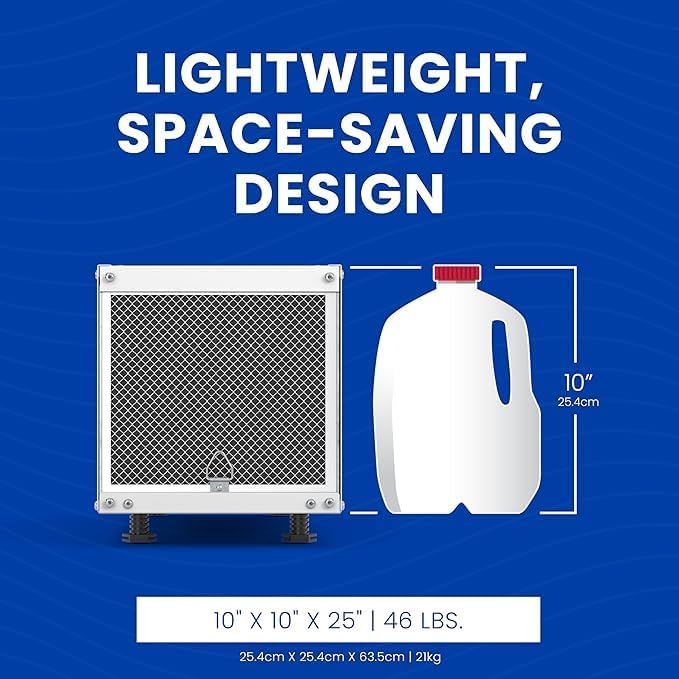
Figure 7.1: Dimensions and weight of the AprilAire E050 Pro Dehumidifier.
8. Warranty and Support
The AprilAire E050 Pro Dehumidifier is backed by an industry-leading 5-year warranty, providing long-term peace of mind and dependable performance.
For technical assistance, warranty claims, or additional support, please visit the official AprilAire website or contact their customer service department. Refer to the contact information provided in your included owner's manual.
You can also visit the AprilAire Store on Amazon for more product information and resources.


