
Bose 329509-1300
Bose Companion 20 Multimedia Speaker System
Model: 329509-1300
Brand: Bose
Introduction
The Bose Companion 20 Multimedia Speaker System is designed to deliver rich, natural sound from your computer or other audio devices. This two-piece system features proprietary TrueSpace stereo digital processing circuitry for a wide soundstage and a convenient control pod for easy access to volume, headphone connection, and an auxiliary input.
What's in the Box
Carefully unpack the contents and ensure all items are present:
- Left speaker
- Right speaker
- Speaker cable
- Audio cable
- Power pack and cable
- AC power cord
- Control pod and cable
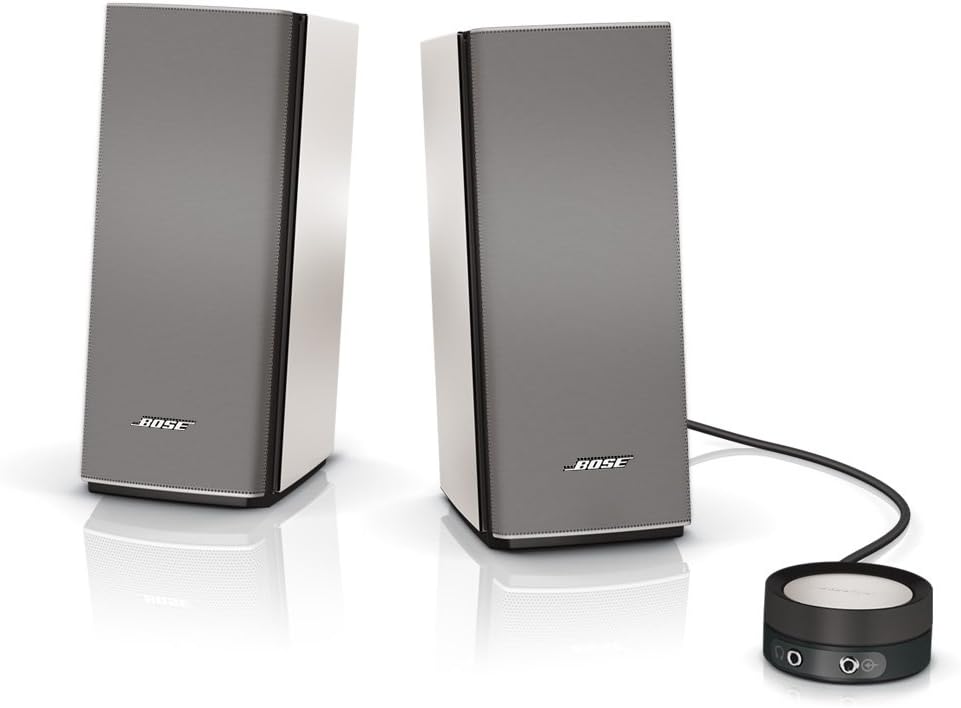
Image: The Bose Companion 20 speaker system, showing both speakers and the circular control pod.
Setup
- Positioning the Speakers: Place the left and right speakers on either side of your computer monitor or listening area. Ensure they are on a stable, flat surface.
- Connecting the Speakers: Connect the speaker cable from the left speaker to the right speaker.
- Connecting the Control Pod: Plug the control pod cable into the designated port on the back of the right speaker.
- Connecting to Audio Source: Connect the audio cable from the control pod to the headphone jack or audio output port of your computer or other audio device.
- Power Connection: Connect the power pack to the power input on the right speaker, then plug the AC power cord into the power pack and a wall outlet.
- Power On: The system will power on automatically once connected to power.

Image: A user seated at a desk, working on a laptop with the Bose Companion 20 speakers positioned on either side, demonstrating a typical setup.
Operating Instructions
- Volume Control: Rotate the top surface of the control pod clockwise to increase volume and counter-clockwise to decrease volume.
- Mute/Unmute: Tap the center of the control pod to mute or unmute the audio. The LED indicator on the pod will change color to show mute status.
- Headphone Connection: Plug your headphones into the headphone jack located on the side of the control pod. This will automatically mute the speakers.
- Auxiliary Input: Connect an additional audio device (e.g., smartphone, MP3 player) to the auxiliary input jack on the side of the control pod using a 3.5mm audio cable.

Image: An angled view of the Bose Companion 20 speakers and the control pod, highlighting the sleek design and connectivity options on the pod.
Maintenance
- Cleaning: Use a soft, dry cloth to clean the surfaces of the speakers and control pod. Do not use liquid cleaners or sprays directly on the product.
- Ventilation: Ensure that the speaker vents are not blocked to allow for proper airflow and prevent overheating.
- Storage: When not in use for extended periods, store the system in a cool, dry place away from direct sunlight and extreme temperatures.
Troubleshooting
If you encounter issues with your Bose Companion 20 system, please refer to the following common troubleshooting steps:
- No Sound:
- Check if the system is properly connected to power and the audio source.
- Ensure the control pod is not muted (tap the center to unmute).
- Increase the volume on both the control pod and your audio source (computer, phone).
- Verify that headphones are not plugged into the control pod.
- Distorted Sound:
- Reduce the volume on both the system and your audio source.
- Check audio cable connections for looseness or damage.
- Test with a different audio source to rule out source issues.
- Intermittent Sound:
- Ensure all cables are securely connected.
- Check for interference from other electronic devices.
For more detailed troubleshooting and advanced solutions, please refer to the official Owner's Guide, which can be found on page 17 for troubleshooting questions. A PDF version of the Owner's Guide is available via the following link: Bose Companion 20 Owner's Guide (PDF).
Specifications
| Feature | Detail |
|---|---|
| Model Name | Companion 20 |
| Speaker Type | Multimedia, Bookshelf |
| Special Feature | Volume Control |
| Compatible Devices | Personal Computer, Phones |
| Surround Sound Channel Configuration | 2.1 |
| Color | Silver |
| Product Dimensions | 3.54"D x 4.72"W x 8.66"H |
| Item Weight | 2.5 Pounds |
| Number of Items | 2 |
| Control Method | Touch |
| Wireless Communication Technology | Bluetooth |
| Power Source | AC |
| Speaker Maximum Output Power | 200 Watts |
| Connectivity Technology | Wired |
| Audio Output Mode | Stereo |
| Mounting Type | Tabletop Mount |
Warranty and Support
The Bose Companion 20 Multimedia Speaker System comes with a Limited Warranty. For specific terms and conditions of your warranty, please refer to the documentation included with your product or visit the official Bose support website.
For further assistance, technical support, or service inquiries, please contact Bose customer support. You can find contact information on the official Bose website or within your product's Owner's Guide.
Official Bose Store: Visit the Bose Store on Amazon
Related documents329509-1300


Ask a question about this manual
Ask about setup, troubleshooting, compatibility, parts, safety, or missing instructions. Manuals+ will review the question and use this page’s manual context to help answer it.