
1. Introduction and Overview
The KZ VXS Pro True Wireless Noise Cancelling Earbuds are designed to provide a superior audio experience with advanced features and comfortable wear. These earbuds incorporate the latest Bluetooth 5.3 technology, aptX Lossless audio support, and CVC noise cancellation for clear sound and reliable connectivity.
Key features include:
- True Wireless Experience with Bluetooth 5.3 and aptX Adaptive/aptX HD Audio/aptX/SBC/AAC support.
- Lightweight and ergonomic design for comfortable, long-lasting wear.
- CVC Sound Isolation technology for effective ambient noise reduction.
- Extended battery life with up to 32 hours of total playtime using the charging case.
- Powerful and deep bass delivered by 10mm drivers.

Image: KZ VXS Pro True Wireless Earbuds resting in their charging case, showcasing their sleek, transparent design and compact form factor.
2. Package Contents
Upon opening your KZ VXS Pro Earbuds package, you should find the following items:
- KZ VXS Pro True Wireless Earbuds (Left and Right)
- Charging Case
- Qualcomm Bluetooth chip 5171 (integrated)
- USB Charging Cable
- Silicone Ear Tips (3 different sizes: Small, Medium, Large)
- User Manual (this document)

Image: The KZ VXS Pro Earbuds, charging case, and USB cable laid out next to the product box, illustrating the minimalist and practical packaging design.
3. Setup
3.1 Initial Charging
Before first use, ensure your KZ VXS Pro earbuds and charging case are fully charged. The charging case has a 400mAh battery capacity and can provide 4 full charges for both earbuds, offering a total playtime of 32 hours. A full charge for the earbuds takes approximately 1 hour.
- Place both earbuds into the charging case.
- Connect the USB charging cable to the charging port on the case and to a compatible USB power source.
- The indicator lights on the case will show the charging status. Refer to the case's specific light indicators for full charge notification.

Image: The charging case with earbuds inside, displaying key battery specifications: 400mAh capacity, 4 recharge cycles, and 32 hours total battery life.
3.2 Bluetooth Pairing
The KZ VXS Pro earbuds utilize Bluetooth 5.3 for fast, stable connections up to 50 feet. Follow these steps to pair them with your device:
- Open the charging case. The earbuds will automatically enter pairing mode.
- On your device (smartphone, tablet, computer), go to Bluetooth settings.
- Select "KZ VXS Pro" from the list of available devices.
- Once connected, a voice prompt will confirm successful pairing.

Image: A detailed internal view of an earbud highlighting the Bluetooth 5.3 chip, emphasizing faster connections, more stable transmission, and improved sound quality.
4. Operating Instructions
4.1 Touch Controls
The KZ VXS Pro earbuds feature smart touch controls for easy operation:
| Action | Function |
|---|---|
| Single tap | Play/Pause music, Hang up/Answer call |
| Double tap on left earbud | Previous track |
| Double tap on right earbud | Next track |
| Long press for 2 seconds | Activate voice assistant |
| Long press during incoming call | Reject call |
| Triple tap on left earbud | Gaming mode (activate/deactivate) |
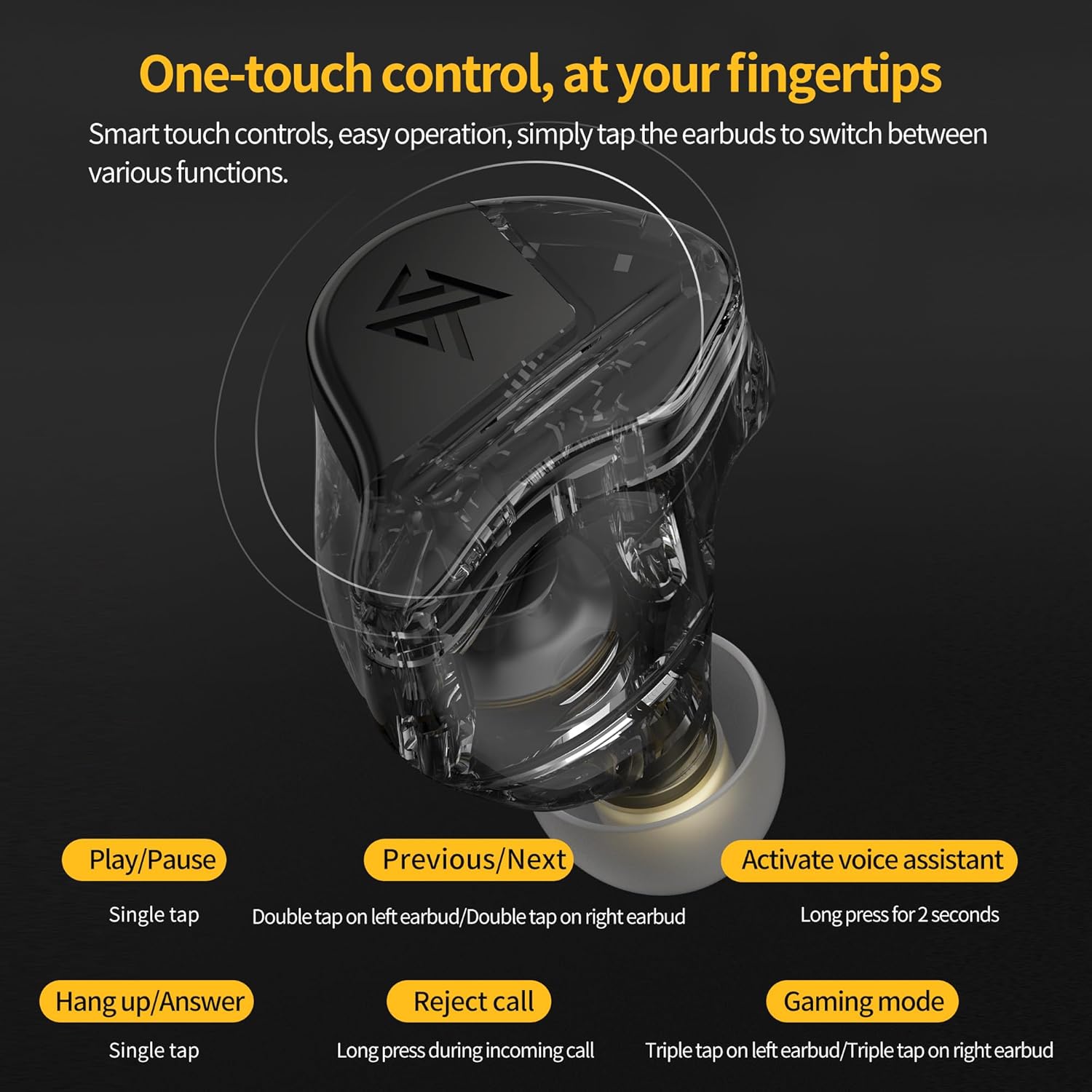
Image: A detailed diagram illustrating the one-touch control functions of the KZ VXS Pro earbuds, showing various tap and press actions for media and call management.
4.2 Audio Features
The KZ VXS Pro earbuds are equipped with a high-end Qualcomm flagship Bluetooth chip 5171, boasting powerful performance with approximately 105dB signal-to-noise ratio. They support advanced audio codecs like aptX Adaptive, aptX HD Audio, aptX, SBC, and AAC for high-fidelity sound.
The 10mm dynamic drivers deliver rich and deep bass, immersing you in your music. Additionally, the earbuds feature CVC (Clear Voice Capture) technology for effective noise isolation, reducing ambient noise during calls and listening sessions.

Image: Earbuds shown next to a smartphone playing music, illustrating how DSP (Digital Signal Processing) enhances the audio experience beyond traditional wired earphones.

Image: A close-up of the Qualcomm Bluetooth chip 5171, highlighting its role in providing powerful performance, anti-interference, fast connection, and stability for professional audio quality.
Video: An official product video showcasing the KZ VXS Pro True Wireless Earbuds, highlighting their key features and design.
5. Maintenance
Proper maintenance ensures the longevity and optimal performance of your earbuds:
- Cleaning: Regularly clean the earbuds and charging case with a soft, dry, lint-free cloth. For ear tips, remove them and clean with mild soap and water, then dry thoroughly before reattaching.
- Storage: When not in use, store the earbuds in their charging case to protect them from dust and damage.
- Avoid Extreme Conditions: Do not expose the earbuds to extreme temperatures, humidity, or liquids. While they are water-resistant, they are not waterproof.
- Battery Care: To preserve battery life, avoid fully discharging the earbuds and charging case frequently. Charge them regularly, even if not in constant use.
6. Troubleshooting
If you encounter any issues with your KZ VXS Pro earbuds, refer to the following common solutions:
| Problem | Solution |
|---|---|
| Earbuds not pairing | Ensure earbuds are in pairing mode (lights flashing). Turn off and on Bluetooth on your device. Forget the device in Bluetooth settings and re-pair. Ensure earbuds are charged. |
| Only one earbud working | Place both earbuds back into the charging case, close the lid, wait a few seconds, then open again. Check if both earbuds are charged. |
| No sound | Check device volume. Ensure earbuds are connected. Try playing different audio. |
| Charging issues | Ensure charging cable is securely connected. Try a different USB port or power adapter. Clean charging contacts on earbuds and case. |
| Poor sound quality / Disconnections | Ensure you are within the 50-foot Bluetooth range. Reduce interference from other wireless devices. Check for firmware updates (if applicable). |
7. Specifications
| Feature | Specification |
|---|---|
| Model Name | VXS Pro |
| Brand | G.K |
| Noise Control | Sound Isolation |
| Sensitivity | 105 dB |
| Headphones Jack | No Jack |
| Connectivity Technology | Wireless |
| Wireless Communication Technology | Bluetooth |
| Included Components | Qualcomm Bluetooth chip 5171 |
| Material | Acrylonitrile Butadiene Styrene (ABS) |
| Charging Time | 1 Hours |
| Compatible Devices | Cellphones |
| Theme | Sweat Resistant |
| Control Type | Media Control |
| Cable Feature | Without Cable |
| Water Resistance Level | Water Resistant |
| Frequency Range | 20Hz - 20,000Hz |
| Control Method | Touch |
| Battery Life (Earbuds) | 8 Hours (single charge) |
| Total Battery Life (with case) | 32 Hours |
| Audio Driver Type | Dynamic Driver |
| Bluetooth Range | 50 Feet |
| Bluetooth Version | 5.3 |
| Carrying Case Battery Capacity | 400 Milliamp Hours |
| Audio Latency | 48 Milliseconds |
| Audio Driver Size | 10 Millimeters |
| Earpiece Shape | Bud |
| Manufacturer | yuanze |
| Package Dimensions | 3.74 x 3.23 x 1.46 inches |
| Item Weight | 4.2 ounces |
| Color | Black |
| Ear Placement | In Ear |
| Form Factor | In Ear |
| Impedance | 24 Ohm |
8. Warranty and Support
For warranty information and customer support, please refer to the documentation included with your product or visit the official G.K website. You may also contact the seller directly for assistance.
For further information and product details, you can visit the Amazon product page.


