
1. Product Overview
The uxcell XY-380 Biochemical Sponge Filter is designed to provide both mechanical and biological filtration for your aquarium. It effectively traps waste particles and provides a large surface area for beneficial bacteria to colonize, promoting a healthy aquatic environment. This filter operates by connecting to an air pump (not included) which draws water through the sponge, providing aeration and filtration simultaneously.

Image 1.1: The uxcell XY-380 Biochemical Sponge Filter, showing its cylindrical sponge body and air tube connector.
Key Features:
- Dual Filtration: Provides both mechanical filtration by trapping debris and biological filtration by housing beneficial bacteria.
- Aeration: Integrates with an air pump to provide essential oxygenation to the aquarium water.
- Efficient Design: The sponge material offers a large surface area for effective filtration.
- Compact Size: Suitable for various aquarium sizes, particularly effective in tanks up to 20 gallons.
2. Safety Information
Please read and understand all safety instructions before operating this product. Failure to follow these instructions may result in injury or damage to the product or aquarium.
- Always unplug all aquarium equipment from the electrical outlet before performing any maintenance, handling, or cleaning.
- This product is designed for indoor use only. Do not use it outdoors or in wet conditions outside of the aquarium.
- Keep out of reach of children and pets.
- Ensure the air pump (not included) is placed above the water level or has a check valve installed to prevent back-siphoning.
- Do not operate the filter if it appears damaged or if any parts are missing.
- Use only with freshwater or saltwater aquariums as specified.
3. Package Contents
Upon opening the package, please verify that all components are present and in good condition:
- 1 x XY-380 Biochemical Sponge Filter Unit
- 1 x Air Tube Connector

Image 3.1: The XY-380 filter shown in its retail packaging and installed within an aquarium.
4. Setup Instructions
Follow these steps to properly set up your XY-380 Biochemical Sponge Filter:
- Rinse the Sponge: Before placing the filter in your aquarium, thoroughly rinse the sponge under clean, dechlorinated water. This removes any manufacturing residues. Do not use tap water directly from the faucet as chlorine can harm beneficial bacteria.
- Connect Air Line: Attach an appropriate air line tubing (not included) to the air tube connector on top of the sponge filter.
- Connect to Air Pump: Connect the other end of the air line tubing to an air pump (not included). Ensure the air pump is suitable for your aquarium size.
- Install Check Valve (Recommended): For safety, install a check valve (not included) in the air line tubing between the air pump and the filter. This prevents water from siphoning back into the air pump during a power outage.
- Place in Aquarium: Submerge the sponge filter completely in your aquarium. The filter is weighted to stay at the bottom. Position it in an area with good water circulation.
- Power On: Once the filter is submerged and the air line is securely connected, plug in your air pump. Air bubbles should begin to rise from the filter's central tube, drawing water through the sponge.
Note: It may take several weeks for beneficial bacteria to fully colonize the sponge filter, establishing biological filtration. During this period, monitor water parameters closely.
5. Operating Instructions
The XY-380 sponge filter operates continuously to maintain water quality. Once set up, it requires minimal intervention during normal operation.
- Ensure the air pump is always running to provide continuous filtration and aeration.
- Observe the flow of bubbles from the filter. A consistent stream indicates proper operation.
- The filter will effectively remove suspended particles and convert harmful ammonia and nitrites into less toxic nitrates.
6. Maintenance
Regular maintenance is crucial for the optimal performance and longevity of your sponge filter and the health of your aquarium inhabitants.
- Cleaning Frequency: Clean the sponge filter every 1-4 weeks, or when you notice a reduction in water flow or visible debris accumulation. The frequency depends on your aquarium's bioload.
- Cleaning Procedure:
- Unplug the air pump.
- Carefully remove the sponge filter from the aquarium.
- Gently squeeze and rinse the sponge in a bucket of old aquarium water (water removed during a water change). This preserves the beneficial bacteria.
- DO NOT rinse the sponge under tap water, as chlorine can kill the beneficial bacteria essential for biological filtration.
- Re-install the cleaned sponge filter into the aquarium and reconnect the air pump.
- Sponge Replacement: The sponge material is durable and designed for long-term use. Replace the sponge only if it becomes severely degraded, torn, or cannot be cleaned effectively. When replacing, consider running the old and new sponges together for a few weeks to transfer beneficial bacteria.
7. Troubleshooting
If you encounter issues with your XY-380 sponge filter, refer to the following common problems and solutions:
| Problem | Possible Cause | Solution |
|---|---|---|
| No or weak air bubbles/water flow. |
|
|
| Water remains cloudy. |
|
|
| Filter floats or moves excessively. |
|
|
8. Specifications
Detailed specifications for the uxcell XY-380 Biochemical Sponge Filter:
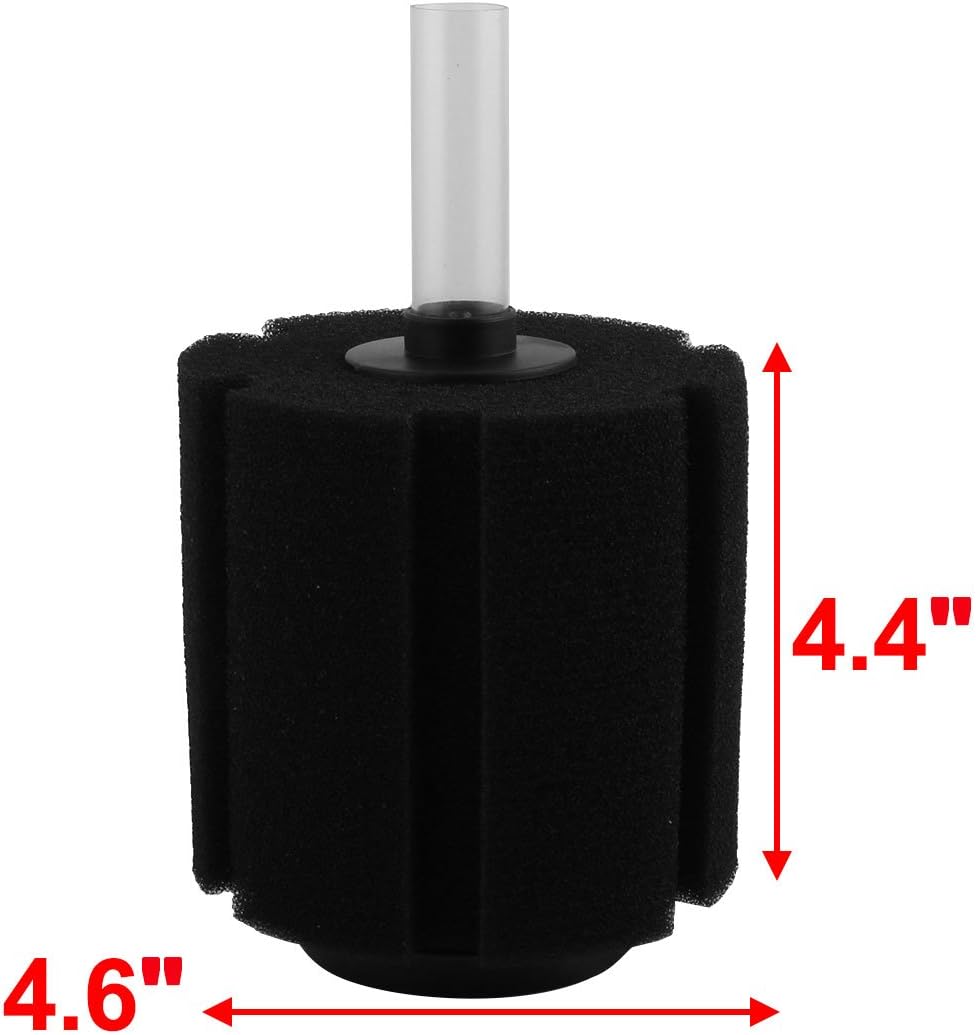
Image 8.1: The XY-380 filter with key dimensions indicated (approx. 4.6 inches diameter, 4.4 inches height).
| Feature | Detail |
|---|---|
| Model Number | XY-380 |
| Brand | uxcell |
| Material | Acrylic (for hard parts), Sponge (for filter media) |
| Filter Dimensions (Diameter x Height) | Approx. 4.5 inches (11.4 cm) Diameter x 5.5 inches (14 cm) Height |
| Tube Dimension (Length x Diameter) | 2 3/4 inches (7 cm) Length x 13/16 inches (2 cm) Diameter |
| Product Dimensions (Overall) | 14L x 11.4W x 14H centimetres |
| Item Weight | 227 g (approx. 0.5 lbs) |
| Recommended Tank Volume | Up to 20 Gallons |
| Color | Black |
| Special Features | Lightweight, Dual Mechanical and Biological Filtration |
9. Warranty and Support
This product is covered by a standard manufacturer's warranty against defects in materials and workmanship. Please refer to the product packaging or the manufacturer's official website for specific warranty terms and conditions.
For technical support, troubleshooting assistance, or warranty claims, please contact uxcell customer service through their official channels. Keep your purchase receipt as proof of purchase.
- Manufacturer: Dragonmarts Co. Ltd. / Uxcell
- Website: www.uxcell.com (Note: This is a placeholder URL, please verify the actual support website.)