
1. Product Overview
The Denon AVR3312CI is a 7.2 channel integrated network A/V surround receiver designed to be the central component of your home theater system. It delivers high-quality audio with 125 watts per channel and offers extensive network functionality, including AirPlay and compatibility with the Denon Remote App. The receiver also features an auto-setup function with an included microphone for optimized sound calibration.
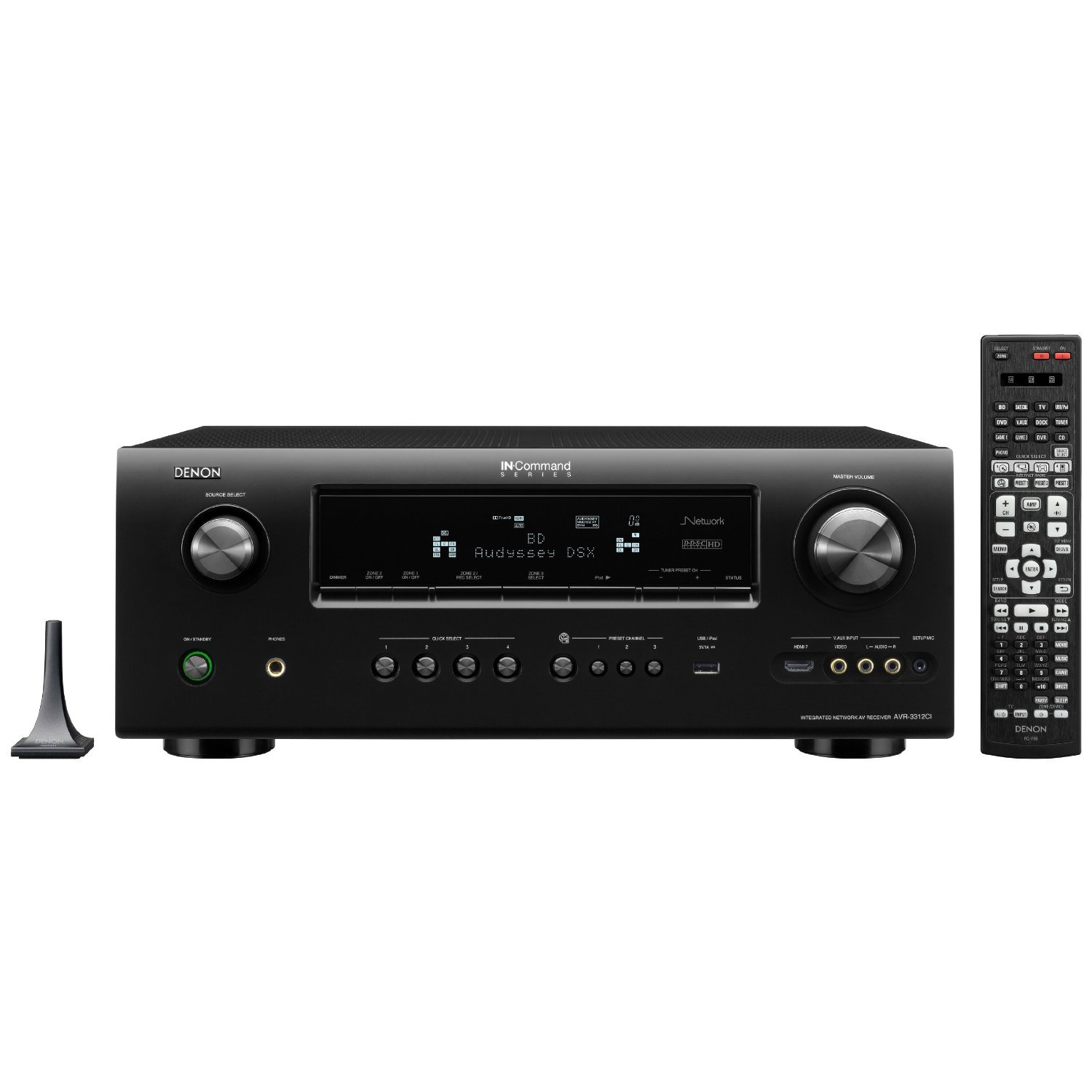
Front view of the Denon AVR3312CI receiver, showing the display, control knobs, and input jacks.
Key Features:
- 7.2 channel Integrated Network A/V Receiver
- HDMI 1.4a with 7 inputs and 2 outputs, supporting 3D content
- AirPlay Ready for wireless audio streaming
- Discrete Power Amplifiers rated at 125 watts per channel
- Network functionality for streaming and control via Denon Remote App
- Audyssey MultEQ XT auto setup with microphone
2. Safety Information
Please read these safety instructions carefully before operating your Denon AVR3312CI receiver. Keep this manual for future reference.
- Power Source: Connect the unit only to an AC outlet of the voltage specified on the rear panel.
- Ventilation: Ensure adequate ventilation. Do not block ventilation openings. Allow sufficient space around the unit for proper heat dissipation.
- Water and Moisture: Do not expose the unit to rain, moisture, dripping, or splashing. Do not place objects filled with liquids, such as vases, on the unit.
- Foreign Objects: Do not insert any foreign objects into the unit's openings.
- Cleaning: Unplug the unit from the wall outlet before cleaning. Use a dry cloth only.
- Servicing: Do not attempt to service the unit yourself. Refer all servicing to qualified service personnel.
- Placement: Place the unit on a flat, stable surface. Avoid placing it near heat sources or in direct sunlight.
3. Package Contents
Verify that all items listed below are included in the package:
- Denon AVR3312CI A/V Surround Receiver
- Remote Control Unit
- AAA Batteries (2) for the remote control
- Audyssey Setup Microphone
- User Manual (this document)
- Power Cord
4. Setup
4.1 Connecting Speakers
Connect your speakers to the corresponding terminals on the rear panel of the AVR3312CI. Ensure correct polarity (+ to + and - to -) for each speaker. The receiver supports a 7.2 channel configuration.
- Front Left/Right Speakers
- Center Speaker
- Surround Left/Right Speakers
- Surround Back Left/Right Speakers (or assignable for Zone 2/3 or bi-amping)
- Subwoofer Pre-Outs (2 for dual subwoofers)
4.2 Connecting Audio/Video Devices
Use HDMI cables for optimal audio and video quality. Connect your source devices (Blu-ray player, game console, cable box, etc.) to the HDMI INPUT ports on the receiver. Connect your TV or projector to one of the HDMI OUTPUT ports.
- HDMI Inputs: Connect up to 7 HDMI source devices.
- HDMI Outputs: Connect up to 2 HDMI displays simultaneously.
- Other Inputs: Analog audio, digital optical/coaxial, and component video inputs are also available for legacy devices.
4.3 Network Connection
Connect an Ethernet cable from your router or network switch to the NETWORK port on the rear of the receiver. This enables network features such as AirPlay, internet radio, and control via the Denon Remote App.
4.4 Power On and Initial Configuration
After all connections are made, plug the power cord into an AC outlet. Turn on the receiver using the power button on the front panel or the remote control. Follow the on-screen setup wizard to configure basic settings, including speaker setup using the Audyssey MultEQ XT microphone for automatic room calibration.
5. Operating Instructions
5.1 Power On/Off
Press the POWER button on the front panel or the remote control to turn the receiver on or off.
5.2 Input Selection
Use the input selector buttons on the front panel or the remote control (e.g., BD/DVD, GAME, CBL/SAT) to switch between connected audio/video sources.
5.3 Volume Control
Adjust the master volume using the large knob on the front panel or the VOLUME +/- buttons on the remote control.
5.4 Sound Modes
Press the MOVIE, MUSIC, or GAME buttons on the remote to select appropriate surround sound modes. Further adjustments can be made through the on-screen menu.
5.5 Network Features
- AirPlay: Stream music wirelessly from your Apple devices. Select the AVR3312CI from the AirPlay menu on your device.
- Denon Remote App: Download the Denon Remote App for iOS or Android devices to control the receiver from your smartphone or tablet.
- Internet Radio: Access a wide variety of internet radio stations through the receiver's network connection.
5.6 Remote Control Usage
The included remote control provides full functionality for the receiver. Ensure the two AAA batteries are correctly inserted. Point the remote control directly at the receiver's front panel sensor.
6. Maintenance
6.1 Cleaning the Unit
To clean the receiver, first disconnect the power cord from the wall outlet. Use a soft, dry cloth to wipe the exterior surfaces. Do not use abrasive cleaners, waxes, or solvents as they may damage the finish.
6.2 Ventilation
Periodically check that the ventilation openings on the top and sides of the receiver are not obstructed by dust or other objects. Proper ventilation is crucial for preventing overheating and ensuring long-term performance.
7. Troubleshooting
If you encounter issues with your Denon AVR3312CI, refer to the following common troubleshooting steps:
- No Power: Ensure the power cord is securely plugged into both the receiver and a working AC outlet. Check the power button on the front panel.
- No Sound: Verify that speakers are correctly connected and polarity is correct. Check the volume level and ensure the mute function is not active. Confirm the correct input source is selected.
- No Video Output: Ensure HDMI cables are securely connected between the source device, receiver, and TV. Select the correct input source on both the receiver and the TV. Try bypassing the receiver by connecting the source directly to the TV to isolate the issue.
- Network Connection Issues: Check the Ethernet cable connection. Ensure your router is functioning correctly. Restart your router and the receiver.
- Remote Control Not Working: Check and replace the AAA batteries. Ensure there are no obstructions between the remote and the receiver's sensor.
For persistent issues, consult the comprehensive troubleshooting section in the full owner's manual or contact Denon customer support.
8. Specifications
| Feature | Specification |
|---|---|
| Model Number | AVR3312CI |
| Product Dimensions (W x D x H) | 17.1 x 15 x 6.7 inches |
| Item Weight | 26 pounds |
| Brand | Denon |
| Connectivity Technology | Ethernet, HDMI, USB |
| Controller Type | Remote |
| Special Features | Dual Subwoofer Outputs, FLAC HD Decoding, Full HD Support, iPod Connectivity |
| Compatible Devices | Smartphone, Speaker |
| Total HDMI Ports | 7 Inputs, 2 Outputs |
| Audio Output Mode | Surround |
| Surround Sound Channel Configuration | 7.2 |
| Video Encoding Support | H.264, H.265/HEVC, MPEG-4 |
| Batteries Required | 2 AAA (included) |
9. Warranty and Support
9.1 Warranty Information
The Denon AVR3312CI Integrated Network A/V Surround Receiver is backed by a three-year warranty from the date of purchase. This warranty covers defects in materials and workmanship under normal use. Please retain your proof of purchase for warranty claims.
9.2 Customer Support
For technical assistance, warranty service, or further inquiries, please visit the official Denon website or contact Denon customer support directly. Contact information can typically be found on the Denon website or in the product packaging.


