1. Introduction
This user manual provides comprehensive instructions for the installation, operation, and maintenance of your ASUS EAH6670/DIS/1GD5 Radeon HD 6670 Graphics Card. This high-performance graphics card is designed to enhance your computing experience with features such as DirectX®11 support, HDMI connectivity, and AMD Eyefinity technology for multi-display setups.
Key features include:
- Super Alloy Power: Provides up to a 15% performance boost, 35°C cooler operation, and 2.5 times longer lifespan compared to standard designs.
- Dust-Proof Fan: Engineered to increase resistance against dust and particles, contributing to a longer fan lifespan and improved cooling efficiency.
- AMD Eyefinity Support: Enables connection of up to three displays for an immersive panoramic computing experience.
2. Safety Information
Please read and follow these safety guidelines carefully to prevent damage to the graphics card or other components, and to ensure your personal safety.
- Always disconnect the power cord from your computer before installing or removing any components.
- Wear an anti-static wrist strap or frequently touch a grounded metal object (like the computer case) to discharge static electricity before handling the graphics card. Static discharge can damage electronic components.
- Ensure proper ventilation within your computer case to prevent overheating.
- Do not expose the graphics card to moisture or extreme temperatures.
- Handle the card by its edges; avoid touching the gold connector pins or the components on the circuit board.
3. Setup and Installation
3.1 Pre-Installation Checklist
- Verify your power supply unit (PSU) meets the minimum wattage requirements for the graphics card and your system.
- Ensure your motherboard has an available PCI Express x16 slot.
- Gather necessary tools: Phillips-head screwdriver.
- Backup important data before making hardware changes.
3.2 Hardware Installation
- Prepare Your System: Power off your computer and disconnect all cables. Open the computer case.
- Locate PCI Express Slot: Identify an available PCI Express x16 slot on your motherboard. Remove the corresponding expansion slot cover from the computer case.
- Insert Graphics Card: Carefully align the graphics card with the PCI Express slot. Press down firmly and evenly until the card is fully seated in the slot. Secure the card to the case with a screw.
- Close Case and Reconnect: Close your computer case and reconnect all cables, including the display cable to the graphics card's output port (HDMI, DVI, or VGA).

Figure 1: Top-down view of the ASUS EAH6670/DIS/1GD5 graphics card, showing the central fan and heatsink assembly. This view highlights the compact design and the red accents around the fan shroud.
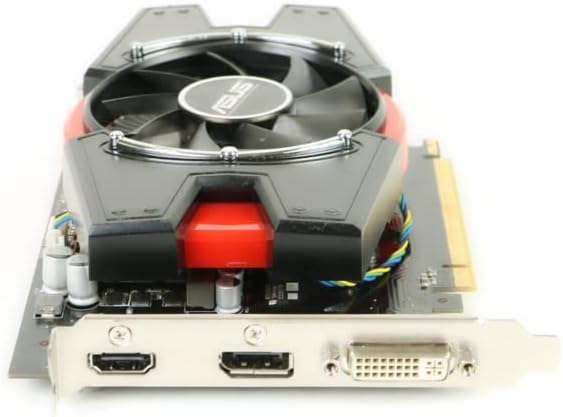
Figure 2: Side view of the ASUS EAH6670/DIS/1GD5 graphics card, illustrating the various display output ports including HDMI and DVI. This perspective is crucial for understanding how to connect your monitor.
3.3 Driver Installation
- Boot System: Power on your computer. Windows should detect the new hardware.
- Install Drivers: Insert the driver CD/DVD that came with your graphics card, or download the latest drivers from the official ASUS support website. Follow the on-screen instructions to complete the driver installation.
- Restart: Restart your computer after the driver installation is complete to apply all changes.
4. Operating the Graphics Card
Once installed and drivers are updated, your ASUS EAH6670/DIS/1GD5 graphics card will automatically handle graphics processing for your system.
4.1 Connecting Displays
Connect your monitor(s) to the appropriate output ports on the graphics card. This model typically includes HDMI and DVI ports. For multi-monitor setups using AMD Eyefinity, refer to the AMD Eyefinity setup guide available on the AMD website or through the graphics driver control panel.
4.2 Graphics Settings
You can adjust graphics settings, resolution, and display configurations through the AMD Radeon Software (formerly Catalyst Control Center) installed with the drivers. This software allows for fine-tuning performance and visual quality for games and applications.
5. Maintenance
Proper maintenance ensures the longevity and optimal performance of your graphics card.
- Dust Management: The card features a Dust-Proof Fan, but regular cleaning of your computer case and components is still recommended. Use compressed air to gently clear dust from the fan and heatsink fins every few months.
- Driver Updates: Periodically check the ASUS support website for updated graphics drivers. Keeping drivers current can improve performance, stability, and compatibility with new software.
- Temperature Monitoring: Use monitoring software (often included with graphics drivers or third-party utilities) to keep an eye on the card's temperature, especially during heavy load. Ensure temperatures remain within safe operating limits.
6. Troubleshooting
If you encounter issues with your graphics card, try the following troubleshooting steps:
- No Display/Black Screen:
- Ensure the display cable is securely connected to both the graphics card and the monitor.
- Verify the graphics card is fully seated in its PCI Express slot.
- Check if your monitor is set to the correct input source.
- Try connecting to a different display output port on the card, or a different monitor if available.
- Driver Issues:
- If you experience display artifacts, crashes, or poor performance, try reinstalling the graphics drivers. First, uninstall existing drivers using the AMD Radeon Software or Windows Device Manager, then perform a clean installation of the latest drivers from the ASUS website.
- Ensure there are no conflicts with integrated graphics drivers. Disable integrated graphics in your system's BIOS/UEFI if necessary.
- System Instability/Crashes:
- Check system temperatures to ensure the graphics card is not overheating.
- Verify your power supply unit (PSU) is sufficient and providing stable power.
- Ensure your system's BIOS/UEFI is up to date.
If problems persist, consult the ASUS support website or contact their technical support for further assistance.
7. Specifications
| Feature | Detail |
|---|---|
| Model Number | EAH6670/DIS/1GD5 |
| Brand | ASUS |
| Graphics Coprocessor | AMD Radeon |
| Graphics RAM Size | 1 GB |
| Video Output Interface | HDMI, DVI |
| Graphics Processor Manufacturer | AMD |
| Product Dimensions | 12 x 3 x 9 inches |
| Item Weight | 2.4 pounds |
8. Warranty and Support
For detailed warranty information, please refer to the documentation included with your product or visit the official ASUS support website. Warranty terms and conditions may vary by region and purchase date.
For technical support, driver downloads, and frequently asked questions, please visit the ASUS support portal:
You can also find more information about ASUS products on their brand store: ASUS Store on Amazon


