
1. Introduction
The Technical Pro IA25U is a versatile 600-watt, 2-channel integrated amplifier designed to provide flexible audio playback options for various home entertainment or venue setups. This unit supports traditional RCA audio sources, as well as modern digital media through USB and SD card inputs. It also features an 1/8" input for direct connection of MP3 players and smartphones.
This manual provides essential information for the safe and efficient operation of your IA25U amplifier. Please read it thoroughly before use and retain it for future reference.
2. Safety Instructions
To reduce the risk of electric shock, fire, or damage to the unit, please observe the following safety precautions:
- Power Source: Connect the unit only to the specified power supply (110-220V switchable). Ensure the voltage selector switch on the rear panel matches your local power supply before connecting.
- Ventilation: Do not block any ventilation openings. Ensure adequate airflow around the unit to prevent overheating.
- Water and Moisture: Do not expose the unit to rain, moisture, dripping, or splashing. Do not place objects filled with liquids, such as vases, on the unit.
- Foreign Objects: Do not insert any objects into the unit's openings.
- Servicing: Do not attempt to service this unit yourself. Refer all servicing to qualified service personnel. Opening the cover may expose you to dangerous voltage or other hazards.
- Cleaning: Unplug the unit from the power outlet before cleaning. Use a soft, dry cloth only.
- Placement: Place the unit on a stable, level surface. Avoid placing it near heat sources or in direct sunlight.
3. Package Contents
Please check that the following items are included in your package:
- Technical Pro IA25U Integrated Amplifier
- Power Cable
- User Manual (this document)
- Note: An audio cable (e.g., 3.5mm to 3.5mm) may be included for MP3 player connection.

Figure 3.1: User Manual Cover. This image shows the front cover of the Technical Pro IA25U user manual, indicating the product model and brand.

Figure 3.2: Product Packaging. This image displays the retail box for the Technical Pro IA25U amplifier, showing the brand logo, model number, and a diagram of the unit.
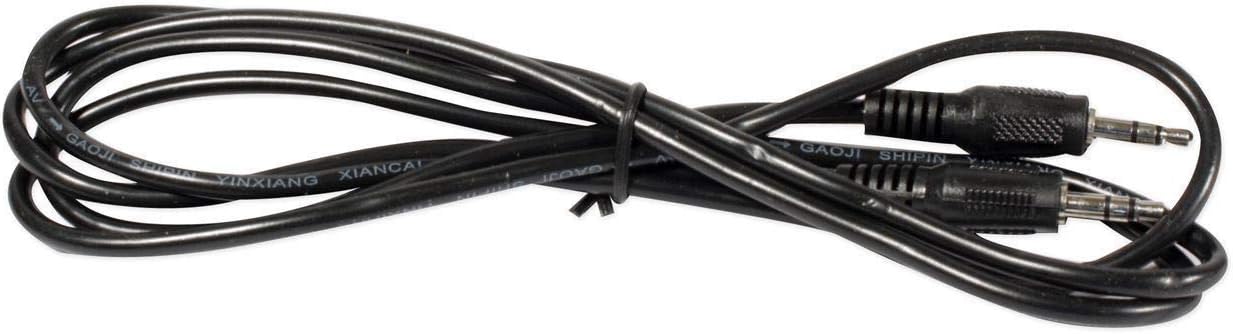
Figure 3.3: Audio Cable. This image shows a black 3.5mm audio cable, which can be used to connect external MP3 players or smartphones to the amplifier.
4. Product Overview
4.1 Front Panel Controls and Inputs
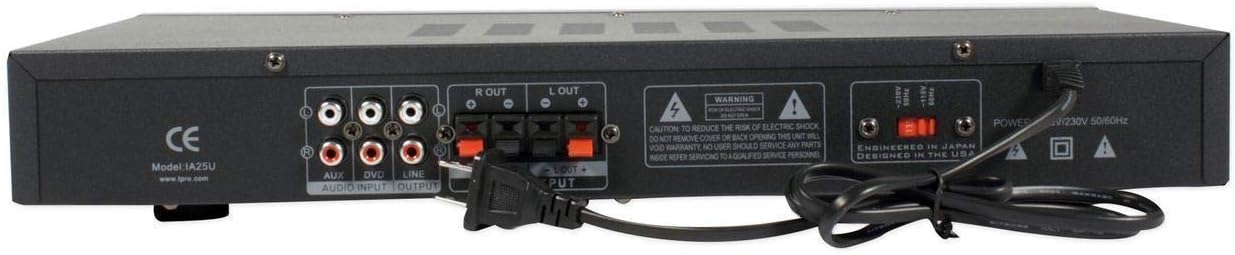
Figure 4.1: Front Panel. This image shows the front panel of the Technical Pro IA25U amplifier, featuring various controls and input ports.
- Power Switch: Turns the unit on or off.
- USB Input: For connecting USB flash drives (max 16 GB) to play MP3 files.
- SD Card Input: For inserting SD cards (max 16 GB) to play MP3 files.
- Playback Controls: Buttons for Play/Pause, Stop, Previous Track, Next Track for USB/SD media.
- Digital Fluorescent Output Display: Shows track information and operational status.
- Bass Control: Adjusts the low-frequency output.
- Treble Control: Adjusts the high-frequency output.
- Balance Control: Adjusts the relative volume between the left and right channels.
- Input Selector: Rotary knob to select the audio source (RCA, USB, SD, MP3).
- Volume Control: Master volume knob to adjust the overall output level.
- MP3 Input (1/8"): For direct connection of portable MP3 players or smartphones using a 3.5mm audio cable.
4.2 Rear Panel Connections

Figure 4.2: Rear Panel. This image shows the rear panel of the Technical Pro IA25U amplifier, highlighting the power input, audio inputs, and speaker outputs.
- Power Input: Connect the included power cable here.
- Voltage Selector (110V/220V): Switch to match your local power supply. Ensure this is set correctly before plugging in the unit.
- RCA Audio Inputs (AUX, DVD, LINE): Two sets of stereo RCA inputs for connecting external audio sources like CD players, DVD players, cassette decks, or mixers.
- Speaker Outputs (Push Button): Connect two loudspeakers using speaker wire. Ensure correct polarity (+ to + and - to -).
- RCA Record Line Out: Provides an unprocessed audio output signal for connecting to a recording device or another amplifier.
5. Setup
Follow these steps to set up your Technical Pro IA25U amplifier:
- Placement: Place the amplifier on a stable, flat surface with adequate ventilation.
- Voltage Selection: Locate the 110V/220V voltage selector switch on the rear panel. Use a small tool (like a screwdriver) to set it to the correct voltage for your region. Failure to do so may damage the unit.
- Connect Speakers: Connect your passive loudspeakers to the "SPEAKER OUTPUT" push-button terminals on the rear panel.
- Strip approximately 1/2 inch of insulation from the ends of your speaker wires.
- Press down on the colored tab of the terminal, insert the bare wire, and release the tab to secure the connection.
- Ensure correct polarity: connect the positive (+) terminal of the amplifier to the positive (+) terminal of the speaker, and the negative (-) terminal of the amplifier to the negative (-) terminal of the speaker. Repeat for both left and right channels.
- Connect Audio Sources:
- RCA Devices (CD/DVD/Cassette): Connect the RCA output cables from your audio source to one of the "AUX", "DVD", or "LINE" RCA input pairs on the rear panel. Match red to red (right channel) and white to white (left channel).
- MP3 Player/Smartphone: Connect a 3.5mm audio cable from your device's headphone jack to the "MP3" 1/8" input jack on the front panel.
- Connect Power: Once all audio and speaker connections are made, plug the included power cable into the "POWER INPUT" on the rear panel, and then into a suitable wall outlet.
6. Operating Instructions
After completing the setup, follow these steps to operate your amplifier:
- Power On: Press the "POWER" switch on the front panel to turn on the amplifier. The digital display will illuminate.
- Select Input Source: Rotate the "INPUT" selector knob on the front panel to choose your desired audio source (e.g., AUX, DVD, LINE, USB, SD, MP3).
- Adjust Volume: Start with the "VOLUME" knob set to a low level. Begin playback from your selected audio source and slowly increase the volume to a comfortable listening level.
- USB/SD Playback:
- Insert a USB flash drive or SD card (max 16 GB, containing .mp3 files) into the respective slot on the front panel.
- Select "USB" or "SD" as the input source.
- Use the playback control buttons (Play/Pause, Stop, Previous, Next) to manage your music. The digital display will show track information.
- Tone and Balance Adjustment: Use the "BASS", "TREBLE", and "BALANCE" knobs to fine-tune the audio output to your preference.
- Bass: Enhances or reduces low frequencies.
- Treble: Enhances or reduces high frequencies.
- Balance: Adjusts the sound distribution between left and right speakers.
- Record Line Out: If you wish to record the audio playing through the amplifier, connect a recording device to the "RCA RECORD LINE OUT" on the rear panel. This output provides a fixed-level signal independent of the main volume control.
- Power Off: When finished, turn down the volume and press the "POWER" switch to turn off the unit.
7. Maintenance
Proper maintenance ensures the longevity and optimal performance of your amplifier.
- Cleaning: Disconnect the power cord before cleaning. Use a soft, dry, lint-free cloth to wipe the exterior surfaces. Do not use liquid cleaners, aerosols, or abrasive chemicals, as they may damage the finish or internal components.
- Ventilation: Regularly check that the ventilation openings are clear of dust and debris to prevent overheating.
- Storage: If storing the unit for an extended period, unplug it from the power outlet and store it in a cool, dry place away from direct sunlight and extreme temperatures.
8. Troubleshooting
If you encounter issues with your IA25U amplifier, refer to the following common problems and solutions:
| Problem | Possible Cause | Solution |
|---|---|---|
| No power | Power cable not connected; Power outlet faulty; Voltage selector incorrect. | Ensure power cable is securely connected. Try a different outlet. Verify 110V/220V selector switch is set correctly. |
| No sound output | Incorrect input selected; Volume too low; Speakers not connected or faulty; Audio source issue. | Select the correct input source. Increase the volume. Check speaker connections and polarity. Test with a different audio source. |
| Sound from only one speaker | Speaker connection issue; Balance control adjusted incorrectly; Faulty speaker. | Check speaker wire connections for the affected channel. Adjust the Balance control to the center. Test with a different speaker. |
| USB/SD card not playing | Incorrect input selected; File format not supported; Card/drive capacity too large; Corrupt files. | Ensure "USB" or "SD" input is selected. Only .mp3 files are supported. Max capacity is 16 GB. Try a different USB drive/SD card with known good MP3 files. |
| Distorted sound | Volume too high; Input signal too strong; Speaker impedance mismatch. | Reduce the volume. Check the output level of your audio source. Ensure speakers are compatible with the amplifier's output. |
9. Specifications
The following are the technical specifications for the Technical Pro IA25U Integrated Amplifier:
- Peak Power Handling: 600 watts
- Inputs: RCA (2 audio sources: AUX, DVD, LINE), USB, SD Card, MP3 (1/8" jack)
- Outputs: Push Button (2 loudspeakers), RCA (Record Line Out)
- USB & SD Card Maximum Size: 16 GB
- Supported File Format (USB/SD): .mp3 files
- Display: Digital fluorescent output display
- Controls: Bass, Treble, Balance, Volume
- Frequency Response: 20-20,000 Hz
- Voltage: 110-220V Switchable
- Dimensions (H x W x D): 3" x 17" x 8"
- Item Weight: 5.45 pounds
- Model Number: IA25U
- Manufacturer: Technical Pro
10. Warranty and Support
For warranty information and technical support, please refer to the documentation provided with your purchase or visit the official Technical Pro website. Keep your proof of purchase for any warranty claims.
Note: Unauthorized servicing or modification of the unit will void the warranty.


