1. Introduction
Thank you for choosing the hjh OFFICE PRO-TEC 200 608010 Professional Office Chair. This chair is designed to provide maximum seating comfort and ergonomic support for daily use in both office and home environments. This manual provides essential information for the safe assembly, operation, and maintenance of your new office chair.

Figure 1: Front view of the hjh OFFICE PRO-TEC 200 Professional Office Chair.
2. Safety Information
Please read all safety instructions carefully before assembling and using the chair. Retain this manual for future reference.
- Weight Capacity: Do not exceed the maximum recommended load of 120 kg (264 lbs). Exceeding this limit may cause damage to the chair and potential injury.
- Proper Use: This chair is intended for seating purposes only. Do not stand on the chair, use it as a ladder, or for any other unintended purpose.
- Stability: Ensure all components are securely fastened before use. Avoid sudden movements or leaning excessively, especially when the chair is in a reclined position.
- Castors: The chair is equipped with load-dependent braked safety double wheels. These wheels are designed to roll freely under load and brake when unloaded to prevent unwanted rolling away.
- Children: Keep children away from the chair during assembly. Do not allow children to play on or with the chair.
- Maintenance: Regularly check all screws and connections to ensure they remain tight. Tighten if necessary.
3. Assembly Instructions
Although the product specifications indicate 'No Assembly Required', user feedback suggests that some assembly is typically needed. Please follow the included assembly guide that comes with your product packaging. A suitable Allen key is usually provided for assembly.
- Unpack Components: Carefully remove all parts from the packaging. Verify that all components listed in the product's assembly guide are present and undamaged.
- Attach Castors: Insert the double castors into the base. Ensure they click securely into place.
- Assemble Base and Gas Lift: Place the gas lift cylinder into the center hole of the assembled base.
- Attach Seat Mechanism: Secure the seat mechanism to the underside of the seat using the provided screws.
- Connect Seat and Backrest: Attach the backrest to the seat assembly according to the specific instructions.
- Mount Armrests: Secure the armrests to the chair frame.
- Final Check: Once assembled, ensure all screws are tightened and the chair is stable before use.

Figure 2: The PRO-TEC 200 chair in an office environment.
4. Operating Instructions
The hjh OFFICE PRO-TEC 200 chair offers multiple adjustment options to customize your seating experience for optimal comfort and ergonomic support.
- Seat Height Adjustment:
Locate the lever on the right side beneath the seat. To raise the seat, lift the lever while taking your weight off the seat. To lower the seat, lift the lever while seated. The seat height is infinitely adjustable between 46 cm and 59 cm. - Backrest Height Adjustment:
The backrest height can be adjusted to provide optimal lumbar support. Lift the backrest to the desired height. It can be adjusted between 59 cm and 67 cm. - Armrest Height Adjustment:
The armrests are adjustable in 5 levels, from 18 cm to 26 cm. Press the button or lever located on the side of the armrest support and slide the armrest up or down to your preferred height. - Synchronous Mechanism and Tilt Adjustment:
The chair features a synchro-relax mechanism with a 5-way lockable tilt angle. This mechanism allows the seat and backrest to recline in a synchronized motion. To adjust the back pressure, use the large knob located under the seat. Turn it clockwise to increase tension (for heavier users) or counter-clockwise to decrease tension (for lighter users). The tilt angle can be locked in various positions.

Figure 3: Backrest recline and tension adjustment.
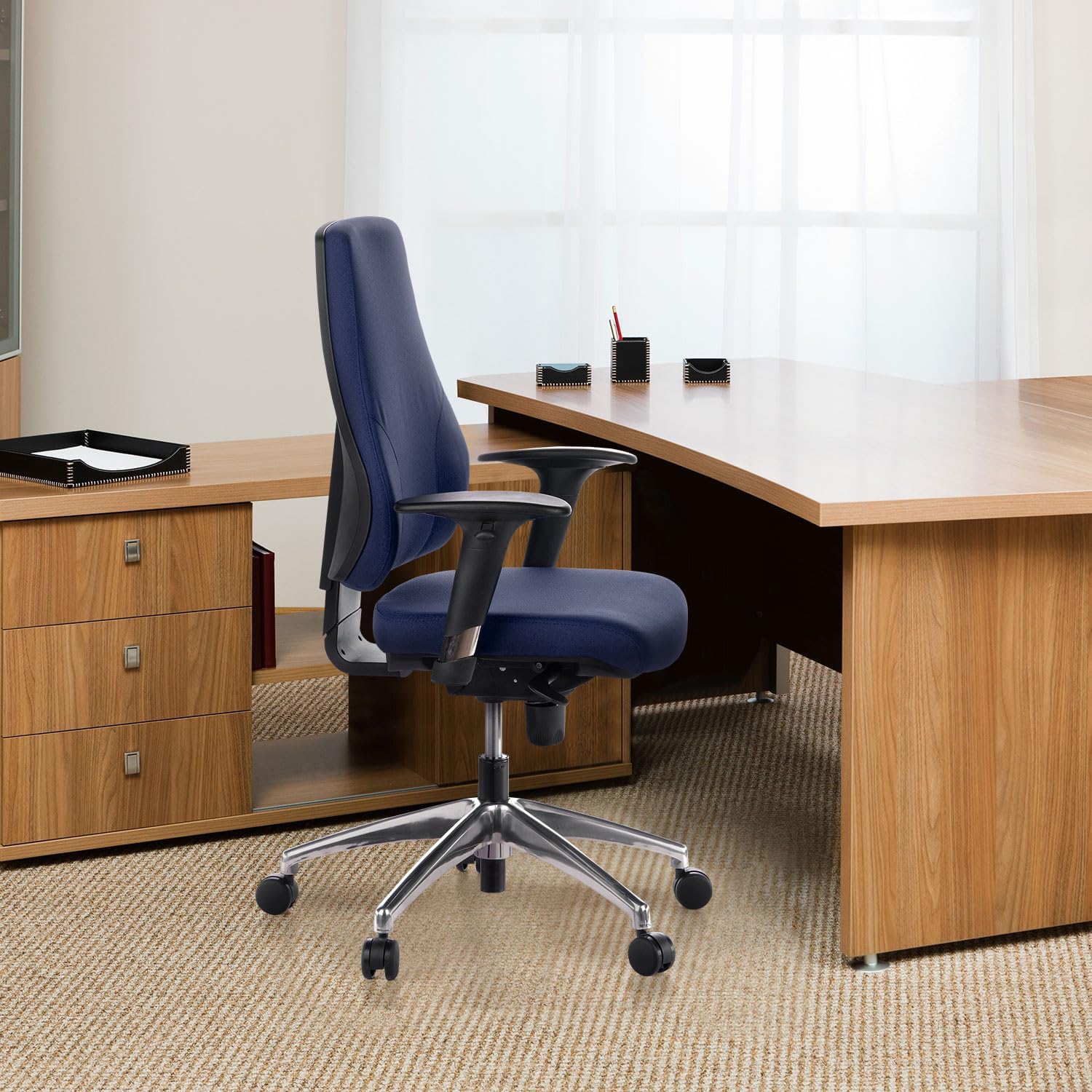
Figure 4: Key adjustment points of the chair.
5. Maintenance
Proper care and maintenance will extend the life of your hjh OFFICE PRO-TEC 200 chair.
- Cleaning: The chair's fabric cover is durable and dirt-repellent. For general cleaning, simply wipe clean with a damp cloth. For stubborn stains, use a mild fabric cleaner and follow the product instructions. Avoid harsh chemicals or abrasive cleaners.
- Inspection: Periodically inspect all screws, bolts, and moving parts. Tighten any loose fasteners to ensure stability and safety.
- Lubrication: If the chair develops squeaks or creaks, a small amount of silicone-based lubricant can be applied to moving metal parts or pivot points. Avoid applying lubricant to the gas lift cylinder.
6. Troubleshooting
If you encounter any issues with your chair, refer to the following common problems and solutions:
- Chair Squeaks or Creaks:
Check all assembly screws and tighten them. Apply a small amount of silicone spray lubricant to metal-on-metal contact points, especially around the seat mechanism and backrest attachment. - Gas Lift Not Functioning:
Ensure the gas lift lever is fully engaged or disengaged as required. If the gas lift consistently fails to hold height, it may need replacement. Contact customer support. - Chair Feels Unstable:
Verify that all components are correctly assembled and all screws are securely tightened. Ensure the base is flat on the floor and not on an uneven surface. - Wheels Not Rolling Smoothly:
Check for debris (hair, lint) caught in the castor wheels. Clean them thoroughly. Ensure the wheels are properly inserted into the base.
7. Specifications
| Feature | Detail |
|---|---|
| Model | PRO-TEC 200 608010 |
| Brand | hjh OFFICE |
| Colour | Blue |
| Material | Fabric (100% Polyester) |
| Frame Material | Aluminium |
| Overall Dimensions (H x W x D) | 126 x 60 x 45 cm |
| Seat Height | 46 - 59 cm |
| Seat Width (Useable) | 47 cm |
| Seat Depth (Useable) | 45 cm |
| Backrest Height | 59 - 67 cm |
| Armrest Height | 18 - 26 cm |
| Item Weight | 19 Kilograms |
| Maximum Load Capacity | 120 Kilograms |
| Special Features | Adjustable Height, Arm Rest, Ergonomic, Rolling, Swivel |
| Included Components | Double castors |
| Care Instructions | Wipe Clean |

Figure 5: Detailed dimensions of the PRO-TEC 200 chair.
8. Warranty and Support
Specific warranty details are not provided within the product information. For warranty claims, technical support, or replacement parts, please contact your retailer or the manufacturer directly. Keep your proof of purchase for any warranty-related inquiries.


