
1. Introduction and Overview
The Pro-User DFC530N is an intelligent microprocessor-controlled battery charger designed for 6V and 12V lead-acid batteries, providing a charging current of up to 5.3 Amperes. This charger is suitable for various battery types including lead-acid, gel, wet cell, MF, VRLA, calcium, and AGM, with capacities ranging from 5 Ah to 120 Ah.
The advanced electronics monitor battery status and apply the appropriate charging current. Once fully charged, the charger switches to a maintenance mode, providing a small current to prevent self-discharge, making it ideal for long-term connection, especially for seasonal vehicles. It features spark protection, short-circuit protection, overheating protection, and reverse polarity protection. The charger comes with both battery clamps and ring terminals with quick-release connectors for versatile connection options. It also includes an acoustic signal and LED warning indicators for operational status.
2. Safety Instructions
Please read and understand all safety instructions before operating the charger. Failure to follow these instructions may result in electric shock, fire, or serious injury.
- Ventilation: Always operate the charger in a well-ventilated area. Batteries can produce explosive gases.
- Eye Protection: Wear appropriate eye protection (safety glasses) when working near batteries.
- Sparks and Flames: Avoid creating sparks or open flames near the battery or charger.
- Disconnect Power: Always disconnect the AC power supply from the charger before connecting or disconnecting the battery leads.
- Correct Polarity: Ensure correct polarity when connecting to the battery (positive to positive, negative to negative). The charger has reverse polarity protection, but incorrect connection should still be avoided.
- Children and Pets: Keep the charger and battery out of reach of children and pets.
- Damaged Equipment: Do not operate the charger if it has been dropped, damaged, or if the cables are frayed.
- Indoor Use: This charger is designed for indoor use. While it has an IP65 rating for water resistance, avoid prolonged exposure to rain or extreme moisture.
3. Package Contents
Verify that all items are present in the package:
- Pro-User DFC530N Intelligent Battery Charger Unit
- Battery Clamps (Red for Positive, Black for Negative)
- Ring Terminals with Quick-Release Connector
- AC Power Cable

Image displaying the Pro-User DFC530N intelligent battery charger along with its included accessories: battery clamps, ring terminals with quick-release connectors, and the AC power cable.
4. Setup and Connection
Follow these steps to connect the charger to your battery:
- Prepare the Battery: Ensure the battery terminals are clean and free of corrosion. If the battery is in a vehicle, ensure the vehicle is turned off.
- Select Connection Method: Choose between the battery clamps for temporary connection or the ring terminals for a more permanent setup. Connect your chosen accessory to the charger's quick-release connector.
- Connect to Battery:
- Connect the RED positive (+) lead from the charger to the positive (+) terminal of the battery.
- Connect the BLACK negative (-) lead from the charger to the negative (-) terminal of the battery.
- Connect to AC Power: Plug the charger's AC power cable into a standard electrical outlet. The charger will automatically begin its charging process.

Image showing the Pro-User DFC530N battery charger connected to a vehicle battery under the hood, illustrating a typical charging setup.
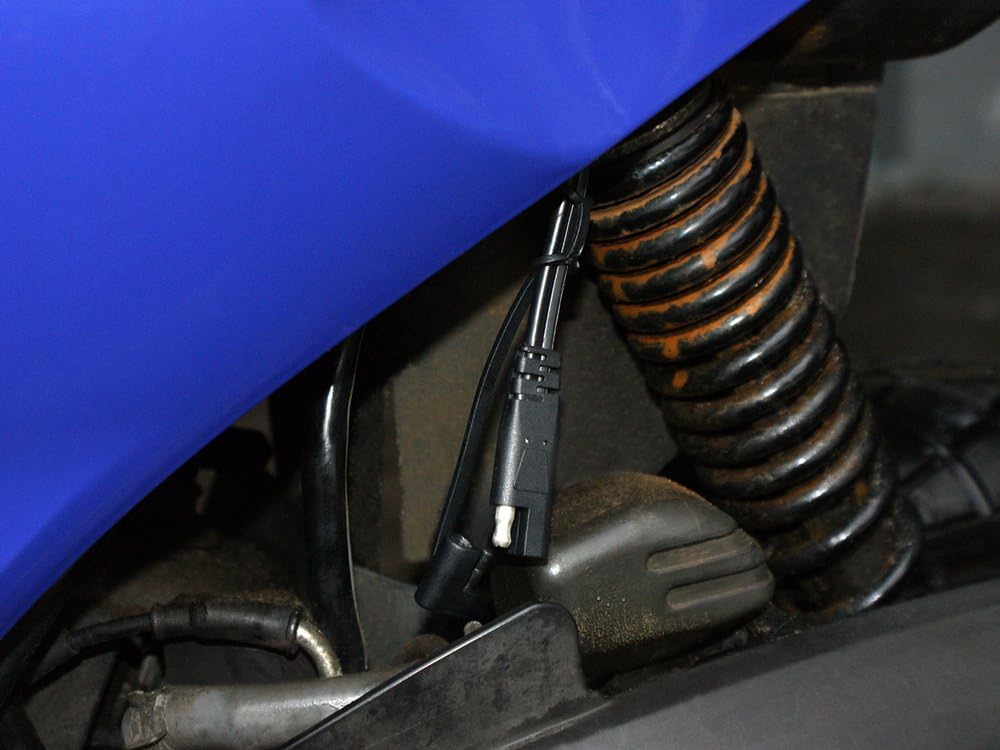
Image demonstrating a permanent connection setup using the ring terminals, secured to a vehicle's battery terminals, with the quick-release connector accessible for charger attachment.
5. Operating Instructions
The DFC530N charger operates automatically once connected to the battery and AC power. It features a 4-stage charging process to optimize battery health and longevity.
LED Indicators and Status:

Close-up view of the Pro-User DFC530N charger's control panel, highlighting the LED indicators for Reverse, Fault, Power, Charging, and Full status, as well as the mode selection buttons.
- POWER LED: Illuminates when the charger is connected to AC power.
- CHARGING LED: Illuminates when the battery is actively being charged.
- FULL LED: Illuminates when the battery is fully charged and the charger has switched to maintenance mode.
- FAULT LED: Illuminates if an error occurs (e.g., short circuit, overheating). An acoustic signal may also sound.
- REVERSE LED: Illuminates if the battery leads are connected with incorrect polarity. An acoustic signal may also sound.
Charging Process:
- The charger automatically detects the battery voltage (6V or 12V).
- It then proceeds through a multi-stage charging cycle, including desulfation (if needed), bulk charge, absorption, and float/maintenance charge.
- The CHARGING LED will be lit during active charging.
- Once the battery reaches full capacity, the FULL LED will illuminate, and the charger will enter a maintenance mode to prevent overcharging and self-discharge. The charger can remain connected indefinitely in this mode.
6. Maintenance
Proper maintenance ensures the longevity and safe operation of your charger:
- Cleaning: Disconnect the charger from AC power and the battery before cleaning. Wipe the casing with a dry or slightly damp cloth. Do not use solvents or abrasive cleaners.
- Cable Inspection: Regularly inspect the AC power cable and battery leads for any signs of damage, cuts, or fraying. Replace if damaged.
- Storage: Store the charger in a cool, dry place when not in use. Keep the cables neatly coiled.
- Battery Terminals: Ensure battery terminals are clean and free of corrosion for optimal charging.
7. Troubleshooting
If you encounter issues with your Pro-User DFC530N charger, refer to the following common problems and solutions:
| Problem | Possible Cause | Solution |
|---|---|---|
| Charger not turning on (no LEDs lit) | No AC power; Faulty outlet; Damaged charger. | Check AC power connection and outlet. Try a different outlet. Inspect charger for damage. |
| FAULT LED is lit / Acoustic signal | Short circuit; Overheating; Internal fault. | Disconnect immediately. Check for short circuits in cables or battery. Allow charger to cool down. If problem persists, contact support. |
| REVERSE LED is lit / Acoustic signal | Incorrect battery polarity connection. | Disconnect AC power. Reconnect battery leads ensuring RED to positive (+) and BLACK to negative (-). |
| Battery not charging (CHARGING LED not lit) | Poor connection; Battery too deeply discharged; Battery fault. | Check all connections for tightness and cleanliness. The charger may not initiate charging if the battery voltage is extremely low. Test battery condition. |
8. Specifications
Detailed technical specifications for the Pro-User DFC530N Intelligent Battery Charger:
- Model: DFC530N
- Part Number: 16605
- Input Voltage: 220-240V AC, 50/60Hz (typical for EU market)
- Output Voltage: 6V DC / 12V DC (Automatic Detection)
- Charging Current: Up to 5.3 Amperes DC
- Battery Types: All lead-acid batteries (Lead-Acid, Gel, Wet Cell, MF, VRLA, Calcium, AGM)
- Battery Capacity: 5 Ah - 120 Ah
- Control: Digital control with built-in 12-bit AD processor
- Charging Stages: 4-stage charging characteristics with automatic maintenance mode
- Protection Features: Spark protection, short-circuit protection, overheating protection, reverse polarity protection
- Indicators: LED status indicators (Power, Charging, Full, Fault, Reverse), Acoustic signal
- Enclosure Rating: IP65 (Waterproof housing)
- Dimensions (L x W x H): Approximately 164 x 75 x 43 mm
- Weight: Approximately 0.620 kg
- Certifications: TÜV/GS tested
9. Warranty and Support
For warranty information, technical support, or service inquiries, please refer to the warranty card included with your product or contact your retailer or the manufacturer directly. Keep your proof of purchase for warranty claims.


