
1. Introduction
This manual provides instructions for the setup, operation, and maintenance of the AmScope SM-3TZ-54S-5M Digital Professional Trinocular Stereo Zoom Microscope. This instrument is designed for detailed inspection and manipulation of specimens, offering a wide magnification range and digital imaging capabilities. It is suitable for various applications requiring high-resolution observation and documentation.
2. What's in the Box
Verify that all components are present before beginning assembly:
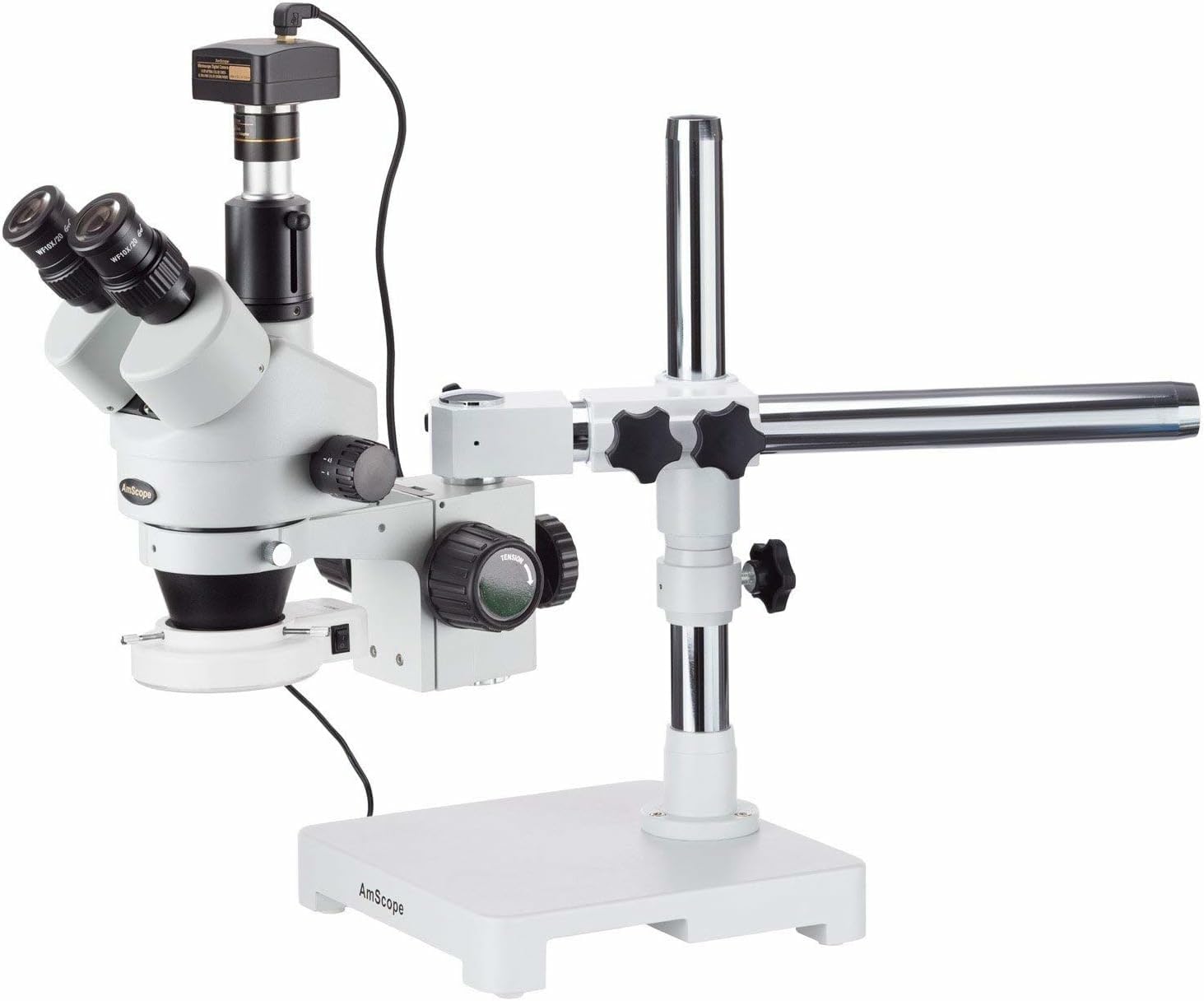
- AmScope SM-3TZ-54S-5M Stereo Zoom Microscope Head
- Single-Arm Boom Stand
- WH10x20mm Eyepieces (30mm), one pair
- 0.7x-4.5x Zoom Objective
- 0.5x Barlow Lens
- 2.0x Barlow Lens
- 54-Bulb LED Ring Light (LED-54S)
- Focus Rack
- 5MP Digital Camera (MU500)
- 0.5x Reduction Lens for Camera
- USB 2.0 Cable
- Software CD
- Eye Guards, one pair
- Instructions (this manual)
3. Setup Instructions
Follow these steps to assemble your microscope:
- Assemble the Boom Stand: Secure the vertical pillar to the solid cast-steel base. Attach the single-arm boom to the pillar, ensuring all knobs are tightened for stability.
- Mount the Microscope Head: Carefully place the trinocular microscope head onto the boom arm's mounting ring. Tighten the securing screw to hold the head firmly in place.
- Install Eyepieces: Insert the pair of WH10x20mm super-widefield high-eyepoint eyepieces into the two ocular tubes of the trinocular head.
- Attach Barlow Lenses (Optional): If desired, screw the 0.5x or 2.0x Barlow lens onto the bottom of the main objective housing. The 0.5x lens increases working distance and reduces magnification, while the 2.0x lens increases magnification and reduces working distance.
- Connect the Digital Camera: Insert the 5MP digital camera (MU500) with its 0.5x reduction lens into the vertical trinocular port. Connect the camera to your computer using the provided USB 2.0 cable.
- Install the LED Ring Light: Attach the 54-bulb LED ring light to the objective housing. Ensure it is securely fastened.
- Power Connection: Connect the power adapter for the LED ring light to a suitable power outlet (110V-240V).


4. Operating Instructions
To operate your AmScope microscope, follow these guidelines:
- Power On Illumination: Locate the power switch on the 54-bulb LED ring light and turn it on. Use the rheostat control on the light head to adjust the brightness to a comfortable level.
- Place Specimen: Position your specimen on the working stage beneath the objective lens. The boom stand allows for a long working distance, accommodating larger items.
- Adjust Magnification: Use the 0.7x-4.5x zoom objective to achieve continuous magnification. Rotate the zoom knob to change the magnification level. If Barlow lenses are installed, they will extend the overall magnification range.
- Focus the Image: Use the bilateral focus knobs located on the focus rack to bring the specimen into sharp focus. Adjust slowly for precise results.
- Adjust Interpupillary Distance: While looking through the eyepieces, adjust the distance between the two ocular tubes until you see a single, clear circular field of view.
- Dioptric Adjustment: If you wear glasses or have different vision strengths in each eye, use the diopter adjustment ring on one of the eyepieces to compensate, ensuring both eyes are in focus.
- Digital Camera Operation:
- Install the provided image capture and editing software from the CD onto your computer.
- Launch the software. The live feed from the 5MP camera should appear on your screen.
- Use the software to capture still images (JPG, TIF, GIF, PSD, WMF, BMP formats supported) or stream live video.
- The software also includes measurement functions and is compatible with Windows 10/XP/Vista/7/8/10 and Mac OS X.
- Head Movement: The microscope head can be rotated on the X- and Y-axes on the boom stand to position it over different areas of a large specimen.
5. Maintenance
Proper maintenance ensures the longevity and optimal performance of your microscope:
- Cleaning Optics: Use a soft, lint-free cloth and a specialized optical cleaning solution to clean lenses. Avoid touching optical surfaces with bare hands.
- General Cleaning: Wipe down the microscope body and stand with a soft, damp cloth. Avoid using harsh chemicals or abrasive cleaners.
- Dust Protection: When not in use, cover the microscope with a dust cover to prevent dust accumulation on optical and mechanical parts.
- Storage: Store the microscope in a dry, stable environment, away from direct sunlight, extreme temperatures, and vibrations.
- Electrical Components: Ensure all electrical connections are secure. Do not attempt to service electrical components yourself.
6. Troubleshooting
Refer to this section for common issues and their solutions:
- No Image Visible:
- Ensure the LED ring light is powered on and brightness is adjusted.
- Check that the specimen is correctly positioned under the objective.
- Adjust the focus knobs slowly.
- Verify eyepieces are correctly inserted.
- Image is Blurry or Out of Focus:
- Re-adjust the focus knobs.
- Check dioptric adjustment for individual eye focus.
- Ensure lenses are clean and free from smudges or dust.
- Digital Camera Not Connecting/Displaying Image:
- Verify the USB cable is securely connected to both the camera and the computer.
- Ensure the camera drivers and software are correctly installed.
- Check computer's device manager to confirm camera recognition.
- Restart the software and/or computer.
- Uneven Illumination:
- Check if the LED ring light is properly seated and centered around the objective.
- Ensure all LED bulbs are functioning.
7. Specifications
| Feature | Specification |
|---|---|
| Head Type | Trinocular |
| Magnification Range | 3.5x-90x |
| Zoom Objective Power | 0.7x-4.5x |
| Eyepieces | WH10x20mm high-eyepoint (DIN, 30mm) |
| Trinocular Port | C-Mount or 23mm |
| Optical Working Distance | Up to 8 inches |
| Microscope Stand | Single-arm boom stand |
| Head Movement | X- and Y-axes |
| Illumination Type | Episcopic (reflected) |
| Light Source | 54-bulb LED ring light |
| Power for Light | 110V-240V variable power supply |
| Digital Camera Resolution | 5MP (2592 x 1944 effective pixels) |
| Camera Sensor | 1/2.5" Aptina MT9P001 CMOS (color) |
| Camera Magnification | 40x |
| Camera Reduction Lens | 0.5x |
| Computer Connection | USB 2.0 |
| Compatible Operating Systems | Windows 10/XP/Vista/7/8/10, Mac OS X |
| Item Weight | 3.3 pounds |
| Color | Black |
8. Warranty and Support
The AmScope SM-3TZ-54S-5M microscope is covered by a 5-Year Manufacturer Warranty. For technical support, warranty claims, or service inquiries, please contact AmScope directly. Refer to the contact information provided with your purchase or visit the official AmScope website.


