
Introduction
This manual provides detailed instructions for the safe and efficient installation, operation, and maintenance of your Fantech PB270H2 Ventilation Fan. Please read this manual thoroughly before installation and retain it for future reference.
The Fantech PB270H2 is designed for ventilating bathrooms, featuring a 270 CFM maximum airflow and a 72-watt system with two halogen bulb grills.
Safety Information
WARNING: To reduce the risk of fire, electric shock, or injury to persons, observe the following:
- Always disconnect power at the circuit breaker before servicing or cleaning.
- Installation must be performed by a qualified electrician in accordance with all local and national electrical codes.
- Do not use this fan with any solid-state speed control device unless specifically approved for use with this model.
- This unit is designed for general ventilating use only. Do not use to exhaust hazardous or explosive materials and vapors.
- Ensure the fan is properly grounded.
Package Contents
Verify that all components are present before beginning installation.
- Fantech PB270H2 Ventilation Fan Unit
- Two Halogen Bulb Grills
- Instruction Manual (this document)
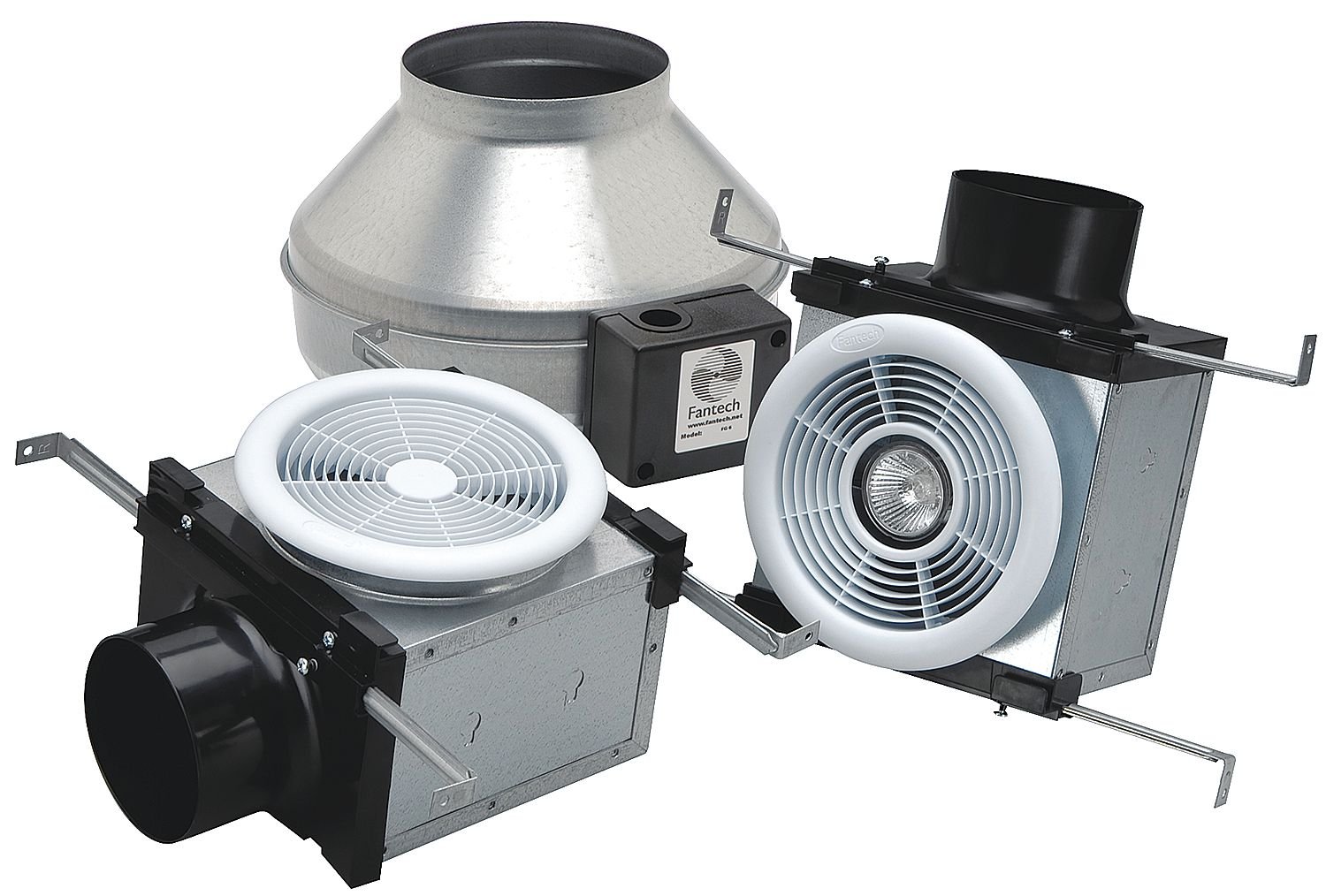
Figure 1: Main Fantech PB270H2 Ventilation Fan unit. This image shows the complete fan assembly with its housing.
Setup and Installation
The Fantech PB270H2 is designed for wall mount installation. Ensure adequate space and structural support are available.
- Preparation: Turn off power at the circuit breaker before starting any work. Clear the installation area.
- Mounting the Fan: Secure the fan unit to a sturdy structural element (e.g., a joist) using appropriate fasteners. The unit dimensions are approximately 21 x 18 x 15 inches. Ensure the unit is level.
- Duct Connection: Connect 4-inch and 6-inch vent ducts to the fan's exhaust ports. Use appropriate clamps and sealing tape to ensure all connections are airtight and prevent air leakage.
- Electrical Wiring: Connect the fan's electrical wiring to the building's power supply according to local electrical codes and the wiring diagram provided with the unit. This unit operates on 72 watts.
- Grill Installation: Attach the two halogen bulb grills to the ceiling or wall openings. Ensure the bulbs are securely seated and the grills are flush with the surface.

Figure 2: Example diagram of a Fantech ventilation system. This image illustrates how a ventilation fan integrates into a ducting system.
Operating Instructions
The Fantech PB270H2 fan and lights can be operated independently using separate wall switches (not included).
- Fan Operation: Activate the fan by flipping the designated wall switch. The fan will begin to exhaust air from the room.
- Light Operation: Activate the halogen lights by flipping their designated wall switch.
- Dimmable Feature: The halogen lights are dimmable. Use a compatible dimmer switch (sold separately) for adjustable light intensity. Ensure the dimmer switch is rated for halogen loads.
Maintenance
Regular maintenance ensures optimal performance and longevity of your ventilation fan. Always disconnect power before performing any maintenance.
- Cleaning Grills: Periodically remove the halogen bulb grills and clean them with a mild detergent and a soft cloth. Ensure they are completely dry before reinstallation.
- Cleaning Fan Blades: With power disconnected, carefully access the fan blades and wipe them clean of dust and debris. Avoid bending the blades.
- Bulb Replacement: To replace a halogen bulb, ensure power is off, allow the bulb to cool completely, then carefully remove the old bulb and insert a new one of the same wattage and type.
- Duct Inspection: Annually inspect the ductwork for any blockages or leaks. Clear any obstructions to maintain airflow efficiency.
Troubleshooting
| Problem | Possible Cause | Solution |
|---|---|---|
| Fan does not operate | No power; faulty switch; motor issue | Check circuit breaker; test switch for continuity; if motor issue suspected, contact qualified technician. |
| Lights do not turn on | Burned out bulb; faulty switch; wiring issue | Replace bulb; test switch; inspect wiring connections. |
| Excessive noise | Loose mounting; debris in fan; motor wear | Secure mounting fasteners; clean fan blades and housing; if motor wear, contact qualified technician. |
| Poor ventilation | Clogged ducts; improper ducting; fan issue | Inspect and clean ducts; verify ducting configuration and size; if fan issue, contact qualified technician. |
Specifications
- Model: PB270H2
- Brand: FANTECH
- Airflow: 270 CFM Max
- Wattage: 72 watts
- Duct Size: 4 inch & 6 inch
- Lighting: 2 Halogen bulb grills (dimmable)
- Item Weight: 17 Pounds
- Product Dimensions: 21 x 18 x 15 inches
- UPC: 650737405748
Warranty and Support
For warranty information and technical support, please contact Fantech customer service. Specific warranty terms and conditions may vary. Please refer to the warranty card included with your product or contact the manufacturer directly for details.
Manufacturer: APR Supply Co.
Online Resources: Visit the official Fantech website for additional product information and support.


