1. Introduction
The Tanita BD-815U Digital Infant Scale is designed for precise monitoring of newborn and infant weight. This scale offers high accuracy, a memory function for pre/post-feeding comparisons, and a comfortable, removable tray. It is suitable for use in various settings, including neonatal intensive care units (NICU), nurseries, and pediatric offices, as well as for home use by caregivers and lactation consultants.
2. Safety Information
Please read all instructions carefully before using the scale. Retain this manual for future reference.
- Do not immerse the scale in water or other liquids.
- Clean the scale with a soft, damp cloth. Avoid abrasive cleaners.
- Ensure the scale is placed on a stable, flat surface during use to ensure accurate readings.
- Keep the scale away from strong electromagnetic fields.
- Do not attempt to disassemble or repair the scale yourself. Contact qualified service personnel.
- Always supervise infants when they are on the scale.
3. Package Contents
Verify that all items are present in the package:
- Tanita BD-815U Digital Infant Scale Base
- Removable Weighing Tray
- AC Adapter
- 4 AA Batteries
- User Manual (this document)
4. Setup
4.1 Unpacking
Carefully remove all components from the packaging. Inspect for any damage. If any components are missing or damaged, contact your retailer or Tanita customer support.
4.2 Installing the Weighing Tray
- Align the weighing tray with the designated slots on the scale base.
- Gently press down until the tray securely clicks into place. Ensure it is stable and does not wobble.
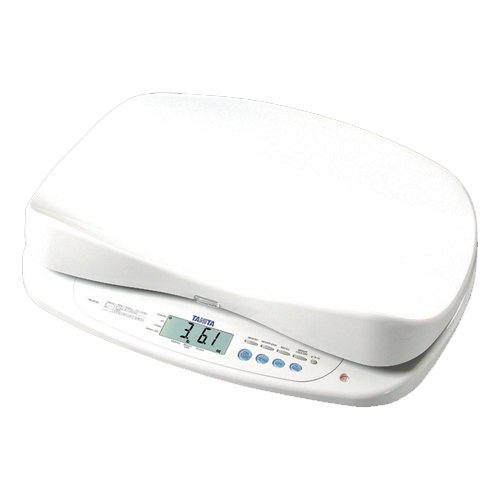
Image: The Tanita BD-815U Digital Infant Scale with its removable weighing tray securely attached.
4.3 Powering the Scale
The BD-815U can be powered by either batteries or the included AC adapter.
4.3.1 Battery Installation
- Locate the battery compartment on the underside of the scale.
- Open the battery compartment cover.
- Insert the 4 AA batteries, ensuring correct polarity (+/-) as indicated inside the compartment.
- Close the battery compartment cover securely.
4.3.2 AC Adapter Connection
- Insert the small end of the AC adapter into the power jack on the side or back of the scale.
- Plug the larger end of the AC adapter into a standard electrical outlet.
Note: When the AC adapter is connected, it will override battery power. Remove batteries if the scale will be stored for an extended period to prevent leakage.
5. Operation
5.1 Turning On/Off
- To turn on: Press the [ON/OFF] button. The display will illuminate.
- To turn off: Press and hold the [ON/OFF] button until the display turns off. The scale also features an auto-off function to conserve power.
5.2 Weighing an Infant
- Place the scale on a firm, flat, and stable surface.
- Press the [ON/OFF] button to turn on the scale. Wait for the display to show "0.00" or "0g".
- If using a blanket or cloth, place it on the tray before turning on the scale or press the [TARE] button after placing it to zero out its weight.
- Carefully place the infant onto the center of the weighing tray.
- Wait for the weight reading to stabilize on the large 1.3-inch blue backlit LCD display.
- Record the weight.
- Carefully remove the infant from the tray.

Image: An infant being weighed on the Tanita BD-815U scale, demonstrating proper use.
5.3 Using the Memory Function (Pre/Post Feed)
The memory function allows for easy comparison of an infant's weight before and after feeding to determine milk intake.
- Weigh the infant before feeding and record the weight (Pre-feed weight).
- Press the [MEMORY] button to store this weight. The display may show a memory indicator.
- Feed the infant.
- Place the infant back on the scale. The scale will automatically calculate and display the weight gain (Post-feed weight - Pre-feed weight).
- To clear the memory, press the [CLEAR] button or turn the scale off and on again.
5.4 Changing Measurement Units
The scale can display weight in pounds (lb), kilograms (kg), or grams (g).
- With the scale on and showing "0.00", press the [UNIT] button to cycle through the available units (lb, kg, g).
- Select the desired unit before weighing.
5.5 Tare Function
The Tare function allows you to zero out the weight of an item placed on the scale, such as a blanket or diaper, so only the infant's weight is measured.
- Turn on the scale.
- Place the blanket or other item on the weighing tray.
- Press the [TARE] button. The display will reset to "0.00" or "0g".
- You can now place the infant on the blanket, and only the infant's weight will be displayed.
6. Maintenance
6.1 Cleaning
- The removable tray can be easily detached for cleaning.
- Wipe the scale and tray with a soft, damp cloth and a mild, non-abrasive detergent.
- Do not use harsh chemicals, abrasive cleaners, or immerse any part of the scale in water.
- Ensure the scale is completely dry before reassembling or storing.
6.2 Storage
- Store the scale in a cool, dry place, away from direct sunlight and extreme temperatures.
- If storing for an extended period, remove the batteries to prevent leakage and potential damage to the scale.
7. Troubleshooting
If you encounter issues with your Tanita BD-815U scale, refer to the table below for common problems and solutions.
| Problem | Possible Cause | Solution |
|---|---|---|
| Scale does not turn on. | Dead batteries or AC adapter not connected/faulty. | Replace batteries or ensure AC adapter is securely connected to both scale and outlet. |
| Inaccurate readings. | Scale on an unstable surface, tray not properly installed, or external interference. | Place scale on a firm, flat surface. Reinstall tray. Ensure no objects are touching the scale during weighing. |
| Display shows "Err" or other error message. | Overload, internal error, or unstable condition. | Remove infant/object from scale. Turn off and on again. If error persists, contact support. |
| Weight fluctuates excessively. | Infant movement, unstable surface, or air currents. | Ensure infant is calm. Place scale in a draft-free area. Verify stable surface. |
8. Specifications
Key technical details for the Tanita BD-815U Digital Infant Scale:
| Feature | Detail |
|---|---|
| Model Number | BD-815U |
| Weight Capacity | Up to 33 lbs (15 kg) |
| Accuracy | 0.1 oz (2 g) up to 12 lbs (6 kg) 0.2 oz (4 g) up to 33 lbs (15 kg) |
| Display | 1.3-inch Blue Backlit LCD |
| Power Source | 4 AA Batteries (included) or AC Adapter (included) |
| Connectivity | RS232 Output |
| Product Dimensions | 23.6 x 16.1 x 6.2 inches |
| Product Weight | 15.65 Pounds |
9. Warranty Information
Tanita products are manufactured with high-quality standards. Specific warranty terms and conditions are typically provided with your purchase documentation. Please refer to the warranty card or contact Tanita customer service for detailed information regarding your product's warranty period and coverage.
10. Customer Support
For further assistance, technical support, or service inquiries regarding your Tanita BD-815U Digital Infant Scale, please contact Tanita customer service through their official website or the contact information provided with your product packaging.
You can visit the official Tanita website for more information: Tanita Official Store


