
1. Introduction
The DEWALT D25301D Dust Extractor Telescope with Hose is an accessory designed to enhance safety and cleanliness when operating DEWALT SDS rotary hammers. This system effectively captures dust and debris at the source during drilling applications, contributing to a cleaner work environment and improved air quality. This manual provides essential information for the proper setup, operation, and maintenance of your dust extractor.

Figure 1: Overview of the DEWALT D25301D Dust Extractor Telescope with Hose.
2. Safety Information
Always adhere to the safety guidelines provided with your DEWALT SDS rotary hammer and any connected vacuum system. Wear appropriate personal protective equipment (PPE), including eye protection, hearing protection, and a dust mask, especially when drilling into masonry or concrete. Ensure all connections are secure before operation.
3. Components Included
The DEWALT D25301D Dust Extractor package includes the following components:
- Dust Extractor Telescope
- Side-Handle
- Hose
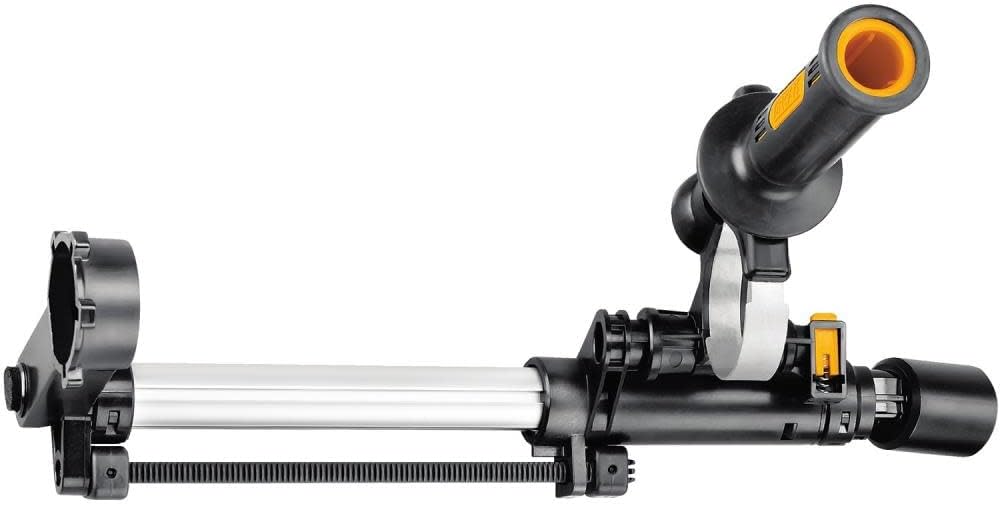
Figure 2: Close-up of the Dust Extractor Telescope and Side-Handle.
4. Setup Instructions
Follow these steps to properly attach the dust extractor to your SDS rotary hammer and connect it to a vacuum system.
4.1 Attaching the Dust Extractor to the Rotary Hammer
- Ensure your DEWALT SDS rotary hammer is unplugged or its battery is removed.
- Slide the dust extractor telescope assembly onto the front of the rotary hammer, aligning it with the tool's design.
- Secure the side-handle into the designated slot on the dust extractor, ensuring it is tightened for stability.
- Adjust the telescope length to accommodate the drill bit you intend to use. The dust shroud should extend to cover the drilling area.

Figure 3: Dust Extractor attached to a corded SDS rotary hammer.

Figure 4: Dust Extractor attached to a cordless SDS rotary hammer.
4.2 Connecting the Hose to a Vacuum
- Connect the provided hose to the dust port on the dust extractor telescope.
- Connect the other end of the hose to a compatible vacuum system. Ensure a tight seal for optimal dust collection.

Figure 5: Close-up of the dust collection shroud and hose connection.
5. Operating Instructions
Once the dust extractor is securely attached and connected to a vacuum, you can begin drilling operations. The dust extractor is designed to activate simultaneously with the rotary hammer, capturing dust as it is generated.
- Ensure the vacuum system is turned on and functioning correctly.
- Position the dust extractor shroud flush against the drilling surface.
- Initiate drilling with your SDS rotary hammer. The dust extractor will collect debris as you drill.
- Maintain consistent pressure and allow the tool to do the work.

Figure 6: Dust Extractor in use with an SDS rotary hammer and shop vacuum.

Figure 7: Side view of the Dust Extractor on a cordless rotary hammer during operation.
6. Maintenance
Regular maintenance ensures the longevity and effective performance of your dust extractor.
- Cleaning: After each use, clean the dust extractor telescope and hose to remove accumulated dust and debris. Use a damp cloth; avoid harsh chemicals.
- Hose Inspection: Periodically inspect the hose for kinks, tears, or blockages. Replace the hose if damage is observed to maintain optimal suction.
- Brush Inspection: Check the bristles on the dust shroud for wear. While replacement parts may not be readily available for this specific component, excessive wear can reduce dust collection efficiency.
- Storage: Store the dust extractor in a clean, dry place away from direct sunlight and extreme temperatures.
7. Troubleshooting
If you encounter issues with your DEWALT D25301D Dust Extractor, consider the following:
- Poor Dust Collection:
- Ensure the vacuum is turned on and has sufficient suction.
- Check the vacuum bag/canister for fullness and the filter for blockages.
- Verify that the hose connections are secure and free of leaks.
- Inspect the dust shroud bristles for excessive wear or damage.
- Difficulty Attaching to Rotary Hammer:
- Ensure you are using a compatible DEWALT corded or cordless SDS rotary hammer. The D25301D is designed specifically for these tools.
- Confirm that the attachment points on both the extractor and the hammer are clean and free of debris.
- Hose Incompatibility with Vacuum:
- The dust extractor hose has a specific diameter. If your vacuum hose connection is a different size, an adapter may be required. DEWALT offers various adapters for their vacuum systems.
8. Specifications
| Feature | Specification |
|---|---|
| Model Number | D25301D |
| Manufacturer | DEWALT |
| Item Weight | 3 pounds |
| Product Dimensions | 18.27 x 7.09 x 3.5 inches |
| Compatible Devices | DEWALT corded and cordless SDS rotary hammers |
| Included Components | Dust Extractor Telescope, Side-Handle, and Hose |
| Power Source | Hand-powered (accessory) |
| Material | Blend |
| Color | Black |
9. Warranty Information
For detailed warranty information regarding the DEWALT D25301D Dust Extractor Telescope with Hose, please refer to the official DEWALT website or contact DEWALT customer service. Warranty terms and conditions may vary.
10. Customer Support
If you require further assistance, have questions about your product, or need to purchase replacement parts, please visit the official DEWALT website or contact their customer support department. Contact information can typically be found on the DEWALT website or in the documentation accompanying your primary DEWALT tool.


