
Introduction
Thank you for choosing the Health o meter Body Fat Scale BFM081DQ-63. This scale is designed to provide accurate measurements of your weight and body fat percentage, helping you monitor your health and fitness progress. Please read this manual thoroughly before using the scale to ensure proper operation and to maximize its lifespan.
For optimal performance, use the scale on a hard, flat surface. Avoid using it on carpets or uneven flooring, as this may affect accuracy.
Safety Information
- Do not use this scale if you have a pacemaker or other internal medical device.
- Do not use this scale on wet or slippery surfaces.
- Keep the scale away from water and extreme temperatures.
- This scale is intended for household use only and not for medical diagnosis or treatment.
- Consult your physician or healthcare provider before beginning any weight loss or exercise program.
Package Contents
Please check the package to ensure all items are present:
- Health o meter Body Fat Scale BFM081DQ-63
- Instruction Manual (this document)
- Batteries (if included, typically 4 x AAA)
Setup
1. Battery Installation
Locate the battery compartment on the underside of the scale. Open the cover and insert the batteries, ensuring the correct polarity (+/-) as indicated inside the compartment. Close the battery cover securely.
2. Initial User Programming
The scale allows for multiple user profiles to store personal data for body fat analysis. Follow these steps to set up a user profile:
- Press the "SELECT" button to choose a user number (e.g., U1, U2, U3, U4).
- Press the "SET" button to confirm the user number.
- Use the arrow buttons (Up/Down) to set your age, then press "SET".
- Use the arrow buttons to set your height, then press "SET".
- Use the arrow buttons to select your gender (Male/Female), then press "SET".
- The scale will display "0.0" and is ready for use.
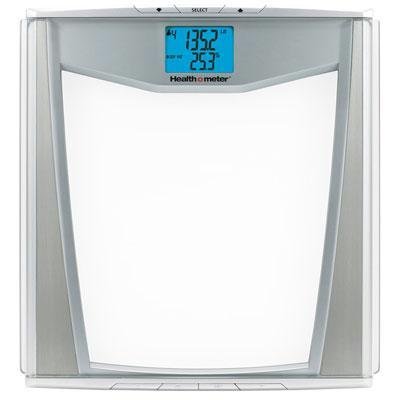
Image: Front view of the Health o meter BFM081DQ-63 Body Fat Scale. The scale features a clear platform with silver accents on the sides and a blue backlit digital display at the top center showing weight and body fat percentage. Control buttons are visible above the display.
Operating Instructions
1. Taking a Weight Measurement
To simply measure your weight:
- Gently tap the scale with your foot or step directly onto the platform.
- Wait for the display to show "0.0".
- Step onto the scale with bare feet, standing still and centered.
- Your weight will be displayed and then flash, indicating the measurement is complete.
2. Using Body Fat Analysis
To measure weight and body fat percentage:
- Ensure your user profile is selected (press "SELECT" if needed).
- Step onto the scale with bare feet, ensuring your feet are positioned on the metal electrodes.
- Stand still until your weight is displayed.
- The scale will then begin the body fat analysis, indicated by a moving segment on the display.
- Once complete, your weight will be displayed, followed by your body fat percentage.
3. Understanding Display Readings
- Weight: Displayed in pounds (lbs) or kilograms (kg).
- Body Fat (%): Percentage of your total body mass that is fat.
- User Number: Indicates which user profile is active (U1, U2, etc.).
Maintenance
Cleaning
Clean the scale with a damp cloth and mild detergent. Do not use abrasive cleaners or immerse the scale in water. Dry thoroughly after cleaning.
Storage
Store the scale in a cool, dry place. Avoid placing heavy objects on the scale when not in use.
Battery Replacement
If the display shows "Lo" or becomes dim, it's time to replace the batteries. Refer to the "Battery Installation" section under Setup for instructions.
Troubleshooting
| Problem | Possible Cause | Solution |
|---|---|---|
| Scale does not turn on. | Batteries are dead or incorrectly installed. | Check battery polarity or replace batteries. |
| Inaccurate readings. | Scale is on an uneven surface; not calibrated; user data incorrect. | Place scale on a hard, flat surface. Step off and on again to re-calibrate. Verify user profile settings. |
| "Lo" displayed. | Low battery power. | Replace batteries. |
| "Err" displayed during body fat analysis. | Feet not making proper contact with electrodes; user data not programmed. | Ensure bare feet are centered on electrodes. Program user data before attempting body fat analysis. |
Specifications
| Feature | Detail |
|---|---|
| Model Number | BFM081DQ-63 |
| Special Feature | Body Fat Measurement |
| Item Weight | 2.95 kg (6.5 Pounds) |
| Product Dimensions (LxWxH) | 5.99 x 36.5 x 38.99 cm |
| Manufacturer | Health o meter |
| UPC | 080006111580, 884438982677, 803982788405, 885184319137 |