
Thermaltake CLP0575
THERMALTAKE Frio OCK CPU Cooler User Manual
Model: CLP0575
1. Introduction
Thank you for choosing the Thermaltake Frio OCK CPU Cooler. This high-performance air cooler is designed to provide superior thermal dissipation for your CPU, supporting all current Intel and AMD platforms with a thermal design power (TDP) of up to 240W. This manual provides detailed instructions for installation, operation, maintenance, and troubleshooting to ensure optimal performance and longevity of your cooler.

Figure 1: Thermaltake Frio OCK CPU Cooler, showing its large heatsink and dual fan configuration.
2. Safety Information
Please read the following safety precautions carefully before installing or operating the cooler to prevent injury or damage to your system components.
- Ensure your computer system is powered off and unplugged from the wall outlet before installation.
- Handle the cooler and its components with care to avoid bending fins or damaging heat pipes.
- Keep out of reach of children.
- Do not attempt to modify the cooler or its components. Unauthorized modifications may void your warranty and pose safety risks.
- Wear anti-static wrist straps or frequently touch a grounded metal object to discharge static electricity before handling internal components.
- Ensure proper ventilation within your PC case to maximize cooling efficiency.
3. Setup and Installation
3.1 Package Contents
Verify that all components are present in the package:
- Thermaltake Frio OCK CPU Cooler (Heatsink with pre-installed fans)
- Universal Backplate
- Mounting Brackets (Intel/AMD)
- Mounting Screws and Spacers
- Thermal Grease
- User Manual (this document)
3.2 Installation Steps
Follow these steps to install the Thermaltake Frio OCK CPU Cooler:
- Prepare the Motherboard: Remove your existing CPU cooler. Clean any old thermal paste from the CPU surface using isopropyl alcohol and a lint-free cloth.
- Install the Backplate: Depending on your CPU socket (Intel or AMD), align the universal backplate with the holes on the back of your motherboard. Secure it with the appropriate standoffs from the front side of the motherboard.
- Apply Thermal Grease: Apply a small, pea-sized amount of the provided thermal grease to the center of your CPU's integrated heat spreader (IHS). Do not spread it manually; the pressure from the cooler will distribute it evenly.
- Attach Mounting Brackets: Secure the correct mounting brackets (Intel or AMD) to the base of the Frio OCK cooler using the provided screws.
- Mount the Cooler: Carefully place the Frio OCK cooler onto the CPU, aligning the mounting holes on the brackets with the standoffs on the motherboard. Apply even pressure and secure the cooler using the spring-loaded screws. Tighten screws in a diagonal pattern until snug.
- Connect Fan Cables: Connect the 4-pin PWM fan cables from the cooler's fans to the CPU_FAN headers on your motherboard. Ensure correct polarity.
- Check Clearance: Verify that the cooler does not interfere with RAM modules, PCIe cards, or your PC case side panel. The Frio OCK is a large cooler, so ensure adequate space.

Figure 2: Top view of the cooler, illustrating fan placement and overall dimensions for clearance checks.
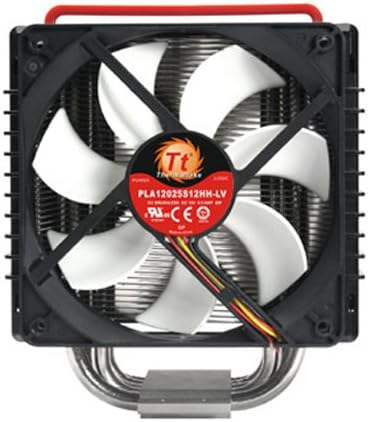
Figure 3: Bottom view of the cooler, highlighting the fan's specifications and mounting points.
4. Operating Instructions
4.1 Fan Speed Control
The Thermaltake Frio OCK CPU Cooler features two 120mm fans with PWM (Pulse Width Modulation) control. This allows your motherboard to automatically adjust fan speeds based on CPU temperature, optimizing for both cooling performance and noise levels. Fan speeds range from 1,200 RPM to 2,100 RPM.
- BIOS/UEFI Settings: You can typically configure fan curves in your motherboard's BIOS/UEFI settings to customize fan behavior.
- Software Control: Some motherboard manufacturers provide software utilities for fan control within the operating system.
4.2 Thermal Performance
The Frio OCK is designed to handle high thermal loads up to 240W. Optimal performance is achieved with proper airflow within your PC case. Ensure intake and exhaust fans are correctly configured to facilitate efficient heat removal from the system.
5. Maintenance
5.1 Cleaning
Regular cleaning helps maintain optimal cooling performance. It is recommended to clean the cooler every 3-6 months, or more frequently in dusty environments.
- Dust Removal: Use compressed air to blow dust out of the heatsink fins. Hold the fan blades gently to prevent them from spinning excessively during cleaning, which can damage the bearings.
- Fan Cleaning: The plastic shroud holding the fans can be easily removed for thorough cleaning of the fan blades and heatsink.
5.2 Thermal Paste Application
The thermal paste applied during initial installation typically lasts for several years. If you remove the cooler for any reason, it is crucial to clean off the old thermal paste from both the CPU and the cooler's base and apply a fresh layer before re-installation.
6. Troubleshooting
This section addresses common issues you might encounter with your CPU cooler.
| Problem | Possible Cause | Solution |
|---|---|---|
| High CPU Temperatures |
|
|
| Excessive Fan Noise |
|
|
| Cooler Not Fitting in Case |
|
|
7. Technical Specifications
| Feature | Specification |
|---|---|
| Model Number | CLP0575 |
| Dimensions (L x W x H) | 143 x 136.8 x 158.4 mm (5.63 x 5.39 x 6.24 inches) |
| Weight | 1.1 kg (2.43 lbs) |
| Heat Sink Material | Aluminum Fins, Copper Heat Pipes |
| Heat Pipes | 6 x Ø6mm U-shaped copper heat pipes |
| Fan Dimensions | 2 x 120 x 120 x 25 mm |
| Fan Speed | 1,200 - 2,100 RPM (PWM controlled) |
| Noise Level | 21 - 48 dBA |
| Rated Voltage | 12V |
| Power Consumption | 240W (Max TDP) |
| Connector | 4-pin PWM |
| Compatibility | Intel LGA 2066/2011-3/2011/1366/1156/1155/1151/1150/775, AMD AM4/AM3+/AM3/AM2+/AM2/FM2+/FM2/FM1 |

Figure 4: Side view of the cooler, emphasizing the heatsink fin array and heat pipe design.
8. Warranty and Support
Thermaltake products are manufactured to the highest quality standards. This product is covered by a limited warranty from the date of purchase. Please refer to the official Thermaltake website or your regional distributor for specific warranty terms and conditions.
For technical support, troubleshooting assistance, or to inquire about replacement parts, please visit the official Thermaltake support website or contact their customer service department. Keep your proof of purchase for warranty claims.
Thermaltake Official Website: www.thermaltake.com
Related documentsCLP0575


Ask a question about this manual
Ask about setup, troubleshooting, compatibility, parts, safety, or missing instructions. Manuals+ will review the question and use this page’s manual context to help answer it.