
Introduction
The Haworth Zody chair is an ergonomic office chair designed for comfort, sustainability, and versatility. It is recognized for its science-based wellness features, including unique asymmetrical lumbar adjustments, and its commitment to sustainable design principles. This manual provides essential information for the proper setup, operation, and maintenance of your Zody chair to ensure optimal performance and longevity.
The Zody chair is engineered to accommodate a wide range of users and office environments, blending advanced ergonomics with a sleek aesthetic. It features a three-point tilt mechanism, multiple position back-stop, and forward tilt capabilities, all designed for intuitive user control.

Image: Haworth Zody Chair in an industrial-style office setting with a blue seat and white frame.
Safety Information
- Weight Limit: Do not use this chair if your weight exceeds 325 pounds (approximately 147 kg). Exceeding this limit may compromise the chair's stability and structural integrity, leading to potential injury.
- Proper Use of Adjustments: Always use the adjustable features of the chair as intended. Improper use or forcing adjustments beyond their designed range can cause damage to the chair and may result in personal injury.
- Stable Placement: Ensure the chair is placed on a stable, level surface to prevent tipping.
- Moving the Chair: When moving the chair, avoid sudden movements or dragging it across uneven surfaces to prevent damage to the casters or frame.
Setup
The Haworth Zody chair is designed for immediate use with no assembly required. Upon unboxing, simply remove all packaging materials and place the chair in your desired location.
Initial Placement
- Unpack the chair carefully, ensuring all protective coverings are removed.
- Place the chair on a flat, stable floor surface.
- Verify that all five casters are making full contact with the floor and roll smoothly.
Operating Instructions: Adjusting Your Zody Chair
The Haworth Zody chair offers a range of adjustments to customize your seating experience for optimal ergonomic support. Familiarize yourself with these controls to achieve your preferred posture and comfort.
1. Seat Height Adjustment
Locate the lever on the right side, beneath the seat. Lift the lever to raise the seat. While seated, lift the lever and apply pressure to lower the seat. Adjust until your feet are flat on the floor and your knees are at approximately a 90-degree angle.
2. Asymmetrical Lumbar Support
The Zody chair features unique asymmetrical lumbar adjustments. On the back of the chair, you will find two paddles or dials, one on each side of the lower backrest. Rotate or slide these controls independently to increase or decrease the lumbar support on the left and right sides of your lower back. This allows for personalized support tailored to your spine's natural curve.
3. Tilt Mechanism and Tension
- Tilt Lock: A lever, typically on the left side, allows you to lock the chair's backrest in various positions or enable free recline. Engage the lever to lock, disengage to unlock.
- Tilt Tension: A knob, usually located under the front of the seat, controls the resistance of the recline. Turn clockwise to increase tension (requiring more effort to recline) and counter-clockwise to decrease tension (allowing easier recline).
- Multiple Position Back-Stop: This feature allows you to set the recline limit at several points. Use the tilt lock lever to select your desired recline angle and lock it in place.
4. Forward Tilt
Some Zody models include a forward tilt feature, which allows the seat to tilt slightly forward, promoting an active, engaged posture. Consult your specific model's controls for activation, typically a separate lever or button near the main tilt controls.
5. Armrest Adjustments
The armrests are height-adjustable. Locate the button or lever on the underside of each armrest. Press and hold to move the armrest up or down to your desired height. Release to lock. Position armrests so your arms are comfortably supported and your shoulders are relaxed.

Image: Haworth Zody Chair in a modern home office setting with a light frame and blue seat.
Maintenance
Proper care and maintenance will extend the life and appearance of your Haworth Zody chair.
- General Cleaning: For routine cleaning, simply wipe the chair surfaces with a clean, damp cloth. Avoid abrasive cleaners or harsh chemicals that could damage the finish or fabric.
- Fabric Care: For fabric components, spot clean with a mild detergent and water solution. Test on an inconspicuous area first. Blot dry; do not rub.
- Frame and Base: Clean the frame and base with a soft cloth and a mild, non-abrasive cleaner. Ensure all parts are thoroughly dried after cleaning.
- Casters: Periodically check casters for accumulated hair or debris and clean as needed to ensure smooth rolling.
- Inspections: Regularly inspect all moving parts and fasteners to ensure they are secure. Do not attempt to lubricate any internal mechanisms unless specifically instructed by Haworth.
Troubleshooting
If you encounter any issues with your Haworth Zody chair, refer to the following common troubleshooting tips:
- Chair Squeaks or Creaks:
Ensure all visible bolts and screws are tightened. Avoid applying lubricants to internal mechanisms unless directed by Haworth support.
- Difficulty Adjusting Seat Height:
Check if the height adjustment lever is fully engaged. If the gas cylinder seems unresponsive, contact customer support.
- Chair Does Not Recline or Lock:
Verify that the tilt lock lever is correctly positioned. Adjust the tilt tension knob to ensure it's not set too high, preventing recline.
- Casters Not Rolling Smoothly:
Inspect casters for tangled hair, lint, or debris. Clean them thoroughly. Ensure the chair is on an appropriate surface for its caster type.
If these steps do not resolve the issue, please contact Haworth customer support for further assistance.
Specifications
| Feature | Detail |
|---|---|
| Brand | Haworth |
| Model Name | Zody |
| Product Dimensions | 29"D x 29"W x 40"H |
| Maximum Weight Recommendation | 325 Pounds (147 kg) |
| Item Weight | 55 pounds (25 kg) |
| Material | Polyvinyl Chloride (PVC), Foam fill |
| Special Feature | Ergonomic, Asymmetrical Lumbar Support, Tilting (3 or more reclining positions) |
| Assembly Required | No assembly required |
| Product Care Instructions | Wipe Clean |
| Recommended Uses | Office |
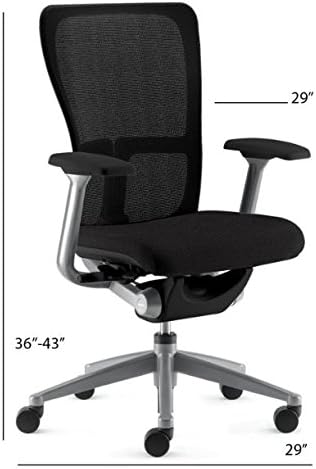
Image: Diagram showing the dimensions of the Haworth Zody Chair.
Warranty and Support
For detailed warranty information regarding your Haworth Zody chair, please refer to the official Haworth website or the warranty card included with your purchase. Haworth stands behind the quality and craftsmanship of its products.
If you require technical assistance, have questions about your chair's features, or need to report a defect, please contact Haworth customer support. You can typically find contact information on the Haworth official website or through the retailer where you purchased the chair.
Online Resources: Visit the official Haworth website for product registration, FAQs, and additional support materials. www.haworth.com


