Product Overview
The BG Electrical 850-01 is a 13 Amp switched fused connection unit, featuring a sleek white moulded design. It is part of the Nexus Moulded range, engineered for reliability and modern aesthetics. This unit is ideal for isolating power to hardwired appliances such as cookers, extractor fans, and other fixed electrical equipment, ensuring safety and convenience.
Key features include:
- Sleek and slim design with softly rounded corners.
- Conveniently angled in-line colour-coded captive screw terminals for easy installation.
- Clean and modern appearance with screw covers for a seamless finish.
- Integrated fuse spur switch to prevent electrical overload.

Front view of the BG Electrical Switched Fused Connection Unit, showcasing its clean white moulded finish and integrated switch and fuse holder.
Setup and Installation
WARNING: Installation must be carried out by a qualified electrician and in accordance with current wiring regulations. Always isolate the mains power supply before commencing any electrical work.
Before You Begin
Ensure you have the following tools and materials:
- Screwdriver set (flat-head and Phillips)
- Wire strippers
- Voltage tester
- Appropriate electrical cable (e.g., 2.5mm² twin and earth)
- 35mm deep back box (if not already installed)
Wiring Instructions
- Ensure the mains power supply is OFF at the consumer unit/fuse box. Verify with a voltage tester.
- Carefully remove the existing accessory (if applicable) and prepare the cables.
- Strip approximately 12-15mm of insulation from the ends of the Live (Brown), Neutral (Blue), and Earth (Green/Yellow) conductors.
- Connect the incoming mains supply cables to the corresponding terminals on the unit:
- Live (Brown) to the 'IN L' terminal.
- Neutral (Blue) to the 'IN N' terminal.
- Earth (Green/Yellow) to the 'E' (Earth) terminal.
- Connect the appliance cables to the corresponding terminals:
- Appliance Live (Brown) to the 'LOAD L' terminal.
- Appliance Neutral (Blue) to the 'LOAD N' terminal.
- Appliance Earth (Green/Yellow) to the 'E' (Earth) terminal.
- Ensure all terminal screws are tightened securely, checking for any loose strands.

Close-up view of the rear of the unit, showing the clearly colour-coded terminals with retained screws, illustrating how wires are slotted into place for hardwired appliances.
Mounting the Unit
- Gently push the wired unit back into the 35mm deep back box, ensuring no wires are pinched.
- Secure the unit to the back box using the provided mounting screws.
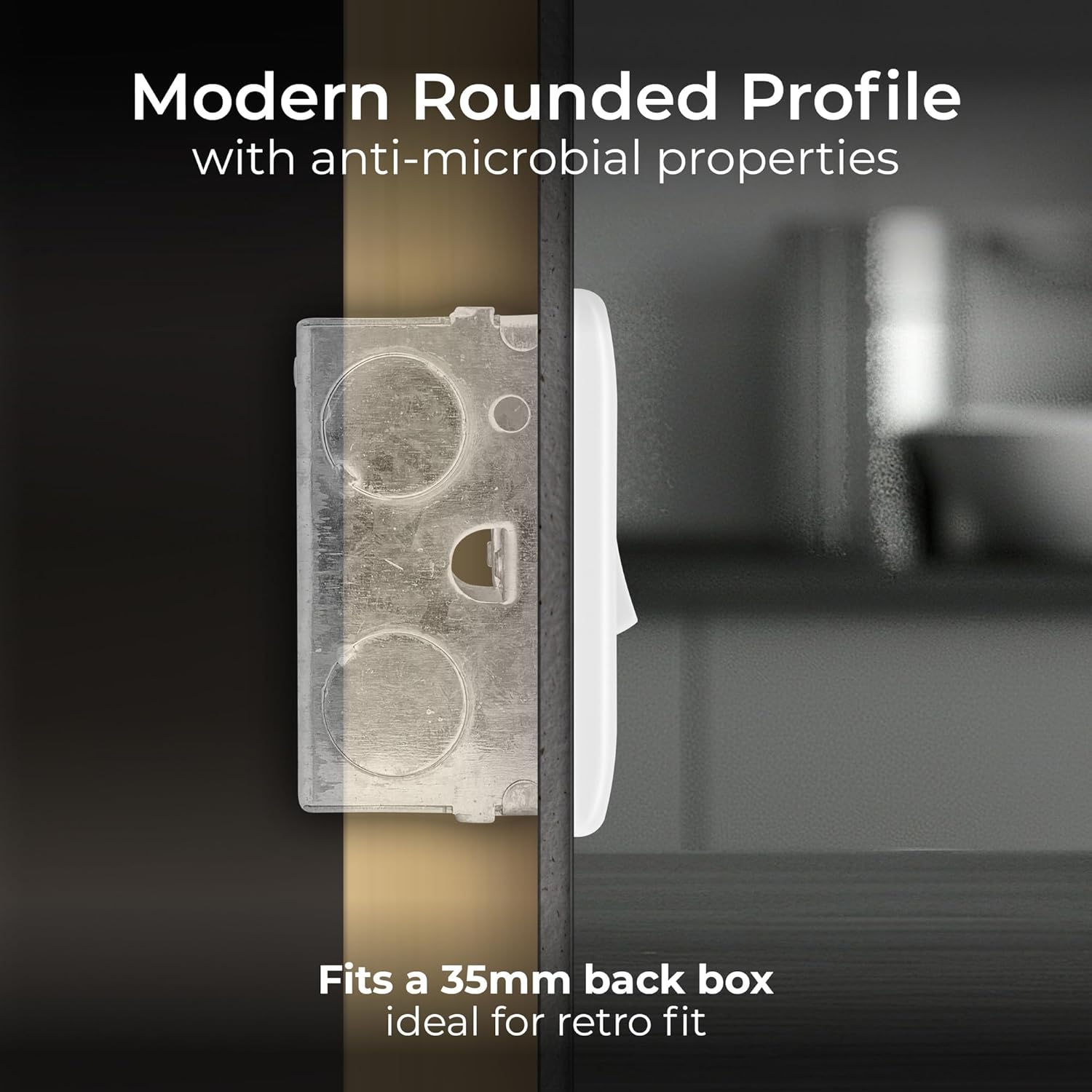
Side view of the unit demonstrating its modern rounded profile and how it fits into a standard 35mm back box, ideal for retrofitting.
Final Assembly
- Attach the front plate to the unit.
- Place the screw covers over the mounting screws for a clean and modern finish.
- Restore power at the consumer unit/fuse box.

Image showing the sleek white moulded front plate of the unit, highlighting its hardwearing and scratch-resistant surface, along with the screw caps for a clean finish.
Operation
The BG Electrical Switched Fused Connection Unit features a simple on/off switch and an accessible fuse holder.
- Switching On/Off: To supply power to the connected appliance, press the rocker switch to the 'ON' position. To cut power, press the switch to the 'OFF' position.
- Fuse Function: The integrated fuse protects the connected appliance and circuit from overcurrent. If an overload or short circuit occurs, the fuse will blow, interrupting the power supply to prevent damage.

The unit installed in a kitchen setting, emphasizing the fuse spur switch designed to prevent electrical overload. The word 'FUSE' is embossed on the front.
Maintenance and Care
The BG Electrical Switched Fused Connection Unit requires minimal maintenance.
- Cleaning: To clean the unit, wipe the surface with a soft, dry cloth. Do not use abrasive cleaners, solvents, or excessive moisture, as this may damage the finish or internal components.
- Fuse Replacement: If the connected appliance stops receiving power, the fuse may have blown. To replace the fuse:
- Ensure the mains power supply to the unit is OFF.
- Carefully open the fuse holder compartment (usually by pressing a small tab or lever).
- Remove the blown fuse and replace it with a new fuse of the correct rating (e.g., 13 Amp).
- Close the fuse holder compartment securely.
- Restore power and test the unit. If the new fuse blows immediately, there may be a fault with the appliance or wiring, and a qualified electrician should be consulted.
Troubleshooting
| Problem | Possible Cause | Solution |
|---|---|---|
| No power to appliance | Unit switch is OFF | Switch the unit to the 'ON' position. |
| No power to appliance | Blown fuse | Replace the fuse with one of the correct rating (see Maintenance section). |
| No power to appliance | Tripped circuit breaker/blown main fuse | Check your consumer unit/fuse box and reset the breaker or replace the main fuse. If it trips again, consult an electrician. |
| Unit feels warm | Normal operation under load | A slight warmth is normal. If the unit is excessively hot or smells of burning, immediately switch off power and consult an electrician. |
| Loose connection | Wiring not securely tightened | Isolate power, remove the front plate, and re-tighten all terminal screws. If unsure, consult an electrician. |
Technical Specifications
| Specification | Detail |
|---|---|
| Model Number | 850-01 |
| Brand | British General |
| Current Rating | 13 Amp |
| Voltage Rating | 250V~ |
| Material | White Moulded (Copper internal components) |
| Product Dimensions | 3.39"W x 3.39"H (86mm x 86mm) |
| Compatibility | Fits 35mm deep back box |
| Standards | BS 1363-4 |
| First Available Date | August 7, 2012 |
Warranty and Support
BG Electrical, part of Luceco PLC, guarantees this product against faulty materials and workmanship for a period of 30 years from the date of purchase. This warranty covers defects arising from normal use and does not cover damage caused by improper installation, misuse, or unauthorized modifications.
For technical support, warranty claims, or further assistance, please refer to the contact information provided on the product packaging or visit the official British General website.


