
1. Introduction
The Etna Mini Claw Machine Model 4474 brings the classic arcade experience into your home. This miniature toy grabber machine is designed for entertainment, allowing users to test their skill and coordination by attempting to grab small prizes. It features authentic arcade-style music and flashing LED lights to enhance the play experience.

Image 1: The Etna Mini Claw Machine, showcasing its design and a variety of small candies inside.
2. Safety Information
- Recommended for ages 6 and up.
- This product contains small parts which may pose a choking hazard for children under 3 years. Adult supervision is recommended during use.
- Ensure the machine is placed on a stable, flat surface to prevent tipping.
- Do not attempt to force the claw mechanism or joysticks, as this may cause damage.
3. Package Contents
Verify that all items are present in the package:
- 1 x Etna Mini Claw Machine
- 30 x Plastic Game Coins
Note: 3 'D' size batteries are required and are not included.
4. Setup
4.1. Battery Installation
- Locate the battery compartment on the bottom of the machine.
- Using a small Phillips head screwdriver, open the battery compartment cover.
- Insert 3 'D' size batteries, ensuring correct polarity (+/-).
- Replace the battery compartment cover and secure it with the screw.
4.2. Filling the Machine
- Carefully slide open the top lid of the machine.
- Fill the game area with small, lightweight prizes such as candy, gum, or small toys. Prizes should not exceed 2.5 x 2.5 inches to fit through the dispenser hole.
- Ensure prizes are not overfilled, allowing the claw to move freely.
- Close the top lid securely.
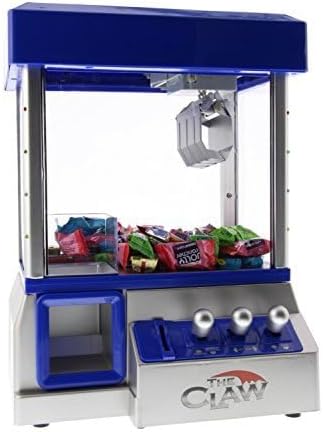
Image 2: The machine's interior, showing how small prizes like candy are placed for gameplay.
4.3. Unboxing and Filling Demonstration
Video 1: A demonstration of unboxing the Mini Claw Machine and how to fill it with prizes.
5. Operating Instructions
To begin playing, ensure the machine is powered on using the switch located on the bottom. The machine will emit arcade sounds and flash LED lights.
- Insert Coin: Insert one of the provided plastic game coins into the coin slot on the front panel. This will activate the game and start the music.
- Control Claw: Use the three joystick controls to maneuver the claw:
- Left joystick: Moves the claw assembly forward and backward.
- Middle joystick: Moves the claw assembly left and right.
- Right joystick: Lowers and raises the claw.
- Grab Prize: Position the claw directly over your desired prize. Press the right joystick down to lower the claw and attempt to grab the prize. The claw will automatically close when it reaches its lowest point.
- Collect Prize: If successful, the claw will automatically return to the prize chute and release the prize. Collect your prize from the dispenser hole.
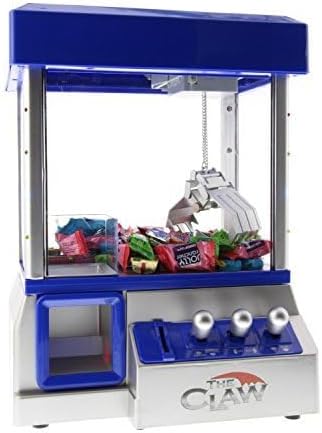
Image 3: Close-up of the claw mechanism, illustrating its movement during gameplay.
5.1. Gameplay Demonstration
Video 2: A short video demonstrating the basic operation and gameplay of the Mini Claw Machine.
6. Maintenance
- Cleaning: Wipe the exterior surfaces with a soft, dry cloth. Do not use abrasive cleaners or immerse the machine in water.
- Storage: When not in use, store the machine in a cool, dry place away from direct sunlight. Remove batteries if storing for extended periods to prevent leakage.
- Claw Mechanism: Periodically check the claw and chain for any obstructions or damage. Ensure the claw moves smoothly.
7. Troubleshooting
| Problem | Possible Cause | Solution |
|---|---|---|
| Machine does not turn on. | Batteries are dead or incorrectly installed. | Check battery polarity or replace with new 'D' size batteries. |
| Claw does not grab prizes effectively. | Prizes are too heavy, too large, or too slippery. | Use lighter, smaller, or less slippery prizes. Ensure prizes fit within the 2.5 x 2.5 inch dispenser opening. |
| Music/sound is too loud. | No volume control feature. | Some users have modified the machine to disconnect the speaker wires for reduced volume. This is not officially supported and may void warranty. |
| Game coins get stuck. | Coin inserted too quickly or at an angle. | Insert coins slowly and straight. If stuck, gently push through with another coin. |
| Claw movement is erratic or unresponsive. | Low batteries or obstruction in mechanism. | Replace batteries. Check for any foreign objects obstructing the claw's movement tracks. |
8. Specifications
- Model: 4474
- Dimensions (L x W x H): 13.5" x 6.5" x 10"
- Item Weight: 3.76 Pounds
- Material: Plastic
- Power Source: Battery Powered (3 'D' batteries required, not included)
- Controller Type: Joystick (3 controls)
- Display Type: LED (Flashing lights)
- Dispenser Hole Size: 2.5" x 2.5"
- Recommended Age: 6 - 16 years
9. Warranty and Support
For any questions, concerns, or support regarding your Etna Mini Claw Machine Model 4474, please contact the retailer or manufacturer directly. Specific warranty details may vary by region and retailer. Please retain your proof of purchase for any warranty claims.