1. Introduction
The Rockford Fosgate R750-1D is a high-performance mono block Class D amplifier designed to deliver powerful and clear audio for your vehicle's sound system. This amplifier is engineered for reliability and optimal audio reproduction, making it an excellent choice for driving subwoofers.
2. Safety Information
- Professional Installation Recommended: Due to the complexity of car audio systems and electrical connections, professional installation is highly recommended.
- Disconnect Battery: Always disconnect the vehicle's negative battery terminal before beginning any installation to prevent electrical shorts and damage.
- Proper Grounding: Ensure the amplifier is properly grounded to a clean, unpainted metal surface of the vehicle chassis. An improper ground connection can lead to poor performance or damage.
- Avoid Moisture and Extreme Temperatures: Install the amplifier in a dry location, away from direct sunlight, heat sources, or areas prone to moisture.
- Correct Wiring Gauge: Use the recommended wire gauges for power, ground, and speaker connections to prevent overheating and ensure optimal performance.
3. Package Contents
Please verify that all items are present in the package:
- Rockford Fosgate R750-1D Mono Block Class D Amplifier
- Remote Punch Level Control (if included with your model)
- Mounting Hardware
- User Manual (this document)
4. Installation
4.1 Mounting
Choose a secure, well-ventilated location for mounting the amplifier. Ensure there is sufficient airflow around the amplifier's heatsink to prevent overheating. Avoid mounting in areas exposed to direct sunlight, excessive heat, or moisture. Use the provided mounting hardware to secure the amplifier firmly to a solid surface.
4.2 Wiring Connections
Refer to the diagram below for proper wiring connections. Always ensure all connections are secure and insulated to prevent short circuits.

Figure 1: Rear panel connections of the R750-1D amplifier.
- Power (B+): Connect a 4 AWG power cable from the amplifier's B+ terminal directly to the positive terminal of your vehicle's battery. Install a 100A inline fuse within 18 inches (45 cm) of the battery.
- Ground (GND): Connect a 4 AWG ground cable from the amplifier's GND terminal to a clean, unpainted metal surface of the vehicle chassis. The ground point should be as short as possible, ideally less than 3 feet (1 meter).
- Remote (REM): Connect a 18 AWG remote turn-on wire from the amplifier's REM terminal to the remote output of your head unit. This wire turns the amplifier on and off with your stereo.
- Speaker Output: Connect your subwoofer(s) to the speaker terminals. The R750-1D is a mono block amplifier, designed for a single channel output. Ensure the total impedance of your speakers matches the amplifier's capabilities (1-Ohm stable).
- Input (RCA): Connect RCA cables from the low-level RCA pre-out of your head unit to the amplifier's RCA input jacks.
- Remote Punch Level: If using the optional Remote Punch Level Control, connect it to the dedicated RJ45 port. This allows for convenient bass level adjustment from the driver's seat.
5. Operation and Controls
The R750-1D amplifier features several controls for fine-tuning your audio system. Familiarize yourself with these controls to optimize performance.
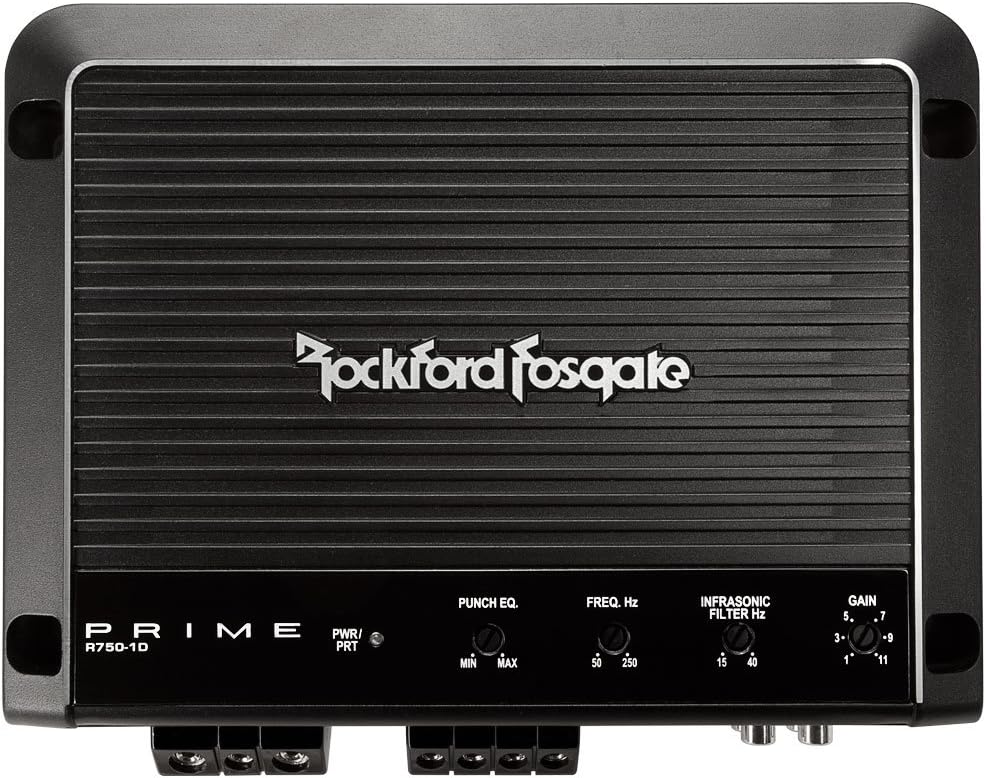
Figure 2: Top panel controls of the R750-1D amplifier.
- Power/Protect Indicator: The LED indicator shows the amplifier's status. A green light indicates normal operation (Power), while a red light indicates protection mode (Protect), often due to a fault or overheating.
- Gain Adjustment: This control matches the amplifier's input sensitivity to the output voltage of your head unit. Set the gain to the lowest possible setting initially, then slowly increase it until you achieve clear, undistorted sound at your desired volume level. Avoid setting the gain too high, as this can cause distortion and damage to speakers.
- Punch EQ (Bass Boost): This control provides a variable bass boost at 45Hz, from 0dB to +18dB. Use this to enhance low-frequency response. Adjust carefully to avoid distortion.
- Freq. Hz (Low-Pass Crossover): This variable control (50Hz - 250Hz) sets the upper frequency limit for the subwoofer. Frequencies above this setting will be filtered out. Adjust this to blend the subwoofer's output seamlessly with your main speakers.
- Infrasonic Filter Hz: This variable filter (15Hz - 40Hz) removes extremely low, inaudible frequencies that can waste amplifier power and potentially damage subwoofers. Set it slightly below your subwoofer's resonant frequency or the lowest frequency you want reproduced.
6. Maintenance
Regular maintenance helps ensure the longevity and optimal performance of your amplifier.
- Cleaning: Keep the amplifier clean and free of dust and debris. Use a soft, dry cloth to wipe down the exterior. Do not use liquid cleaners directly on the amplifier.
- Ventilation: Ensure that the amplifier's heatsink fins are not obstructed. Proper airflow is crucial for dissipating heat and preventing the amplifier from entering protection mode.
- Connection Checks: Periodically inspect all wiring connections (power, ground, remote, speaker, RCA) to ensure they remain secure and free from corrosion. Loose connections can lead to poor performance or damage.
7. Troubleshooting
If you encounter issues with your R750-1D amplifier, refer to the following common problems and solutions:
| Problem | Possible Cause | Solution |
|---|---|---|
| Amplifier does not turn on (no Power LED) | Blown fuse, loose power/ground/remote wire, no remote signal. | Check inline fuse, verify all power, ground, and remote connections are secure and receiving voltage. Ensure head unit is on and sending a remote signal. |
| No audio output | Loose RCA cables, incorrect gain setting, speaker wires disconnected, amplifier in protect mode. | Check RCA input connections, adjust gain, verify speaker wiring, check if Protect LED is on (refer to Protect Mode solution). |
| Distorted sound | Gain set too high, incorrect crossover settings, speaker impedance mismatch, damaged speakers. | Reduce gain, adjust Freq. Hz and Infrasonic Filter, verify speaker impedance, inspect speakers for damage. |
| Amplifier goes into protection mode (Protect LED on) | Overheating, short circuit in speaker wiring, speaker impedance too low, low voltage. | Allow amplifier to cool down, ensure proper ventilation. Check speaker wiring for shorts. Verify speaker impedance is within acceptable range (1-Ohm minimum). Check vehicle's battery voltage. |
8. Specifications
Detailed technical specifications for the Rockford Fosgate R750-1D amplifier:

Figure 3: Manufacturer's specifications for the R750-1D amplifier.
| Feature | Specification |
|---|---|
| Model Number | R750-1D |
| Circuit Topology | Class D |
| Number of Channels | 1 (Mono Block) |
| Rated Power (RMS Continuous Power) | 250 Watts x 1 @ 4-Ohm 500 Watts x 1 @ 2-Ohm 750 Watts x 1 @ 1-Ohm |
| Dynamic Power (PowerCube®) | 310 Watts x 1 @ 4-Ohms 567 Watts x 1 @ 2-Ohms 968 Watts x 1 @ 1-Ohm |
| Total Harmonic Distortion (THD+Noise) | <1.0% @ 4-Ohm, 2-Ohm, 1-Ohm |
| Frequency Response | 20Hz to 250Hz +/-1dB |
| Input Sensitivity | 150 mV to 4 V |
| Crossover Controls | Low-Pass: Variable 50Hz - 250Hz @ 12dB/Octave |
| Infrasonic Filter | Variable 15Hz - 40Hz @ 12dB/Octave |
| Punch EQ (Bass Boost) | 0dB to +18dB @ 45Hz |
| Recommended Fuse | 100 A |
| Power Wire Gauge | 4 AWG |
| Speaker Wire Gauge | 12 AWG |
| Operating Voltage | 9 - 16 VDC |
| Max. Current Draw (13.8V SineWave) | 80 A |
| Average Current Draw (13.8V Music) | 40 A |
| Suggested Alternator | 75 A |
| Dimensions (H x W x D) | 1.97" x 6.77" x 9.10" (5cm x 17.20cm x 23.10cm) |
| Item Weight | 5 pounds (2.27 kg) |
| Shipping Weight | 6.6 Lbs. (2.99 Kg.) |
| Heat Sink Type | Cast aluminum |
| Cooling | Convection |
| Mounting Type | Car Mount |
| Material | Plastic or Metal |
| UPC | 613815588757, 780687333133 |
9. Warranty and Support
Rockford Fosgate products are designed and engineered for high performance and reliability. This amplifier is covered by a manufacturer's warranty against defects in materials and workmanship. For specific warranty terms and conditions, please refer to the documentation included with your purchase or visit the official Rockford Fosgate website.
For technical support, troubleshooting assistance, or service inquiries, please contact Rockford Fosgate customer service or visit their official brand store: Rockford Fosgate Store.