
hitech CK30, CK31, AB1G, 318-020-001
User Manual: Hitech Replacement Batteries for Intermec Barcode Scanners
Model: CK30, CK31, AB1G, 318-020-001
1. Introduction
This manual provides essential information for the safe and effective use of your Hitech replacement batteries for Intermec CK30 and CK31 barcode scanners. These batteries are designed to meet or exceed original specifications, ensuring reliable performance for your devices.
The battery cases are constructed with 100% polycarbonate (PC) plastic, known for its strength, hardness, high impact resistance, dimensional stability, and flame retardant properties. Each battery is made to order to guarantee freshness and quality.
2. Product Features
- Compatibility: Specifically designed for Intermec CK30 and CK31 barcode scanners.
- OEM Equivalent: 100% OEM compatible, guaranteed to meet or exceed original specifications.
- Battery Type: Li-ion (Lithium-ion) chemistry.
- Voltage: 7.4 Volts.
- Capacity: 2500mAh.
- Replaces Models: AB1G, 318-020-001.
- Cell Quality: Made with high-quality Sanyo Japanese cells.
- Construction: Battery pack assembled in Taiwan with durable 100% polycarbonate (PC) plastic casing.
3. Setup and Installation
Before installing the new battery, ensure your barcode scanner is powered off. Refer to your scanner's original user manual for specific battery compartment access instructions.
- Power Off Device: Turn off the Intermec barcode scanner completely.
- Locate Battery Compartment: Identify and open the battery compartment on your scanner. This usually involves sliding a latch or unscrewing a cover.
- Remove Old Battery (if applicable): Carefully remove the existing battery, if any, from the compartment.
- Insert New Battery: Align the Hitech replacement battery with the contacts inside the compartment. Gently push the battery into place until it clicks or sits securely. Ensure the battery is fully seated to make proper contact.
- Close Compartment: Close the battery compartment cover and secure it.
- Initial Charge: It is recommended to fully charge the new battery before its first use. Connect your scanner to its charger and allow it to charge until the charging indicator shows a full charge.
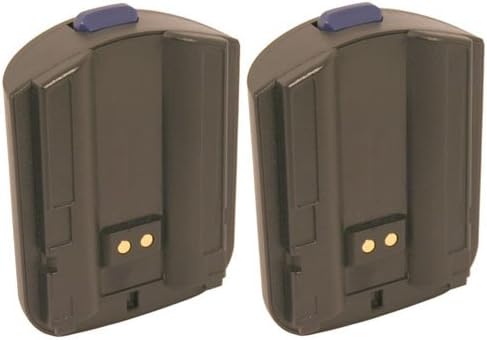
Figure 1: Two Hitech replacement batteries. Each battery is dark grey with a blue release button on top and two gold contact points on the bottom face. They are designed to fit Intermec CK30 and CK31 barcode scanners.
4. Operating Instructions
Once installed and fully charged, your Hitech replacement battery will power your Intermec barcode scanner. The operational aspects of the scanner itself remain unchanged.
4.1. Charging the Battery
Use only the original or a compatible charger designed for your Intermec barcode scanner. Charging times may vary depending on the charger and the battery's discharge level.
- Connect the scanner to its charging cradle or direct charger.
- Monitor the charging indicator on your scanner. It typically changes color or turns off when charging is complete.
- Avoid overcharging for extended periods, although modern Li-ion batteries have built-in protection.
4.2. Battery Usage
For optimal battery life, avoid completely draining the battery before recharging. Li-ion batteries do not suffer from a "memory effect" like older battery technologies, so partial charges are acceptable.
5. Maintenance and Care
Proper care can extend the lifespan of your Hitech replacement batteries.
- Storage: If storing the battery for an extended period, store it in a cool, dry place at approximately 50% charge. Avoid extreme temperatures.
- Cleaning: Keep the battery contacts clean. Use a dry, soft cloth to wipe away any dust or debris. Do not use liquid cleaners.
- Temperature: Avoid exposing the battery to extreme heat or cold, as this can degrade performance and lifespan.
- Physical Damage: Do not drop, puncture, or disassemble the battery. The polycarbonate casing provides good protection, but severe impact can cause internal damage.
- Disposal: Dispose of old batteries responsibly according to local regulations. Do not dispose of them in household waste or by incineration.
6. Troubleshooting
If you encounter issues with your Hitech replacement battery, consider the following:
- Battery Not Charging:
- Ensure the battery is correctly seated in the scanner and the compartment is closed securely.
- Check the charger and charging cable for damage.
- Verify the power outlet is functional.
- Clean the battery contacts on both the battery and the scanner/charger.
- Short Battery Life:
- Ensure the battery is fully charged before use.
- Check if the scanner's settings (e.g., screen brightness, Wi-Fi usage) are optimized for battery saving.
- Battery capacity naturally degrades over time and with many charge cycles. If the battery is old, replacement may be necessary.
- Scanner Not Powering On:
- Confirm the battery is fully charged.
- Re-install the battery to ensure proper connection.
- Test with another known good battery if available to rule out scanner issues.
If problems persist after following these steps, please refer to the Warranty & Support section for further assistance.
7. Specifications
| Attribute | Detail |
|---|---|
| Brand | Hitech |
| Compatible Devices | Intermec CK30, CK31 Barcode Scanners |
| Replaces Battery Models | AB1G, 318-020-001 |
| Battery Chemistry | Li-ion (Lithium-ion) |
| Voltage | 7.4 Volts |
| Capacity | 2500mAh |
| Power Source | Battery Powered |
| Cell Origin | Sanyo Japanese cells |
| Battery Pack Assembly | Taiwan |
| Casing Material | 100% Polycarbonate (PC) Plastic |
| Item Weight | 0.01 ounces (per battery) |
| UPC | 034051600605 |
8. Warranty and Support
Hitech stands behind the quality of its products. For specific warranty information regarding your replacement batteries, please refer to the documentation included with your purchase or visit the official Hitech website. For technical support or further assistance, please contact Hitech customer service through their official channels.
Please note: Unauthorized disassembly or modification of the battery will void any applicable warranty.
Ask a question about this manual
Ask about setup, troubleshooting, compatibility, parts, safety, or missing instructions. Manuals+ will review the question and use this page’s manual context to help answer it.