
1. Introduction
This manual provides instructions for the setup, operation, and maintenance of your AIRCARE MA1201 Whole-House Console-Style Evaporative Humidifier. This unit is designed to maintain optimal humidity levels in homes up to 3,600 square feet, utilizing evaporative technology for efficient moisture distribution. It features digital controls for precise settings and an easy-to-refill water tank.

Image 1.1: Front view of the AIRCARE MA1201 Humidifier, showcasing its console design and front grille.

Image 1.2: Informational graphic highlighting the MA1201's ability to humidify up to 3,600 square feet, its easy-to-refill tank, and digital controls.
2. Safety Information
Please read all safety instructions before operating this appliance to reduce the risk of fire, electric shock, or injury.
- Always unplug the humidifier before cleaning, filling, or performing any maintenance.
- Do not operate the humidifier with a damaged cord or plug.
- Place the humidifier on a firm, level, water-resistant surface at least 4 inches away from walls and furniture.
- Keep the humidifier away from electronic devices to prevent moisture damage.
- Do not block air inlets or outlets.
- Do not immerse the unit in water.
- This appliance is for indoor use only.
3. Package Contents
Verify that all items are present in the packaging:
- AIRCARE MA1201 Humidifier Unit
- One MAF1 Super Wick
- Owner's Manual (this document)
- Four Casters
4. Setup
Follow these steps for initial setup of your humidifier:
- Unpack the Unit: Carefully remove all packaging materials from the humidifier.
- Install Casters: Turn the humidifier upside down. Insert the four casters into the designated holes on the bottom of the unit. Ensure they are securely seated.

Image 4.1: Close-up view of one of the caster wheels, demonstrating its attachment point on the humidifier's base.
- Position the Humidifier: Place the humidifier on a level surface in a central location of your home. Maintain at least 4 inches of clearance from walls and furniture for optimal airflow.
- Install Wick Filter: Open the humidifier's top cover. Insert the MAF1 Super Wick into the designated filter tray. Ensure it is properly seated.
- Fill Water Tank: Remove the water tank from the unit. Unscrew the cap, fill the tank with clean, cool tap water, and securely replace the cap. Place the filled tank back into the humidifier. The unit has a 3.6-gallon capacity.
- Connect Power: Plug the power cord into a standard 110-volt electrical outlet.

Image 4.2: Side view of the humidifier, showing the integrated handle for easy movement and access to the water tank.

Image 4.3: Rear view of the humidifier, illustrating the power cord connection point and rear air intake.
5. Operation
Your AIRCARE MA1201 humidifier is equipped with digital controls for easy operation.

Image 5.1: Close-up of the digital control panel, showing the display and control buttons.
- Power On/Off: Press the power button (usually indicated by a universal power symbol) to turn the unit on or off.
- Set Desired Humidity: Use the humidity control buttons (often up/down arrows or a dedicated button) to set your desired humidity level. The digital humidistat will automatically maintain this level.
- Select Fan Speed: Press the fan speed button to cycle through the four available fan speeds (F1, F2, F3, F4) or select the 'Auto' setting. In 'Auto' mode, the fan speed adjusts automatically based on the current humidity and desired level.
- Automatic Shut-Off: The unit will automatically shut off when the desired humidity level is reached or when the water tank is empty.
- Refill Indicator: An indicator light or message on the display will alert you when the water tank needs refilling.

Image 5.2: Informational graphic detailing the MA1201's auto setting for fan adjustment, adjustable humidistat, auto shutoff, refill indicator, and check wicking filter indicator.
6. Maintenance
Regular maintenance ensures optimal performance and longevity of your humidifier.
- Daily: Refill the water tank as needed.
- Weekly: Inspect the wick filter for mineral buildup. If heavily soiled, replace it. Clean the water tank and base with a mild detergent and rinse thoroughly.
- Seasonal: At the end of each humidification season, thoroughly clean the entire unit, including the water tank, base, and fan area. Replace the wick filter before storing the unit.
- Wick Filter Replacement: The evaporative wick traps mineral deposits from the water. Replace the MAF1 Super Wick filter when it becomes hard, discolored, or when the humidifier's output decreases.
7. Troubleshooting
Refer to this section for common issues and their solutions.
| Problem | Possible Cause | Solution |
|---|---|---|
| Humidifier not turning on | No power; unit unplugged; power button not pressed. | Ensure unit is plugged in; check power outlet; press power button. |
| No humidity output or low output | Empty water tank; clogged wick filter; low fan speed setting. | Refill water tank; replace wick filter; increase fan speed or select 'Auto' mode. |
| Unusual noise during operation | Unit not level; foreign object in fan; mineral buildup. | Ensure unit is on a level surface; inspect fan for obstructions; clean unit. |
| Water leakage | Water tank cap not secured; tank not seated correctly; unit damaged. | Tighten tank cap; re-seat water tank; inspect for damage. |
8. Specifications
| Feature | Detail |
|---|---|
| Model | MA1201 |
| Type | Console-Style Evaporative Humidifier |
| Coverage Area | Up to 3600 Square Feet |
| Reservoir Capacity | 3.6 Gallons |
| Run Time | Up to 36 hours |
| Fan Speeds | 4 (plus Auto setting) |
| Product Dimensions (D x W x H) | 16.5" x 23.5" x 21.5" |
| Voltage | 110 Volts |
| Included Components | One MAF1 Super Wick; Owner's Manual; Four Casters |
| Special Features | Auto Shut Off, Quiet Operation, Digital Humidistat, Removable Tank, Refill Indicator |
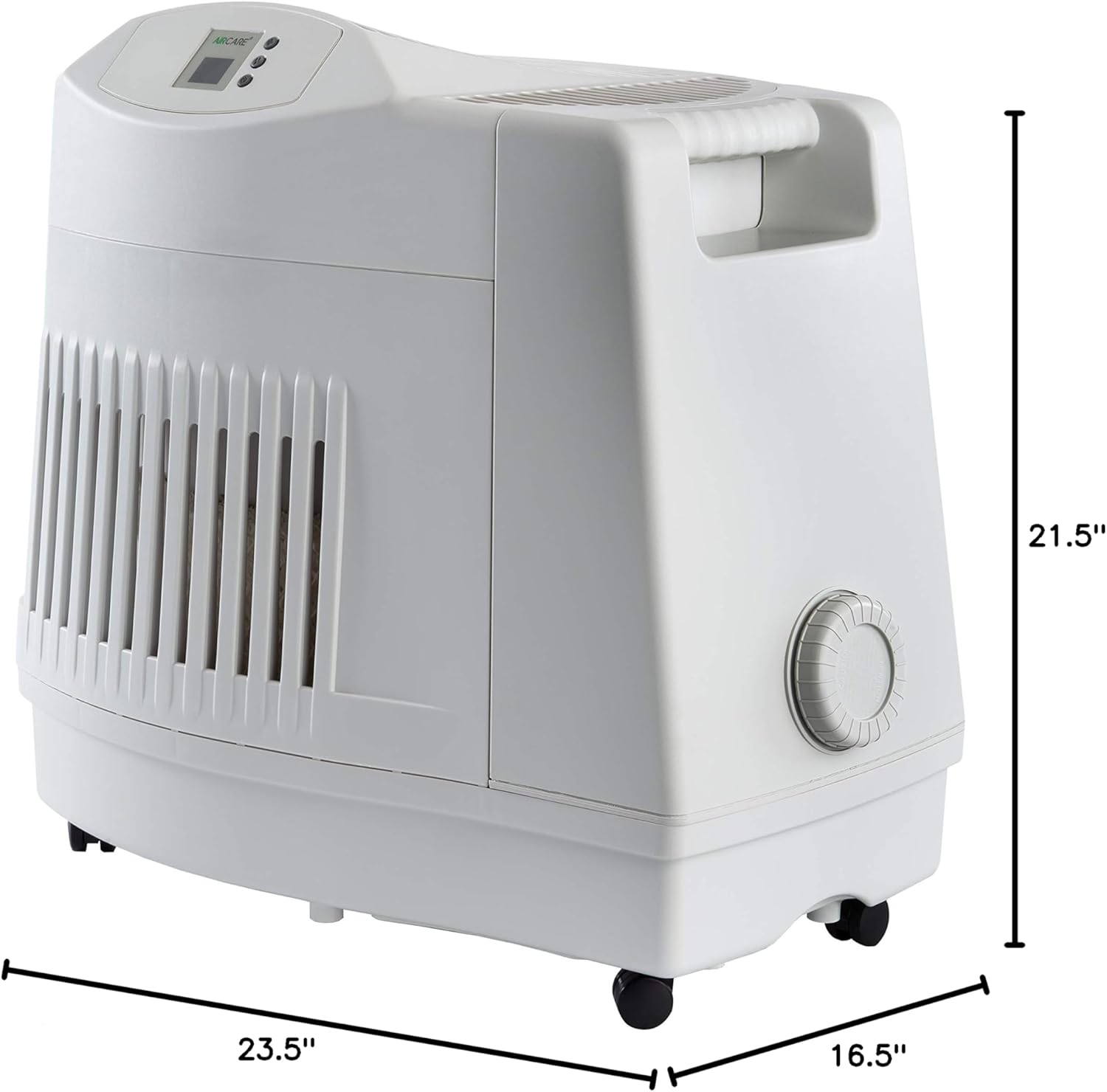
Image 8.1: Diagram illustrating the dimensions of the AIRCARE MA1201 Humidifier (Depth: 16.5", Width: 23.5", Height: 21.5").

Image 8.2: Icons representing key specifications: Coverage Area (up to 3,600 sq ft), Run Time (36 hours), Capacity (3.6 gallons), and Auto Shut-Off feature.
9. Warranty and Support
This AIRCARE MA1201 Humidifier comes with a 2-year limited warranty.
For warranty claims, technical assistance, or to order replacement parts, please refer to the contact information provided on the official AIRCARE website or the documentation included with your purchase. When contacting support, please have your model number (MA1201) and purchase date available.


