
1. Product Overview
The dbx 223xs crossover is designed to optimize audio performance by precisely separating frequency bands. It utilizes precision filters to direct correct frequencies to specific loudspeaker drivers, allowing amplifiers to operate more efficiently with usable signals, thereby reducing distortion and enhancing sound clarity for PA systems. This dual-channel crossover offers professional-grade features including Linkwitz-Riley 24dB per octave filters, independent output gain controls for level matching, output phase inversion, a 40 Hz low cut filter, and optional mono summing of the low frequency (subwoofer) output. Its robust design incorporates solid controls and high-quality XLR inputs and outputs.
2. Key Features
- XLR balanced inputs and outputs for professional connectivity.
- Mode switch for flexible stereo 2-way or mono 3-way operation.
- Low frequency summed (subwoofer) output for enhanced bass management.
- x10 range switch on both channels for extended frequency control.
- 40Hz high pass (low cut) filter on both channels to remove unwanted low-end rumble.
3. Package Contents
- dbx 223xs Crossover Unit
- Quick Start Guide
4. Controls and Connections
4.1 Front Panel
The front panel of the dbx 223xs features controls for each channel, including input gain, 40Hz low cut filter, crossover frequency, and individual output gains for low and high frequencies. A mode switch allows selection between Stereo 2-Way and Mono 3-Way operation. The Subwoofer section includes its own crossover frequency and gain controls.

Image: Front panel of the dbx 223xs crossover, showing all control knobs and switches for Channel 1, Subwoofer, Mode, and Channel 2.

Image: Close-up of the crossover frequency knob and associated switches on the dbx 223xs, highlighting the frequency selection and x10 range switch.
4.2 Rear Panel
The rear panel provides all audio input and output connections. It features balanced XLR inputs for Channel 1 and Channel 2, and balanced XLR outputs for Low, Mid (in 3-way mode), and High frequencies for each channel, as well as a dedicated Subwoofer output.
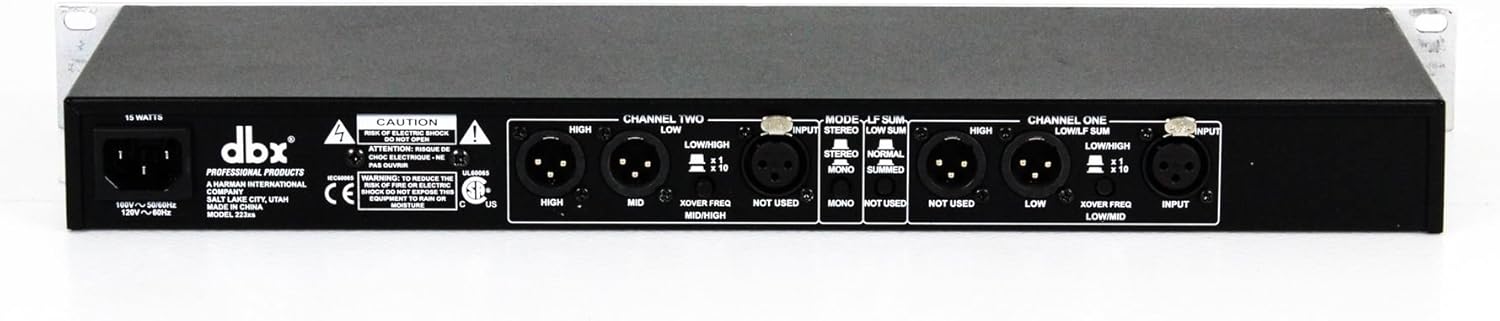
Image: Rear panel of the dbx 223xs crossover, displaying XLR input and output connectors for both channels, mode switches, and power input.
5. Setup
The dbx 223xs crossover can be configured for Stereo 2-Way or Mono 3-Way operation. Proper setup ensures optimal sound distribution to your speakers and subwoofers, enhancing clarity and preventing distortion.
5.1 General Setup Principles
- Signal Flow: Connect your audio source (e.g., mixer) to the inputs of the 223xs.
- Output Connections: Connect the outputs of the 223xs to your respective amplifiers for low, mid (if applicable), and high frequency speakers.
- Power On Sequence: Always power on your audio source first, then the 223xs, and finally your amplifiers. When powering off, reverse this sequence.
5.2 Stereo 2-Way Crossover Setup
In Stereo 2-Way mode, the crossover splits the stereo input signal into two frequency bands (low and high) for each channel. This is ideal for systems with main speakers and subwoofers.
- Connect the stereo outputs of your mixer to the CHANNEL 1 INPUT and CHANNEL 2 INPUT on the rear panel of the dbx 223xs using balanced XLR cables.
- Set the MODE switch on the front panel to STEREO 2-WAY.
- Connect the LOW OUTPUT of Channel 1 and Channel 2 to the inputs of your subwoofer amplifier(s).
- Connect the HIGH OUTPUT of Channel 1 and Channel 2 to the inputs of your main speaker amplifier(s).
- Adjust the X-OVER FREQ knobs for Channel 1 and Channel 2 to set the desired crossover point between your low and high frequency speakers. A common starting point is around 80-120 Hz for subwoofers.
- Use the GAIN knobs for Input, Low Output, and High Output to balance the levels between your speakers.
- Engage the 40Hz LOW CUT filter if you wish to remove very low frequencies from your main speakers, especially if your subwoofers handle these frequencies.
5.3 Mono 3-Way Crossover Setup
In Mono 3-Way mode, the crossover splits a mono input signal into three frequency bands (low, mid, and high). This is suitable for systems requiring dedicated mid-range speakers in addition to lows and highs.
- Connect a mono output from your mixer to the CHANNEL 1 INPUT on the rear panel. The 223xs will sum the stereo input to mono internally if both inputs are used.
- Set the MODE switch on the front panel to MONO 3-WAY.
- Connect the LOW OUTPUT to your low-frequency amplifier.
- Connect the MID OUTPUT to your mid-range amplifier.
- Connect the HIGH OUTPUT to your high-frequency amplifier.
- Adjust the X-OVER FREQ knobs to define the separation points between low, mid, and high frequencies.
- Use the GAIN knobs for Input, Low Output, Mid Output, and High Output to achieve proper level balance.
5.4 Setup Demonstration Video
Watch this video for a detailed guide on setting up your dbx 223xs crossover (demonstrated with a similar RX230 model).
Video: A detailed guide on how to set up a Rockville RX230 crossover, demonstrating connections to amplifiers, subwoofers, and mixers, and explaining the function of various controls for optimal sound separation.
6. Operating Modes
6.1 Stereo 2-Way Operation
In Stereo 2-Way mode, the 223xs processes two independent stereo channels. Each channel's input signal is divided into a low-frequency band and a high-frequency band. This allows for precise control over the audio sent to your main speakers and subwoofers, optimizing their performance and preventing frequency overlap.
6.2 Mono 3-Way Operation
In Mono 3-Way mode, the 223xs sums the stereo input to a mono signal and then divides it into three distinct frequency bands: low, mid, and high. This configuration is ideal for systems that utilize dedicated amplifiers and speakers for each of these frequency ranges, providing maximum control and clarity in a mono sound environment.
6.3 Supplementary Videos on Crossover Functionality
These videos demonstrate the functionality of similar crossover units, providing additional context on how to utilize such devices in various audio setups.
Video: A brief demonstration of a stereo crossover unit in an outdoor stage performance setting, highlighting its application in live sound.
Video: An overview of a professional 2/3 way stereo/4 way mono crossover, showcasing its features and potential applications in audio management.
Video: A demonstration of a 234XL Stereo 2/3 Way crossover, illustrating its controls and how it processes audio signals.
7. Maintenance
- Cleaning: Use a soft, dry cloth to clean the unit. Avoid abrasive cleaners or solvents.
- Ventilation: Ensure proper ventilation around the unit to prevent overheating. Do not block ventilation openings.
- Storage: Store the unit in a cool, dry place away from direct sunlight and extreme temperatures.
8. Troubleshooting
- No Sound: Check all cable connections (inputs, outputs, power). Ensure all connected devices (mixer, amplifiers, speakers) are powered on and set to appropriate volume levels. Verify the MODE switch is correctly set.
- Distortion: Reduce input gain on the 223xs and/or your mixer. Check output gain levels to ensure they are not clipping your amplifiers. Verify crossover frequency settings are appropriate for your speakers.
- Uneven Sound: Adjust individual output gain controls for low, mid, and high frequencies to achieve a balanced sound. Check phase inversion switches if certain frequencies sound thin or out of phase.
9. Specifications
| Brand | dbx |
| Model Name | 223xs |
| Mounting Type | Tabletop Mount |
| Material | Metal |
| Connectivity Technology | XLR |
| Audio Output Mode | Stereo, Mono, 2-way, 3-way |
| Recommended Uses | For PA systems |
| Compatible Devices | Desktop, Laptop |
| Item Weight | 5.4 Pounds |
| Product Dimensions | 19 x 6.9 x 1.75 inches |
| Power Source | Corded Electric |
| Frequency Response | 90000000 Hz |
| Number Of Circuits | 2 |
| Indoor/Outdoor Usage | Indoor |
10. Warranty and Support
The dbx 223xs Crossover comes with a Limited Warranty. For detailed warranty information, please refer to the included Quick Start Guide or contact dbx customer support.
For any questions, comments, or concerns regarding your dbx 223xs, please reach out to dbx customer support.