
Holmes HTF3110A-WM
Holmes Oscillating Tower Fan User Manual
Model: HTF3110A-WM
Your guide to safe and efficient operation.
Introduction
The Holmes Oscillating Tower Fan is designed to provide refreshing, cool relief in your living space with its elegant, space-saving design. This fan offers whole-room cooling through multidirectional oscillation and quiet operation. Its intuitive control panel allows for easy selection of three speed settings, making it an ideal cooling solution for various room sizes. An integrated carry handle ensures convenient transport and positioning.
Important Safety Information
Please read and save these important safety instructions before using this fan. Basic safety precautions should always be followed to reduce the risk of fire, electric shock, and injury to persons.
- Always unplug the fan before cleaning or servicing.
- Do not operate any fan with a damaged cord or plug. Discard fan or return to an authorized service facility for examination and/or repair.
- Do not run cord under carpeting. Do not cover cord with throw rugs, runners, or similar coverings. Arrange cord away from traffic area and where it will not be tripped over.
- This appliance has a polarized plug (one blade is wider than the other). To reduce the risk of electric shock, this plug is intended to fit in a polarized outlet only one way. If the plug does not fit fully in the outlet, reverse the plug. If it still does not fit, contact a qualified electrician. Do not attempt to defeat this safety feature.
- Do not insert or allow foreign objects to enter any ventilation or exhaust opening as this may cause an electric shock or fire, or damage the fan.
- To prevent a possible fire, do not block air openings in any manner. Do not use on soft surfaces, like a bed, where openings may become blocked.
- This product contains chemicals known to the State of California to cause cancer and birth defects or other reproductive harm.
Package Contents
Upon opening the package, please ensure all components are present and in good condition:
- Holmes Oscillating Tower Fan Unit
- Base Assembly (two halves)
- Fasteners for Base Assembly
- Instruction Manual
Setup
The Holmes Oscillating Tower Fan requires minimal assembly before first use. Follow these steps to set up your fan:
- Carefully remove all components from the packaging.
- Assemble the two halves of the base by aligning them and securing them with the provided fasteners.
- Align the assembled base with the bottom of the tower fan unit. Ensure the fan unit is securely seated on the base.
- Secure the tower fan unit to the base using the appropriate screws or locking mechanism, typically found on the underside of the base.
- Place the fan on a firm, level surface. Ensure there is adequate space around the fan for proper air circulation and oscillation.
- Plug the fan into a standard 110-volt AC electrical outlet.
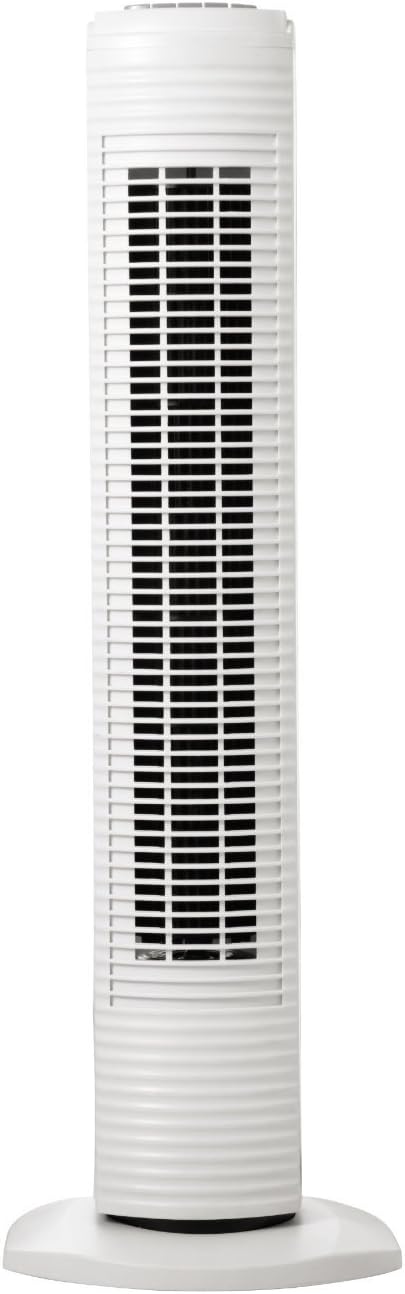
Figure 1: Front view of the Holmes Oscillating Tower Fan, showing its slim profile and white finish.

Figure 2: Angled view of the tower fan, highlighting its compact design suitable for various room settings.
Operating Instructions
Your Holmes Tower Fan features simple manual controls located on the top of the unit. Familiarize yourself with these controls for optimal use.

Figure 3: Close-up of the manual control panel on top of the fan, showing buttons for power, speed settings (1, 2, 3), and oscillation.
Power On/Off
- To turn the fan ON, press the power button (marked 'O' or with a power symbol).
- To turn the fan OFF, press the power button again.
Adjusting Fan Speed
The fan offers three speed settings to customize your comfort level:
- Press button '1' for Low speed.
- Press button '2' for Medium speed.
- Press button '3' for High speed.
Oscillation Function
The oscillation feature allows the fan to rotate from side to side, distributing air over a wider area.
- To activate oscillation, press the oscillation button (typically marked with a rotating fan icon).
- To stop oscillation, press the oscillation button again. The fan will stop in its current position.

Figure 4: The Holmes Tower Fan positioned in a living room, demonstrating its discreet presence and effective air circulation.
Maintenance
Regular cleaning and proper maintenance will ensure the longevity and efficient operation of your Holmes Tower Fan.
Cleaning
- Always unplug the fan from the electrical outlet before cleaning.
- Use a soft, damp cloth to wipe the exterior surfaces of the fan. Do not use harsh cleaners or abrasive materials, as they may damage the finish.
- For dust accumulation on the air intake or exhaust grilles, use a vacuum cleaner with a brush attachment to gently remove debris.
- Ensure the fan is completely dry before plugging it back in and operating.
Storage
When storing the fan, especially during off-season, it is recommended to:
- Store the fan in its original box or cover it to protect it from dust.
- Store in a cool, dry place.
Troubleshooting
If your fan is not operating as expected, please refer to the following common issues and solutions:
| Problem | Possible Cause | Solution |
|---|---|---|
| Fan does not operate. | Not plugged in. Power outlet not functioning. Fan switch is OFF. Overload protection fuse tripped. | Ensure fan is securely plugged into a working electrical outlet. Check household circuit breaker/fuse box. Press the power button to turn the fan ON. Unplug the fan, wait 5 minutes, then plug it back in. If it still doesn't work, consult a qualified electrician or service center. |
| Reduced airflow. | Air intake/exhaust grilles are blocked. Fan speed setting is too low. | Clean any dust or obstructions from the grilles. Increase the fan speed setting (1, 2, or 3). |
| Fan does not oscillate. | Oscillation function is not activated. | Press the oscillation button to activate the feature. |
Specifications
- Brand: Holmes
- Model Name: Holmes Oscillating Tower Fan
- Model Number: HTF3110A-WM
- Color: White
- Style: Manual Buttons
- Product Dimensions: 5.7"D x 30.94"W x 7.24"H
- Size: 31 Inch
- Item Weight: 6.65 Pounds
- Power Source: Corded Electric
- Voltage: 110 Volts
- Wattage: 35 watts
- Number of Power Levels: 3
- Control Method: Manual Buttons
- Indoor/Outdoor Usage: Indoor
- Blade Material: Plastic
- Efficiency: Energy efficient
Warranty and Support
The Holmes Oscillating Tower Fan comes with a 3-year limited warranty from the manufacturer. This warranty covers defects in material and workmanship under normal household use.
For warranty claims, technical support, or further assistance, please refer to the official Holmes website or contact their customer service department. You may also find additional resources, including a detailed user guide, at the following links:
Related documentsHTF3110A-WM


Ask a question about this manual
Ask about setup, troubleshooting, compatibility, parts, safety, or missing instructions. Manuals+ will review the question and use this page’s manual context to help answer it.