
Microsoft 52A-00004
Microsoft Xbox 360 Wired Controller User Manual
Model: 52A-00004
Introduction
This manual provides essential information for the setup, operation, and maintenance of your Microsoft Xbox 360 Wired Controller. Designed for use with both Windows PCs and Xbox 360 consoles, this controller offers a reliable and responsive gaming experience.

Figure 1: Front view of the Microsoft Xbox 360 Wired Controller.
The controller features an ergonomic design for comfortable extended play, precise thumb sticks, two pressure-point triggers, and an 8-way directional pad. It connects via a flexible nine-foot cable, providing a stable connection without the need for batteries during use.
What's in the Box
Upon opening your product packaging, please ensure all the following items are present:
- Microsoft Xbox 360 Wired Controller
- 90-Day Limited Warranty Information

Figure 2: Product packaging for the Xbox 360 Wired Controller.
Key Features
- Ergonomic Design: A compact, ergonomic shape allows for comfortable gameplay for extended periods on both PC and Xbox 360.
- Vibration Feedback: Integrated vibration motors provide a more immersive and responsive gaming experience.
- Precise Controls: Features precise thumb sticks, two pressure-point triggers, and an 8-way directional pad for accurate input.
- Wired Connectivity: Connects via a powered USB port, ensuring a stable and lag-free connection.
- Flexible Cable: The thin, flexible nine-foot cord is designed to offer the sensation of wireless freedom with the consistent performance of a wired connection.
- Integrated Headset Port: Includes a port for connecting a headset, enabling Xbox LIVE® play and in-game communication.
Setup Guide
Connecting to Xbox 360 Console:
- Locate an available USB port on your Xbox 360 console.
- Insert the USB connector of the controller's cable firmly into the USB port.
- The Xbox Guide button on the controller will illuminate, indicating a successful connection and that the controller is ready for use.
Connecting to Windows PC:
- Locate an available USB port on your Windows PC.
- Insert the USB connector of the controller's cable firmly into the USB port.
- Driver Installation:
- For most modern Windows operating systems (Windows 7, 8, 10, 11), drivers should install automatically upon connection.
- If automatic installation fails, use the provided driver disc (if included) or download the latest drivers from the official Microsoft support website.
- Follow the on-screen prompts to complete the driver installation. A system restart may be required.
- Once drivers are installed, the Xbox Guide button on the controller will illuminate, indicating it is ready for use with your PC games.
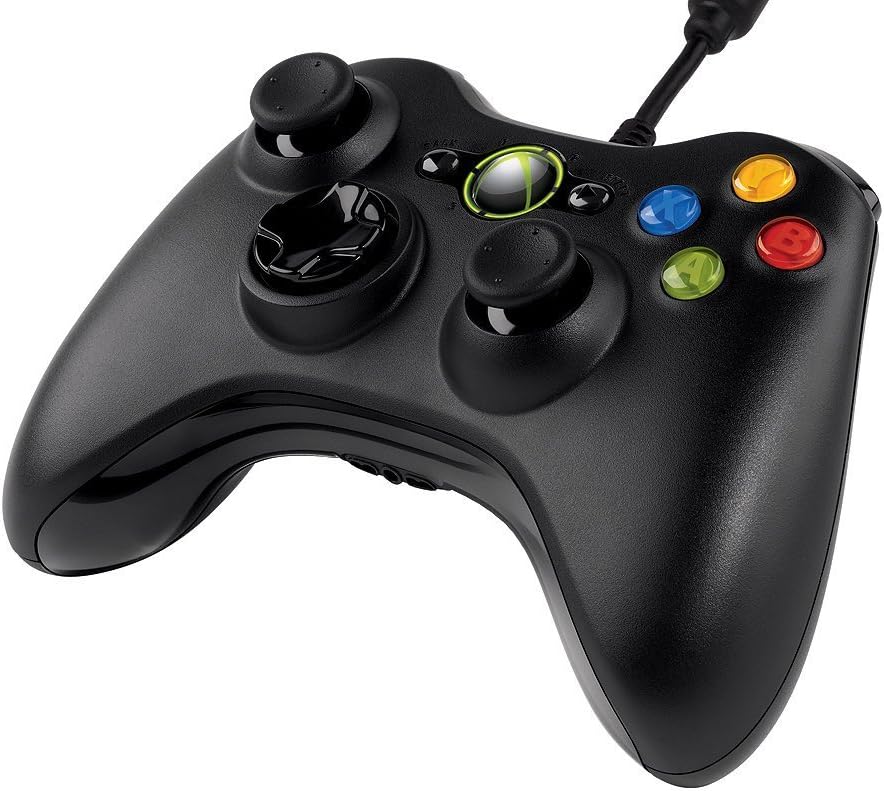
Figure 3: Top-angled view of the controller, highlighting the cable connection point.
Operating Instructions
The Xbox 360 Wired Controller provides intuitive controls for a wide range of games. Familiarize yourself with the button layout for optimal gameplay.
- Analog Sticks: Use the left and right analog sticks for movement, camera control, or other in-game actions.
- D-Pad: The directional pad is typically used for menu navigation or specific in-game commands.
- Face Buttons (A, B, X, Y): These colored buttons are used for primary actions, interactions, or specific game functions.
- Shoulder Buttons (LB, RB) & Triggers (LT, RT): Located on the top of the controller, these are commonly used for secondary actions, aiming, or firing.
- Start & Back Buttons: Used for pausing games, accessing menus, or confirming selections.
- Xbox Guide Button: Press the glowing Xbox Guide button in the center to access the Xbox Guide on your console or the Xbox Game Bar/overlay on PC.
Maintenance
To ensure the longevity and optimal performance of your Xbox 360 Wired Controller, follow these maintenance guidelines:
- Cleaning: Use a soft, dry cloth to wipe down the controller regularly. For stubborn dirt, a slightly damp cloth can be used, but ensure no moisture enters the internal components. Avoid harsh chemicals or abrasive cleaners.
- Storage: Store the controller in a clean, dry place away from extreme temperatures, direct sunlight, and excessive dust. Avoid wrapping the cable too tightly around the controller to prevent damage.
- Handling: Avoid dropping the controller or subjecting it to strong impacts, as this can damage internal circuitry or external components.
Troubleshooting
If you encounter issues with your Xbox 360 Wired Controller, try the following common troubleshooting steps:
- Controller Not Responding:
- Ensure the USB cable is securely plugged into both the controller and the console/PC.
- Try plugging the controller into a different USB port.
- Restart your Xbox 360 console or PC.
- Vibration Not Working:
- Check in-game settings to ensure vibration feedback is enabled.
- Verify that your console/PC drivers are up to date.
- Buttons/Sticks Not Functioning Correctly:
- Ensure no debris is lodged around the buttons or sticks.
- Test the controller on another game or system to determine if the issue is specific to one application.
- On PC, check controller calibration settings in your operating system.
If problems persist, refer to the official Microsoft support resources or the full user guide linked in the Support section.
Specifications
| Feature | Detail |
|---|---|
| Brand | Microsoft |
| Model Name | MICROSOFT CORP/LICENSING |
| Item Model Number | 52A-00004 |
| Compatible Devices | PC, Xbox 360 Console (Windows Operating System) |
| Controller Type | Gamepad |
| Connectivity Technology | USB (Wired) |
| Hardware Platform | PC, Xbox 360 |
| Color | Black |
| Item Weight | 12.5 ounces (approx. 354 grams) |
| Product Dimensions (LxWxH) | 7.91 x 5.51 x 2.56 inches (approx. 20.09 x 14.00 x 6.50 cm) |
| Power Source | Corded Electric (USB Powered) |
Warranty and Support
Limited Warranty:
Your Microsoft Xbox 360 Wired Controller comes with a 90-Day Limited Warranty. Please refer to the warranty information included in your product packaging for full terms and conditions.
Additional Resources:
- For a more detailed user guide, you can download the official PDF document: User Guide (PDF)
- For further assistance, technical support, or to find updated drivers, please visit the official Microsoft Support website.
Related documents52A-00004


Ask a question about this manual
Ask about setup, troubleshooting, compatibility, parts, safety, or missing instructions. Manuals+ will review the question and use this page’s manual context to help answer it.