
1. Introduction
Thank you for choosing the Absaar HF-1202 Automatic Battery Charger. This device is designed for efficient and safe charging of 12V lead-acid and VRLA (Gel and AGM) batteries. Utilizing modern high-frequency technology and integrated microcontrollers, it ensures an optimized charging process, including a maintenance charge mode that allows batteries to remain connected for extended periods without damage. Please read this manual thoroughly before operating the charger to ensure proper use and safety.
2. Safety Information
Always observe the following safety precautions to prevent injury or damage to the charger or battery:
- Read all instructions before using the charger.
- Use the charger in a well-ventilated area.
- Wear eye protection and protective clothing when working with batteries.
- Avoid sparks or flames near the battery during charging, as batteries can produce explosive gases.
- Disconnect the AC power supply before connecting or disconnecting the battery clamps.
- Do not attempt to charge frozen or visibly damaged batteries.
- This charger is for indoor use only. Do not expose it to rain or moisture.
- Keep the charger out of reach of children.
- Ensure the charger is compatible with your battery type and voltage (12V lead-acid/VRLA).
3. Product Overview
The Absaar HF-1202 is a compact and efficient automatic battery charger. Its design incorporates advanced electronics for precise control of the charging process.
Key Features:
- Modern high-frequency technology.
- Integrated microcontrollers for full charge process control.
- Maintenance charging mode to keep batteries in optimal condition.
- Fully automatic charging.
Components and Indicators:
The charger features indicator lights on its front panel to display the charging status:
- Laden (Charging): Indicates that the battery is currently being charged.
- Erhaltung (Maintenance): Indicates that the battery is fully charged and the charger is in maintenance mode, providing a trickle charge to keep the battery at optimal voltage.
- Verpolung (Reverse Polarity): Indicates that the battery clamps are connected incorrectly (positive to negative, or vice versa). Disconnect immediately and correct the connection.
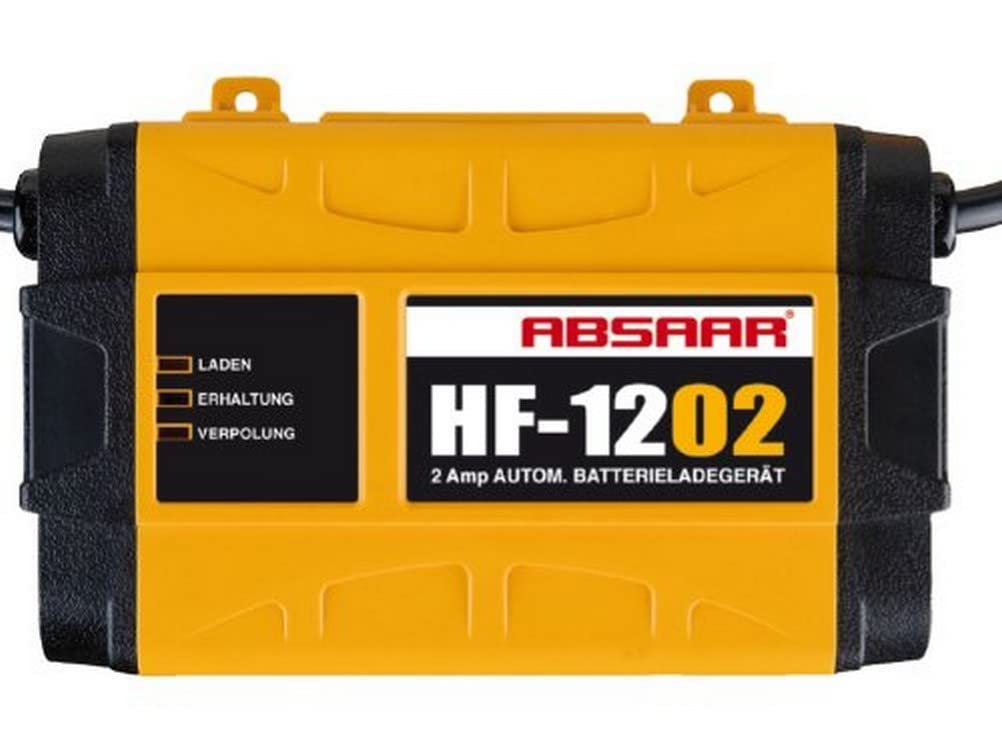
An image showing the Absaar HF-1202 automatic battery charger. The charger is yellow and black, featuring indicator lights labeled 'Laden' (Charging), 'Erhaltung' (Maintenance), and 'Verpolung' (Reverse Polarity). The model name 'HF-1202' and '2 Amp AUTOM. BATTERIELADEGERÄT' are visible on the front.
4. Setup
Follow these steps to set up your Absaar HF-1202 battery charger:
- Ensure the charger is disconnected from the AC power outlet.
- Identify the positive (+) and negative (-) terminals on your 12V battery.
- Connect the red (+) clamp from the charger to the positive (+) terminal of the battery.
- Connect the black (-) clamp from the charger to the negative (-) terminal of the battery.
- Verify that the connections are secure and correct. If the 'Verpolung' (Reverse Polarity) indicator lights up after plugging in, immediately disconnect and correct the connections.
- Plug the charger's power cord into a standard 230-240V ~ 50Hz AC power outlet.
5. Operating Instructions
Once properly connected and powered on, the Absaar HF-1202 charger will automatically begin the charging process.
Charging Process:
- The 'Laden' (Charging) indicator will illuminate, signifying that the battery is actively being charged.
- The integrated microcontrollers will monitor the battery's state and adjust the charging current as needed.
- Once the battery reaches full charge, the charger will automatically switch to maintenance mode.
Maintenance Mode:
- When in maintenance mode, the 'Erhaltung' (Maintenance) indicator will light up.
- In this mode, the charger provides a small, continuous current to compensate for self-discharge, keeping the battery at its optimal charge level without overcharging.
- The battery can remain connected to the charger in maintenance mode for extended periods.
Disconnecting the Charger:
- Unplug the charger's power cord from the AC outlet.
- Disconnect the black (-) clamp from the battery's negative terminal.
- Disconnect the red (+) clamp from the battery's positive terminal.
6. Maintenance
To ensure the longevity and proper functioning of your Absaar HF-1202 charger, follow these simple maintenance guidelines:
- Keep the charger clean and dry. Wipe the casing with a soft, damp cloth. Do not use harsh chemicals or abrasive cleaners.
- Regularly inspect the charging cables and clamps for any signs of damage, such as cuts, fraying, or corrosion. Replace if damaged.
- Store the charger in a cool, dry place when not in use.
- Ensure proper ventilation around the charger during operation to prevent overheating.
7. Troubleshooting
If you encounter issues with your Absaar HF-1202 charger, refer to the following common troubleshooting steps:
- Charger not turning on:
- Check that the power cord is securely plugged into a working AC outlet.
- Ensure the outlet itself is functional by testing it with another device.
- Battery not charging (Laden indicator not on):
- Verify that the battery clamps are correctly and securely connected to the battery terminals.
- Check the battery's voltage. If the battery is severely discharged below a certain threshold, some chargers may not initiate charging.
- Ensure the battery is a 12V lead-acid or VRLA type.
- 'Verpolung' (Reverse Polarity) indicator is on:
- Immediately unplug the charger from the AC outlet.
- Correctly connect the red (+) clamp to the positive (+) battery terminal and the black (-) clamp to the negative (-) battery terminal.
- Plug the charger back into the AC outlet.
- Charger feels hot during operation:
- Some warmth is normal. However, if it feels excessively hot, ensure the charger is in a well-ventilated area and not covered.
- Check for any obstructions blocking the charger's ventilation openings.
If these steps do not resolve the issue, contact customer support.
8. Specifications
| Parameter | Value |
|---|---|
| Nominal Voltage & Power | 230 - 240 V ~ 50 Hz, 110 W |
| Input Current | 0.5 A |
| Maximum Output Current | 2A |
| Constant Current Charge Voltage | <14.4 V DC |
| Float Charge Voltage | 13.5 ± 0.2 V DC |
| Battery Type | 12 V Lead-Acid / VRLA (Gel and AGM) |
| Ambient Temperature | -30°C to 40°C |
| Weight | 480 g |
| Model Number | 5200217512020 |
| Manufacturer | MSA International S.A. |
9. Warranty and Support
Information regarding spare parts availability and guaranteed software updates is not available at this time. For product support or inquiries, please refer to the contact information provided by your retailer or the manufacturer, MSA International S.A.