
Shure SE215
Shure SE215 PRO Wired Earbuds Instruction Manual
Model: SE215-CL

Image: Shure SE215 PRO Wired Earbuds, clear housing with black ear tips, connected by a translucent cable.
1. Setup
1.1 Unpacking and Included Components
Carefully unpack all items from the packaging. Ensure all components are present:
- Shure SE215 PRO Sound Isolating Earphones
- Detachable 3.5mm Audio Cable
- Protective Carrying Case
- Fit Kit: Various sizes of Foam Sleeves and Flex Sleeves
- 1/4" Adapter
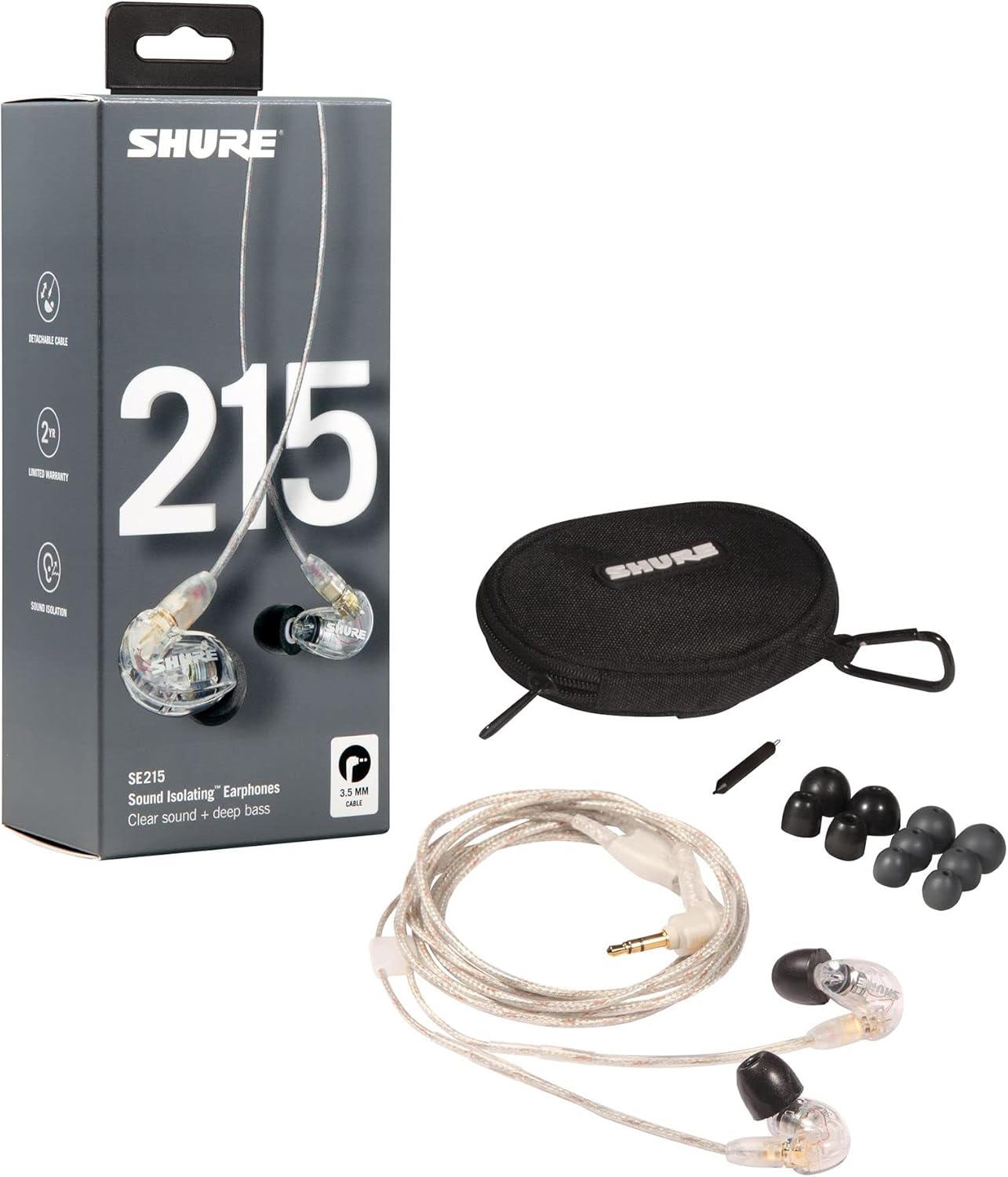
Image: Contents of the Shure SE215 PRO package, including the earbuds, cable, carrying case, and various ear tips.
1.2 Choosing the Correct Ear Sleeves
The performance of your SE215 PRO earphones is significantly affected by the fit of the ear sleeves. Experiment with the different sizes and types (foam and flex) provided in the fit kit to find the best seal for your ears. A proper seal ensures optimal sound isolation and bass response.
- Foam Sleeves: Offer excellent sound isolation and a secure fit. Compress the foam before inserting into the ear canal.
- Flex Sleeves: Provide a comfortable fit and good sound isolation.
1.3 Attaching Earphones to the Cable
The SE215 PRO features a durable, reinforced detachable cable with MMCX connectors. This allows for easy replacement or customization.
- Identify the left (L) and right (R) earpieces and cable connectors.
- Align the earpiece connector with the cable connector.
- Push firmly until you hear a click, indicating a secure connection. The MMCX connector allows 360-degree rotation for a comfortable fit.

Image: The Shure SE215 PRO earbuds detached from their cable, showing the MMCX connectors.
1.4 Wearing the Earphones
The SE215 PRO earphones are designed for an over-the-ear fit, which helps keep them securely in place and cables out of the way.
- Insert the chosen ear sleeve into your ear canal, ensuring a snug seal.
- Route the cable over the top of your ear and down your back. The wireform section of the cable can be gently molded to fit the contour of your ear for added stability.

Image: A person wearing the Shure SE215 PRO earbuds, demonstrating the over-the-ear cable routing for a secure fit.
2. Operating Instructions
2.1 Sound Isolation Technology
The SE215 PRO earphones utilize Sound Isolating technology, which blocks up to 37 dB of outside noise. This passive noise reduction allows for a more immersive listening experience without the need for active noise cancellation.
- A proper seal with the ear sleeves is crucial for effective sound isolation.
- This feature is beneficial in noisy environments, such as during travel or exercise.
2.2 Connecting to Audio Devices
Connect the 3.5mm jack of the earphone cable to the audio output port of your smartphone, music player, or other compatible device.
2.3 Volume Control
The SE215 PRO earphones do not feature integrated volume controls. Adjust the audio volume directly from your connected audio source device.
3. Maintenance
3.1 Cleaning the Earphones and Sleeves
Regular cleaning helps maintain hygiene and optimal sound quality.
- Ear Sleeves: Remove the ear sleeves from the earphones. Clean them with a mild soap and water solution, rinse thoroughly, and allow them to air dry completely before reattaching. Replace sleeves if they become worn or damaged.
- Earphone Nozzles: Gently wipe the earphone nozzles with a dry, soft cloth. Use the included cleaning tool to carefully remove any earwax buildup from the nozzle opening. Avoid pushing debris further into the earphone.
3.2 Cable Care
The detachable cable is designed for durability, but proper care extends its lifespan.
- Avoid sharp bends or excessive pulling on the cable.
- When detaching the cable, grasp the connector firmly, not the cable itself.
3.3 Storage
When not in use, store your SE215 PRO earphones in the provided protective carrying case to prevent tangling and damage.
4. Troubleshooting
4.1 No Sound or Low Sound
- Ensure the 3.5mm jack is fully inserted into your audio device.
- Check that the earphone cables are securely connected to the earpieces.
- Verify the volume level on your audio source device.
- Confirm that the ear sleeves are properly seated in your ear canal to create a good seal.
4.2 Poor Sound Quality (Lack of Bass, Tinny Sound)
- The most common cause is an improper seal. Re-evaluate your ear sleeve choice and fit. Try different sizes or types of sleeves.
- Ensure the earphone nozzles are clear of debris.
- Test with a different audio source or cable to rule out device or cable issues.
4.3 Earphones Falling Out
- Ensure you are using the correct size and type of ear sleeves for a secure fit.
- Confirm the cable is routed over your ear and the wireform is shaped to your ear's contour.
5. Specifications
| Feature | Specification |
|---|---|
| Model Name | SE215 PRO |
| Connectivity Technology | Wired |
| Headphones Jack | 3.5 mm Jack |
| Noise Control | Sound Isolation (up to 37 dB) |
| Frequency Range | 20 Hz - 20,000 Hz |
| Impedance | 10 Ohm |
| Item Weight | 0.03 Pounds (0.48 ounces) |
| Cable Feature | Detachable |
| UPC | 042406196956 |
6. Warranty and Support
6.1 Warranty Information
The Shure SE215 PRO Wired Earbuds typically come with a two-year limited warranty. Please refer to the warranty card included with your product or visit the official Shure website for detailed terms and conditions.
6.2 Customer Support
For further assistance, technical support, or service inquiries, please visit the official Shure support website or contact their customer service department. Contact information can usually be found on the Shure website or in the product packaging.
Related documentsSE215


Ask a question about this manual
Ask about setup, troubleshooting, compatibility, parts, safety, or missing instructions. Manuals+ will review the question and use this page’s manual context to help answer it.