
Wiha 38701
Wiha 38701 ESD Safe Quick Release Bit Holder
Instruction Manual
1. Introduction
This manual provides essential information for the proper use and maintenance of your Wiha 38701 ESD Safe Quick Release Bit Holder. Designed for precision work, this tool features an Electrostatic Discharge (ESD) safe handle and a quick-release mechanism for efficient bit changes. Please read this manual thoroughly before operating the tool.
2. Safety Information
- ESD Safe Design: The Wiha 38701 is designed to protect sensitive electronic components from electrostatic discharge. Always use this tool in conjunction with other ESD protective measures, such as grounding mats and wrist straps, when working on electronics.
- Proper Bit Usage: Use only 1/4-inch hex bits that are in good condition. Damaged or incorrect bits can cause injury or damage to the workpiece.
- Secure Grip: Ensure the bit is fully seated and locked in the holder before applying torque.
- Storage: Store the tool in a clean, dry environment, away from extreme temperatures and corrosive substances.
3. Product Overview
The Wiha 38701 ESD Safe Quick Release Bit Holder is a hand tool designed to securely hold 1/4-inch hex screwdriver bits. Its ergonomic handle provides comfort and control, while the quick-release mechanism allows for rapid bit changes.

Figure 1: Front view of the Wiha 38701 ESD Safe Quick Release Bit Holder.

Figure 2: Angled view of the Wiha 38701 ESD Safe Quick Release Bit Holder, highlighting the handle and bit holder mechanism.
4. Setup
The Wiha 38701 Bit Holder requires no assembly. It is ready for use upon removal from its packaging.
- Inspect the Tool: Before first use, inspect the bit holder for any signs of damage. Do not use if damaged.
- Select Appropriate Bit: Choose a 1/4-inch hex screwdriver bit suitable for your application.
5. Operating Instructions
5.1. Inserting a Bit
- Pull Collar Forward: Grasp the knurled collar of the bit holder and pull it forward (away from the handle). This action opens the locking mechanism.
- Insert Bit: While holding the collar forward, insert the 1/4-inch hex bit into the opening until it is fully seated.
- Release Collar: Release the collar. It will snap back into place, securely locking the bit. Gently tug on the bit to ensure it is firmly held.
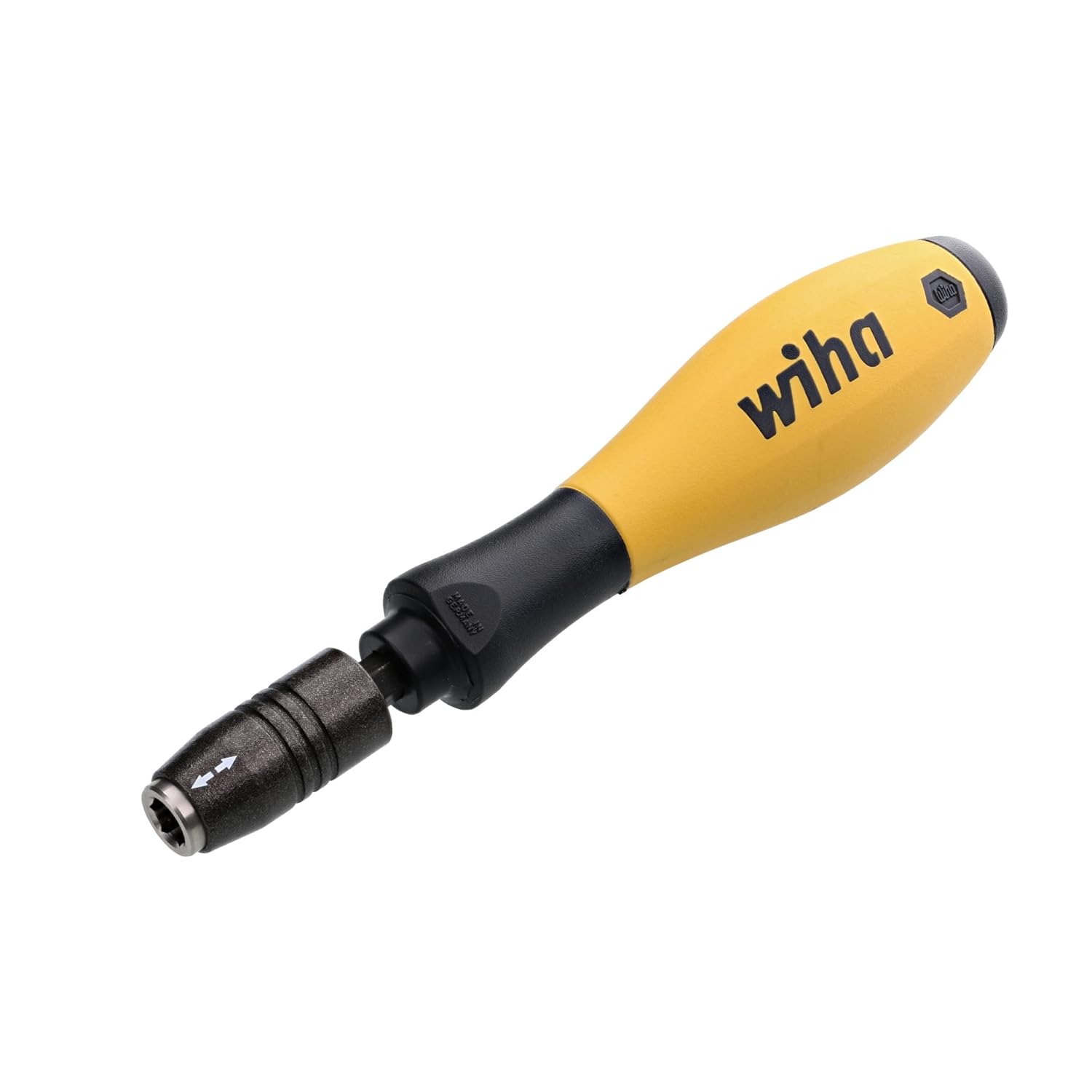
Figure 3: Illustrates pulling the collar forward to insert a bit.

Figure 4: Shows a bit fully inserted and locked in the holder.
5.2. Releasing a Bit
- Pull Collar Forward: Grasp the knurled collar and pull it forward (away from the handle).
- Remove Bit: While holding the collar forward, pull the bit straight out of the holder.
- Release Collar: Release the collar to return it to its locked position.
6. Maintenance
- Cleaning: Wipe the bit holder with a clean, dry cloth after each use to remove dirt, dust, or debris. Do not use harsh chemicals or abrasive cleaners.
- Lubrication: The quick-release mechanism is designed for maintenance-free operation. Avoid applying lubricants, as this can attract dust and impair ESD properties.
- Inspection: Periodically inspect the bit holder for wear or damage, especially the quick-release mechanism. Replace the tool if any damage is observed.
7. Troubleshooting
| Problem | Possible Cause | Solution |
|---|---|---|
| Bit does not lock securely. | Collar not fully released; bit not fully inserted; damaged bit or mechanism. | Ensure collar snaps back completely. Push bit firmly until seated. Inspect bit and holder for damage; replace if necessary. |
| Difficulty inserting/releasing bit. | Debris in mechanism; collar not pulled far enough. | Clean the mechanism. Ensure the collar is pulled fully forward. |
| ESD properties compromised. | Damage to handle; improper cleaning agents. | Inspect handle for cracks or wear. Use only dry cloth for cleaning. Replace if ESD properties are critical and damage is present. |
8. Specifications
| Model Name: | 38701 |
| Brand: | Wiha |
| Head Style: | One-Way |
| Material: | Blend (ESD Safe) |
| Color: | Multi |
| Item Weight: | 3.84 ounces |
| Product Dimensions: | 1 x 1 x 1 inches |
| UPC: | 084705387017 |
9. Warranty and Support
For information regarding warranty coverage, product support, or service, please refer to the official Wiha website or contact Wiha customer service directly. Keep your purchase receipt for warranty claims.
Related documents38701


Ask a question about this manual
Ask about setup, troubleshooting, compatibility, parts, safety, or missing instructions. Manuals+ will review the question and use this page’s manual context to help answer it.