
1. Product Overview
The Sony LCS-HH/B Carrying Case is designed to provide protection for select Sony H Series Cyber-shot digital cameras. This sleek, leather-like case safeguards your camera from dust and scratches, ensuring its longevity and maintaining its appearance.

Figure 1: Sony LCS-HH/B Carrying Case (Black) - Front View. This image shows the closed carrying case, highlighting its compact and protective design.
Key Features:
- Specifically designed for select H Series Cyber-shot digital cameras.
- Offers protection against dust and scratches.
- Includes a convenient internal pocket for memory cards.
- Equipped with a belt loop for secure and easy carrying.
2. Setup and Initial Use
2.1 Inserting Your Camera
- Open the Case: Unsnap the front flap of the carrying case.
- Position the Camera: Gently slide your compatible H Series Cyber-shot camera into the main compartment of the case. Ensure the camera is oriented correctly for a snug fit.
- Secure the Flap: Close the front flap and press firmly to engage the snap closure. The case is designed for a secure fit, which may require a slight squeeze to close the snap.
2.2 Using the Memory Card Pocket
The case features a small, internal pocket designed to hold a spare memory card. This pocket is located inside the main compartment, typically on the flap or side, providing convenient access and secure storage for your media.
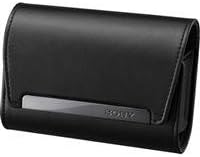
Figure 2: Sony LCS-HH/B Carrying Case - Open View. This image illustrates the interior of the case, showing the space for the camera and the internal memory card pocket.
3. Operating Instructions
3.1 Carrying the Case
- Handheld: The compact design allows for easy carrying by hand.
- Belt Attachment: Utilize the integrated belt loop on the rear of the case to securely attach it to your belt. This provides hands-free portability and quick access to your camera. Ensure the belt is threaded through the loop completely for maximum security.
3.2 Accessing Your Camera
To access your camera, simply unsnap the front flap. When finished, re-insert the camera and securely close the flap by pressing the snap closure until it clicks into place.
4. Care and Maintenance
Proper care will extend the life and appearance of your carrying case.
- Cleaning: Wipe the exterior with a soft, damp cloth. Avoid using harsh chemicals or abrasive cleaners, as these can damage the material.
- Drying: If the case becomes wet, allow it to air dry completely in a well-ventilated area, away from direct sunlight or heat sources.
- Storage: Store the case in a cool, dry place when not in use. Avoid prolonged exposure to extreme temperatures or humidity.
- Avoid Overfilling: Do not attempt to store items other than your camera and a memory card, as overfilling can stress the seams and material.
5. Troubleshooting
5.1 Case is Difficult to Close
The Sony LCS-HH/B case is designed for a snug fit to ensure maximum protection. If you find the snap closure difficult to engage:
- Ensure your camera is fully seated within the case.
- Apply firm, even pressure directly over the snap mechanism to close it. Over time, the material may soften slightly, making closure easier.
5.2 Camera Fit Issues
This case is specifically designed for select Sony H Series Cyber-shot digital cameras. If your camera does not fit, verify its compatibility with the LCS-HH/B model. Refer to your camera's documentation or the Sony support website for compatible accessories.
6. Product Specifications
| Feature | Specification |
|---|---|
| Model Number | LCS-HH/B |
| Product Dimensions (L x W x H) | 7.87 x 1.96 x 4.92 inches |
| Item Weight | 3.84 ounces |
| Material | Leather-like material |
| Color | Black |
| Manufacturer | Sony |
| Date First Available | February 24, 2011 |
7. Warranty and Support
For detailed warranty information, please refer to the documentation included with your original product purchase or visit the official Sony support website. Warranty terms and conditions may vary by region.
For further assistance or product support, please contact Sony customer service or visit the official Sony website.
You can also find more information about Sony products on their Amazon store: Sony Official Store on Amazon.