
Introduction
Thank you for choosing the Beurer LS 10 Luggage Scale. This digital scale is designed to help you accurately weigh your luggage before travel, preventing unexpected excess baggage fees. Its compact design, integrated flashlight, and easy-to-read display make it an ideal travel companion. Please read these instructions carefully and keep them for future reference.
Safety Information
- Keep the device out of reach of children.
- Do not expose the scale to moisture or extreme temperatures.
- Do not attempt to disassemble or repair the device yourself. Contact authorized service personnel.
- Ensure the luggage is securely attached to the strap before lifting to prevent injury or damage.
- Do not exceed the maximum load capacity of 50 kg (110 lb).
- Dispose of batteries according to local regulations.
Product Overview
The Beurer LS 10 Luggage Scale features a robust design with an easy-to-read LCD display and intuitive controls.
Key Features:
- Maximum Load Capacity: 50 kg (110 lb)
- Measurement Accuracy: ±100 g
- Unit Conversion: Switch between kilograms (kg) and pounds (lb)
- Automatic Hold Function: An audible signal confirms stable weight measurement.
- Integrated Flashlight: For convenience in low-light conditions.
- Easy-to-Read LCD Display: With 9 mm digit size.
- Overload Indicator: Alerts when capacity is exceeded.
- Automatic Shut-off: Conserves battery life.
- Compact Design: With a fastening strap for space-saving storage.
Components:
- Scale Body
- LCD Display
- Power/Unit Button
- Flashlight Button
- Integrated Flashlight
- Weighing Strap with Hook
- Battery Compartment (on the side)

Figure 1: Beurer LS 10 Luggage Scale. This image illustrates the compact design of the scale, ideal for travel, and its integrated strap.
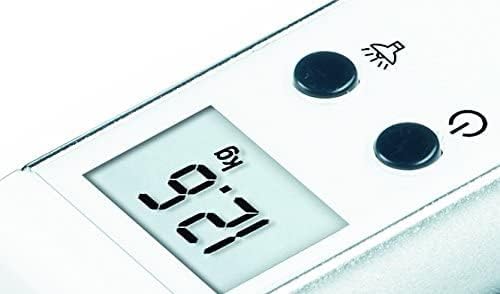
Figure 2: Close-up of the LCD display and control buttons. The display shows '9.2 kg' and the buttons for power/unit and flashlight are visible.
Setup
1. Battery Installation
The Beurer LS 10 requires 3 x 1.5V LR44 lithium metal button cell batteries (included). Ensure correct polarity when inserting.
- Locate the battery compartment on the side of the scale.
- Open the battery compartment cover.
- Insert the 3 LR44 batteries, observing the correct polarity (+/-).
- Close the battery compartment cover securely.
Note: When opening the battery compartment, be cautious as the batteries may be under slight pressure and could spring out.
2. Initial Power On
Press the Power/Unit button (⑂) to turn on the scale. The display will show '8888' briefly, then '0.0 kg' or '0.0 lb'.
Operating Instructions
1. Weighing Luggage
- Turn on the scale by pressing the Power/Unit button (⑂).
- Ensure the display shows '0.0 kg' or '0.0 lb' before weighing.
- Loop the weighing strap around the handle of your luggage and secure the hook.
- Lift the scale and luggage steadily off the ground. Hold the scale horizontally.
- Keep the scale stable until the display shows a stable weight and an audible beep confirms the automatic hold function has activated. The weight will then be locked on the display.
- Lower the luggage and read the weight from the LCD display.

Figure 3: The Beurer LS 10 scale in use, demonstrating how to weigh a suitcase. The display shows a weight of '12.5 kg'.
2. Changing Weight Units (kg/lb)
With the scale turned on and displaying '0.0', press the Power/Unit button (⑂) repeatedly to toggle between kilograms (kg) and pounds (lb). The selected unit will be shown on the display.
3. Using the Integrated Flashlight
Press the Flashlight button (💡) to turn the flashlight on or off. This feature is useful for reading the display or finding items in low-light environments.

Figure 4: The integrated flashlight of the Beurer LS 10. The light beam is visible from the end of the scale.
4. Automatic Shut-off
To conserve battery life, the scale will automatically turn off after approximately 60 seconds of inactivity.
Maintenance and Care
- Clean the scale with a slightly damp cloth. Do not use abrasive cleaners or immerse the device in water.
- If the scale will not be used for an extended period, remove the batteries to prevent leakage.
- Store the scale in a cool, dry place, away from direct sunlight and extreme temperatures. Use the fastening strap for convenient, space-saving storage.
Troubleshooting
| Problem | Solution |
|---|---|
| Display shows "Lo" | Batteries are low. Replace all 3 LR44 batteries. |
| Display shows "Err" or "O-Ld" | Overload. The weight exceeds the maximum capacity of 50 kg. Remove some weight from the luggage. |
| Inaccurate readings | Ensure the scale is held steadily and horizontally. Recalibrate by turning off and on. Check battery level. |
| Scale does not turn on | Check if batteries are inserted correctly and have sufficient charge. Replace if necessary. |
Specifications
| Feature | Detail |
|---|---|
| Product Name | Travel Accessory - Luggage Scale |
| Model Number | LS 10 (732.10) |
| Brand | Beurer |
| Maximum Load Capacity | 50 kg (110 lb) |
| Measurement Accuracy | ±100 g |
| Weight Units | kg / lb |
| Display Type | LCD |
| Digit Size | 9 mm |
| Power Source | 3 x 1.5V LR44 Lithium Metal Batteries (included) |
| Product Dimensions (L x W x H) | Approx. 13.8 x 3.2 x 5.5 cm |
| Product Weight | Approx. 110 grams |
| Strap Length | Approx. 22.5 cm |
| Country of Origin | China |
Warranty
The Beurer LS 10 Luggage Scale comes with a 5-year warranty from the date of purchase. This warranty covers defects in material and workmanship. It does not cover damage resulting from improper use, accidents, or unauthorized repairs. Please retain your proof of purchase for warranty claims.
Support
For further assistance, technical support, or warranty claims, please contact Beurer customer service. You can find contact information on the official Beurer website or through your local distributor.
Visit the official Beurer store: Beurer Store on Amazon