
1. Introduction
The Samlex SSW-600-12A is a 600-watt pure sine wave inverter designed to convert 12V DC battery power into 120V AC household electricity. This device is ideal for powering sensitive electronics and appliances that require a clean, stable power source, similar to utility-supplied electricity. Its compact design makes it suitable for use in vehicles, RVs, boats, and off-grid applications.
2. Safety Information
- Proper Ventilation: Ensure the inverter is installed in a well-ventilated area to prevent overheating. The unit features an internal cooling fan.
- Correct Battery Connection: Always connect the inverter to a 12V DC power source. Incorrect voltage can damage the unit. Observe correct polarity (positive to positive, negative to negative).
- Appropriate Cabling: Use adequately sized cables for connecting the inverter to the battery. Undersized cables can lead to voltage drop, reduced efficiency, and overheating. Refer to the manual for recommended cable gauges.
- Inline Fusing: An appropriate inline fuse should be installed on the DC input side to protect against overcurrent. Consult the manual for the correct fuse rating (e.g., 80 amps for this model).
- Avoid Overload: Do not exceed the inverter's continuous power rating (600 watts) or peak power rating. Overloading can cause the inverter to shut down or be damaged.
- Grounding: Ensure the inverter is properly grounded according to local electrical codes and the manufacturer's instructions.
- Proposition 65 Warning: This product may contain chemicals known to the State of California to cause cancer and birth defects or other reproductive harm. Wash hands after handling.
3. Product Overview
The Samlex SSW-600-12A is a compact and reliable pure sine wave inverter. It provides clean AC power suitable for a wide range of electronics, including laptops, medical devices, and sensitive audio/video equipment, without the risk of damage or interference often associated with modified sine wave inverters.
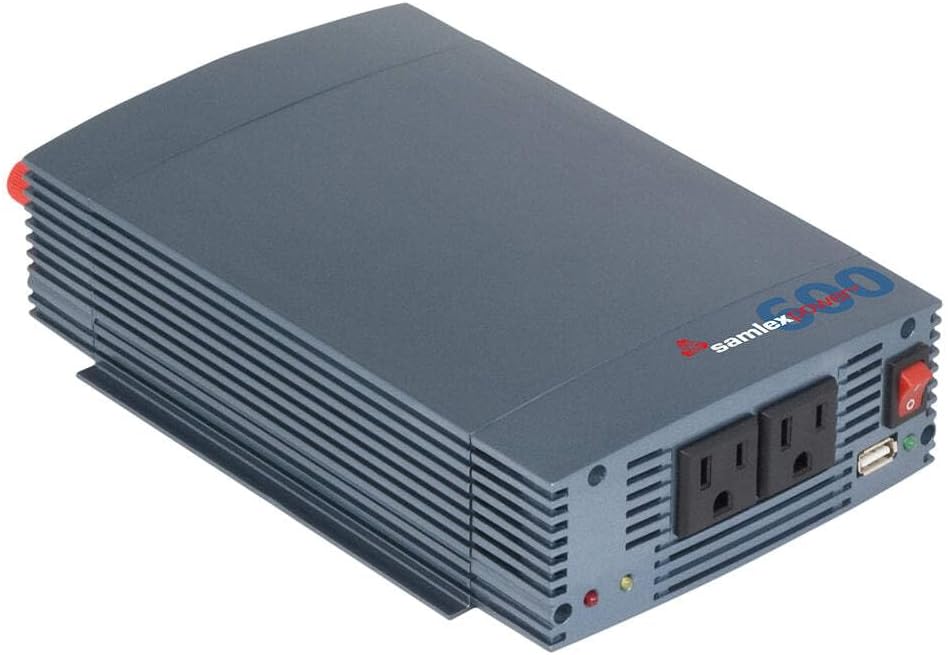
Figure 1: Samlex SSW-600-12A 600-watt 12V Pure Sine Wave Inverter, showing the front panel with two standard AC outlets and two USB charging ports. The unit has a gray metallic casing with heat dissipation fins along the sides.

Figure 2: A side profile of the inverter, highlighting its compact size. The image includes measurement markings indicating a height of 2.5 inches (6 cm), providing a clear understanding of its physical footprint.
Key Features:
- Pure Sine Wave Output: Provides clean, stable power for sensitive electronics.
- 600 Watts Continuous Power: Capable of powering multiple devices simultaneously.
- 12V DC Input: Compatible with standard vehicle and deep-cycle batteries.
- Multiple Output Ports: Includes standard AC outlets and USB charging ports.
- Integrated Cooling Fan: Automatically adjusts speed based on load and temperature to maintain optimal operating conditions.
- Safety Protections: Features overload, short circuit, low voltage, and over-temperature protection.
4. Setup and Installation
4.1 Mounting the Inverter
Choose a dry, well-ventilated location for mounting the inverter. Ensure there is sufficient clearance around the unit for proper airflow, especially around the cooling fan and ventilation grilles. The inverter can be mounted horizontally or vertically using appropriate fasteners through its mounting tabs.
4.2 Connecting to a 12V DC Power Source
- Prepare Cables: Use heavy-gauge cables (e.g., #6 AWG or larger for short runs, consult manual for specific recommendations) to connect the inverter to your 12V battery. Ensure the cables are as short as possible to minimize voltage drop.
- Install Inline Fuse: Install an appropriate inline fuse (e.g., 80A) on the positive (+) DC cable, as close to the battery as possible. This is a critical safety measure.
- Connect to Inverter: Connect the positive (+) cable (red) to the positive terminal on the inverter and the negative (-) cable (black) to the negative terminal. Tighten all connections securely.
- Connect to Battery: Connect the other end of the positive (+) cable to the positive terminal of your 12V battery and the negative (-) cable to the negative terminal. Ensure all connections are firm.
- Grounding: Connect the inverter's chassis ground terminal to a reliable earth ground point (e.g., vehicle chassis, boat hull ground, or dedicated ground rod for stationary setups).
Note: Some users have reported that the included cables may be undersized for optimal performance, especially under heavy loads. Consider upgrading to thicker gauge cables if you experience significant voltage drop or frequent low-voltage shutdowns.
5. Operating Instructions
5.1 Powering On/Off
- Ensure all DC connections are secure and the battery is adequately charged.
- Flip the ON/OFF switch on the inverter to the 'ON' position. The power indicator LED should illuminate (typically green).
- To power off, flip the switch to the 'OFF' position.
5.2 Connecting AC Devices
- With the inverter powered on, plug your 120V AC appliances into the standard AC outlets on the front panel.
- Ensure the total wattage of all connected AC devices does not exceed the inverter's continuous power rating (600 watts).
5.3 Connecting USB Devices
- Plug your USB-powered devices (e.g., smartphones, tablets) into the USB charging ports on the front panel.
- The USB ports provide standard 5V DC power for charging.
6. Maintenance
- Keep Clean: Regularly clean the exterior of the inverter with a dry cloth. Do not use liquid cleaners.
- Check Connections: Periodically inspect all DC and AC connections to ensure they are tight and free from corrosion. Loose connections can cause overheating and poor performance.
- Ensure Ventilation: Keep the inverter's ventilation openings clear of dust and debris to allow the cooling fan to operate effectively.
- Battery Health: Monitor your battery's charge level and overall health. A weak or discharged battery can lead to frequent low-voltage shutdowns.
7. Troubleshooting
| Problem | Possible Cause | Solution |
|---|---|---|
| Inverter not turning on | No DC input power; loose connections; blown fuse. | Check battery connections and charge level. Inspect inline fuse and replace if necessary. |
| Inverter shuts down (overload) | Connected load exceeds 600W continuous or peak rating. | Reduce the total wattage of connected appliances. Ensure starting (surge) power of motors/compressors is within inverter limits. |
| Inverter shuts down (low voltage) | Battery voltage too low (below 10.9V); undersized cables causing voltage drop. | Recharge or replace battery. Use thicker gauge cables for DC input. |
| Fan is noisy or constantly running | High load; high ambient temperature; fan operating as designed. | Ensure adequate ventilation. The fan speed adjusts automatically based on internal temperature and load. |
| No AC output | Inverter in fault mode; AC device not working. | Check inverter status indicators. Try a different AC device. Reset inverter by turning off and on. |
8. Specifications
| Feature | Detail |
|---|---|
| Model Name | SSW-600-12A |
| Brand | Samlex America |
| Wattage | 600 watts (Continuous) |
| Power Source | 12V DC (Solar Powered compatible) |
| Output Type | Pure Sine Wave |
| Item Dimensions (LxWxH) | 12.3 x 7.7 x 3.9 inches |
| Item Weight | 3.8 Pounds |
| Material | Plastic (housing) |
| Color | Gray |
9. Warranty and Support
The Samlex SSW-600-12A Inverter comes with a manufacturer's warranty. For specific details regarding warranty coverage, duration, and claims, please refer to the warranty card included with your product or visit the official Samlex America website. For technical support, troubleshooting assistance, or replacement parts, please contact Samlex America customer service directly.


