
1. Introduction
The Simran AC-3000 is a heavy-duty, continuous-use voltage converter transformer designed for global compatibility. This unit facilitates voltage conversion between 110V/120V and 220V/240V, operating efficiently with both 50Hz and 60Hz frequencies. It can function as a step-up transformer (converting 110V/120V to 220V/240V) or a step-down transformer (converting 220V/240V to 110V/120V).
The transformer features a durable metal casing, an ON/OFF switch with an indicator lamp, and multiple output sockets for versatile use. It is fuse-protected, and two spare fuses are included for convenience. The AC-3000 is CE Certified, ensuring compliance with European safety standards.

Figure 1: Front view of the Simran AC-3000 Voltage Transformer, showing the output sockets and power switch.
2. Important Safety Information
Read all instructions before using this product. Failure to follow these safety guidelines may result in electric shock, fire, or serious injury.
- Ventilation: Ensure the transformer is placed in a well-ventilated area. Do not block any ventilation openings.
- Dry Environment: Use the transformer in a dry location. Do not expose it to rain, moisture, or liquids.
- Overload Protection: To prevent overheating and damage, always ensure the total wattage of connected appliances does not exceed the transformer's rated capacity (3000 Watts).
- Wattage Slack: For optimal performance and safety, leave at least a 100% wattage slack. For example, if your appliance is 1500 Watts, use a 3000 Watt transformer.
- Surge Appliances: For appliances with high power surges upon startup (e.g., TVs, Xbox, game consoles, heating appliances, laser printers, power tools), select a transformer with a wattage rating 3 to 4 times higher than the appliance's rated wattage.
- Grounding: The transformer is equipped with a grounded USA plug. Always connect it to a properly grounded outlet.
- Children and Pets: Keep the transformer out of reach of children and pets.
- Disconnection: Always turn off the transformer and unplug it from the power source before cleaning or when not in use for extended periods.
- Damage: Do not operate the transformer if the cord, plug, or casing is damaged. Contact qualified service personnel for repair.
3. Setup Instructions
3.1 Unpacking and Inspection
- Carefully remove the transformer from its packaging.
- Inspect the unit for any signs of damage during transit. If damaged, do not use and contact your retailer.
- Confirm all included accessories are present: the AC-3000 transformer, two spare fuses, and one grounded European Shucko plug adapter.
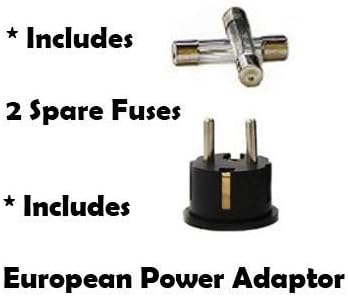
Figure 2: The Simran AC-3000 includes two spare fuses and a European Shucko plug adapter.
3.2 Selecting Input Voltage (Step Up or Step Down)
The Simran AC-3000 features a voltage selector switch on the back of the unit. This switch determines whether the transformer will step up or step down the voltage.
- For Step Down (220V/240V to 110V/120V): If you are in a country with 220V/240V mains power and wish to use a 110V/120V appliance, set the switch to 220V.
- For Step Up (110V/120V to 220V/240V): If you are in a country with 110V/120V mains power and wish to use a 220V/240V appliance, set the switch to 110V.
WARNING: Always ensure the voltage selector switch is set correctly before connecting the transformer to a power source or an appliance. Incorrect setting can damage the transformer and/or your appliance.

Figure 3: The voltage selector switch on the rear of the unit, allowing selection between 110V and 220V input.
3.3 Connecting to Power
- With the transformer's ON/OFF switch in the OFF position, plug the transformer's power cord into a suitable wall outlet.
- If using in Europe or Asia with a Shucko outlet, attach the provided European Shucko plug adapter to the transformer's USA plug before inserting into the wall outlet.
4. Operating Instructions
4.1 Connecting Your Appliance
- Ensure your appliance is turned off.
- Identify the correct output socket on the front of the transformer for your appliance's voltage requirement. The transformer has two 110V/120V outlets and two 220V/240V outlets.
- Plug your appliance into the appropriate output socket on the transformer.
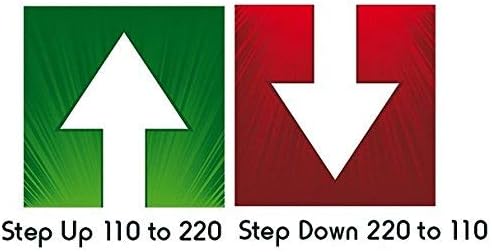
Figure 4: Visual representation of Step Up (110V to 220V) and Step Down (220V to 110V) functionality.
4.2 Powering On
- Once the transformer is plugged into the wall and your appliance is connected, flip the ON/OFF switch on the front of the transformer to the ON position.
- The indicator lamp will illuminate, signifying that the transformer is receiving power and is operational.
- You may now turn on your connected appliance.
4.3 Powering Off
- Turn off your connected appliance.
- Flip the ON/OFF switch on the transformer to the OFF position. The indicator lamp will turn off.
- Unplug the transformer from the wall outlet when not in use.
5. Maintenance
5.1 Fuse Replacement
The Simran AC-3000 is fuse-protected. If the transformer stops working and the indicator lamp does not light up, the fuse may have blown. Two spare fuses are included with your unit.
- Ensure the transformer is turned off and unplugged from the wall outlet.
- Locate the fuse holder, typically on the back or side of the unit.
- Unscrew or open the fuse holder.
- Carefully remove the blown fuse.
- Insert a new fuse of the correct rating (30 Amp) into the holder.
- Securely close the fuse holder.
- Plug the transformer back into the wall and test its operation.
5.2 Cleaning
To clean the transformer, ensure it is unplugged from all power sources. Use a soft, dry cloth to wipe down the exterior. Do not use liquid cleaners or abrasive materials, as these can damage the unit.
5.3 Storage
When not in use, store the transformer in a cool, dry place, away from direct sunlight and extreme temperatures. Keep it in its original packaging if possible to protect it from dust and physical damage.
6. Troubleshooting
| Problem | Possible Cause | Solution |
|---|---|---|
| Transformer does not power on (no indicator light). | No power from wall outlet, blown fuse, loose internal wiring. | Check wall outlet with another device. Replace fuse (refer to Section 5.1). If problem persists, contact support. |
| Appliance does not work when connected. | Incorrect voltage selection, appliance not turned on, appliance faulty, transformer overloaded. | Verify voltage selector switch setting. Ensure appliance is switched on. Test appliance directly if possible. Check total wattage of connected devices. |
| Transformer is excessively hot. | Overloaded, insufficient ventilation. | Immediately disconnect appliance and transformer. Reduce load. Ensure adequate airflow around the unit. Allow to cool before reuse. |
| Unusual noise from transformer. | Normal operational hum (some noise is expected), loose components. | A slight hum is normal. If noise is loud or unusual, disconnect and inspect for loose parts. If unsure, contact support. |
7. Specifications
- Model: AC-3000
- Brand: Simran
- Power Rating: 3000 Watts (Continuous Use)
- Input Voltage: Selectable 110V/120V or 220V/240V
- Output Voltage: 110V/120V and 220V/240V (simultaneous output)
- Frequency: 50Hz / 60Hz compatible
- Output Sockets: Two 110V/120V (USA standard), Two 220V/240V (One Universal, One European Shucko)
- Protection: Fuse protected (30 Amp fuse)
- Dimensions (L x W x H): Approximately 13.5 x 10.5 x 9 inches
- Weight: Approximately 28 pounds
- Certifications: CE Certified
- Included Components: Voltage transformer, 2 extra fuses, 1 European Shucko plug adapter
8. Warranty and Support
8.1 Warranty Information
This Simran AC-3000 transformer typically comes with a 30-day warranty from the date of purchase. Please refer to your purchase documentation or contact your retailer for specific warranty terms and conditions.
8.2 Customer Support
For technical assistance, troubleshooting beyond this manual, or warranty claims, please contact the retailer or manufacturer directly. Keep your purchase receipt and model number (AC-3000) readily available when seeking support.

