
Introduction
This manual provides comprehensive instructions for the safe and efficient operation of your Simran AC-100 Voltage Power Converter. This heavy-duty transformer is designed for continuous use, allowing you to step up 110V/120V to 220V/240V or step down 220V/240V to 110V/120V. It is suitable for worldwide use with both 50Hz and 60Hz frequencies. Please read this manual thoroughly before using the device to ensure proper functionality and to prevent damage or injury.
Safety Information
Always adhere to the following safety precautions to prevent electric shock, fire, or damage to the unit and connected appliances:
- Power Rating: Ensure the total wattage of the appliances connected does not exceed the converter's maximum wattage (100 Watts for this model). For heating appliances, laser printers, or power tools, allow a power surge margin of 3 to 4 times the rated wattage. For TVs, Xbox, and PS3 consoles, allow a 3 times wattage rating.
- Ventilation: Place the converter in a well-ventilated area. Do not block ventilation openings.
- Moisture: Do not expose the converter to rain or moisture. Do not operate with wet hands.
- Indoor Use Only: This unit is designed for indoor use.
- Grounding: Always use a grounded outlet. The converter comes with a grounded USA plug and a grounded European Shucko plug adapter.
- Fuse Protection: The unit is fuse protected. If the unit stops working, check and replace the fuse as instructed in the Maintenance section. Use only fuses of the specified rating.
- Children: Keep out of reach of children.
- Disconnection: Disconnect the power converter from the main power supply when not in use.
Product Overview
The Simran AC-100 is a compact and robust voltage converter designed for international travel and use with various electronic devices and appliances.

Figure 1: Front view of the Simran AC-100 Voltage Power Converter with its power switch, 110V and 220V output sockets, and two spare fuses.
Key Features:
- CE Certified 100 Watt Heavy-Duty Continuous Use Voltage Converter Transformer.
- Operates in both 110V/120V and 220V/240V countries with 50Hz / 60Hz.
- Functions as both a Step Up (110V/120V to 220V/240V) and Step Down (220V/240V to 110V/120V) converter.
- Features two outlets on the front: one for 110V and one for 220V.
- Equipped with an On/Off power switch and an indicator lamp.
- Wired with a grounded USA plug.
- The 220V outlet is a USA patented universal output socket, accepting most plug types (excluding large South African plugs).
- Fuse protected, with 2 spare fuses included.
- Includes a grounded European Shucko plug adapter for use in Europe and Asia.
- Durable metal casing.
Setup
Follow these steps to set up your Simran AC-100 converter:
- Unpack: Carefully remove the converter and all accessories from the packaging. Verify that the unit, two spare fuses, and the European Shucko plug adapter are present.
- Placement: Place the converter on a stable, flat surface in a well-ventilated area, away from direct sunlight, heat sources, and moisture.
- Input Voltage Selection: Locate the input voltage switch on the back of the unit. Set this switch to match the voltage of the wall outlet you will be plugging the converter into (either 110V/120V or 220V/240V). Incorrect setting can damage the unit or connected appliances.
- Connect to Power: Plug the converter's power cord into a grounded wall outlet. If you are in Europe or Asia and using a 220V/240V outlet, attach the provided European Shucko plug adapter to the converter's USA plug before plugging it into the wall.
- Power On: Flip the ON/OFF switch on the front of the unit to the 'ON' position. The indicator lamp should illuminate, confirming the unit is receiving power.
- Connect Appliance: Plug your appliance into the appropriate output socket on the front of the converter.
- For Step Up (110V/120V input to 220V/240V output): Plug your 220V/240V appliance into the 220V output socket.
- For Step Down (220V/240V input to 110V/120V output): Plug your 110V/120V appliance into the 110V output socket.
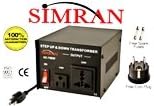
Figure 2: The Simran AC-100 converter shown with the included European Shucko plug adapter and spare fuses, illustrating accessories for international use.
Operating Instructions
Once the converter is set up and powered on, it is ready for use. Ensure your appliance's power requirements (voltage and wattage) are compatible with the converter's output and capacity.
Step Up Operation (110V/120V to 220V/240V):
- Set the input voltage switch on the back of the converter to 110V/120V.
- Plug the converter into a 110V/120V wall outlet.
- Plug your 220V/240V appliance into the 220V output socket on the front of the converter.
- Turn on the converter using the front ON/OFF switch, then turn on your appliance.
Step Down Operation (220V/240V to 110V/120V):
- Set the input voltage switch on the back of the converter to 220V/240V.
- Plug the converter into a 220V/240V wall outlet (using the European Shucko adapter if necessary).
- Plug your 110V/120V appliance into the 110V output socket on the front of the converter.
- Turn on the converter using the front ON/OFF switch, then turn on your appliance.
Note on Frequency: This transformer converts voltage but does not change the frequency (Hz). If your device relies on precise timing (like some clocks or motors), be aware that operating a 50Hz device on a 60Hz supply (or vice versa) may affect its performance or lifespan.
Maintenance
The Simran AC-100 is designed for durability. Regular cleaning and proper fuse management will ensure its longevity.
Cleaning:
- Ensure the converter is unplugged from the wall outlet before cleaning.
- Wipe the exterior with a soft, dry cloth. Do not use liquid cleaners or abrasive materials.
Fuse Replacement:
The converter is equipped with a protective fuse. If the unit stops functioning or the indicator light does not turn on, the fuse may have blown. Two spare fuses are included with your purchase.
- Disconnect Power: Unplug the converter from the wall outlet and disconnect any connected appliances.
- Locate Fuse Holder: The fuse holder is typically located on the back or side of the unit. It is a small, round cap that can be unscrewed.
- Remove Blown Fuse: Unscrew the fuse holder cap and carefully remove the old fuse. A blown fuse will usually have a broken wire or a dark discoloration inside.
- Insert New Fuse: Insert one of the spare fuses into the fuse holder. Ensure it is properly seated.
- Secure Fuse Holder: Screw the fuse holder cap back into place firmly.
- Test: Plug the converter back into the wall outlet and turn it on to verify functionality. If the fuse blows again immediately, there may be an issue with the connected appliance or an internal fault; discontinue use and consult support.
Troubleshooting
If you encounter issues with your Simran AC-100 converter, refer to the following common problems and solutions:
| Problem | Possible Cause | Solution |
|---|---|---|
| Converter does not turn on (no indicator light). |
|
|
| Appliance does not work when plugged into converter. |
|
|
| Converter gets excessively hot. |
|
|
Specifications
| Attribute | Detail |
|---|---|
| Model Number | AC-100 |
| Brand | Simran |
| Wattage | 100 Watts |
| Input Voltage | 110V/120V or 220V/240V (selectable) |
| Output Voltage | 110V/120V and 220V/240V (simultaneous output) |
| Frequency | 50Hz / 60Hz compatible |
| Dimensions (L x W x H) | 6 x 5.75 x 4 inches |
| Item Weight | 3.27 pounds |
| Casing Material | Metal |
| Certifications | CE Certified |
| Included Accessories | 2 Spare Fuses, Grounded European Shucko Plug Adapter |
Warranty and Support
For warranty information, technical support, or service inquiries regarding your Simran AC-100 Voltage Power Converter, please contact Simran customer service directly. Refer to the product packaging or the official Simran website for the most current contact details and warranty terms.
Manufacturer: VCT Electronics

