
Sanus CAPC01-B1
Sanus CAPC01-B1 Rack Mounted Power Conditioner User Manual
Model: CAPC01-B1
Introduction
This manual provides essential information for the proper installation, operation, and maintenance of your Sanus CAPC01-B1 Rack Mounted Power Conditioner. Please read these instructions thoroughly before use to ensure optimal performance and safety.
The Sanus CAPC01-B1 is designed to protect your rack equipment and provide clean power. It features adjustable, dual pull-out LED lights for illuminating rack equipment, 11 protected outlets, and EMI/RFI noise filtration.
Important Safety Information
- Read all instructions: Before operating the unit, read and understand all safety and operating instructions.
- Retain instructions: Keep this manual for future reference.
- Heed warnings: Follow all warnings on the product and in the operating instructions.
- Unplug during storms: Unplug the unit during lightning storms or when unused for long periods.
- Avoid liquids: Do not expose the unit to dripping or splashing liquids. Do not place objects filled with liquids on the unit.
- Proper ventilation: Ensure adequate ventilation. Do not block ventilation openings.
- Power source: Connect only to a grounded AC power outlet with the specified voltage.
- Servicing: Do not attempt to service this product yourself. Refer all servicing to qualified service personnel.
Product Overview
The Sanus CAPC01-B1 is a rack-mounted power conditioner designed to provide clean, protected power to your audio/video equipment. Key features include:
- Adjustable, dual pull-out LED lights for illuminating rack equipment.
- 11 fast-acting 2,400-joule protected outlets.
- Multi-Mode LED panel indicating voltage, amperage, and power consumption.
- EMI/RFI noise filtration, reducing noise up to 30 dB for superior signal quality.
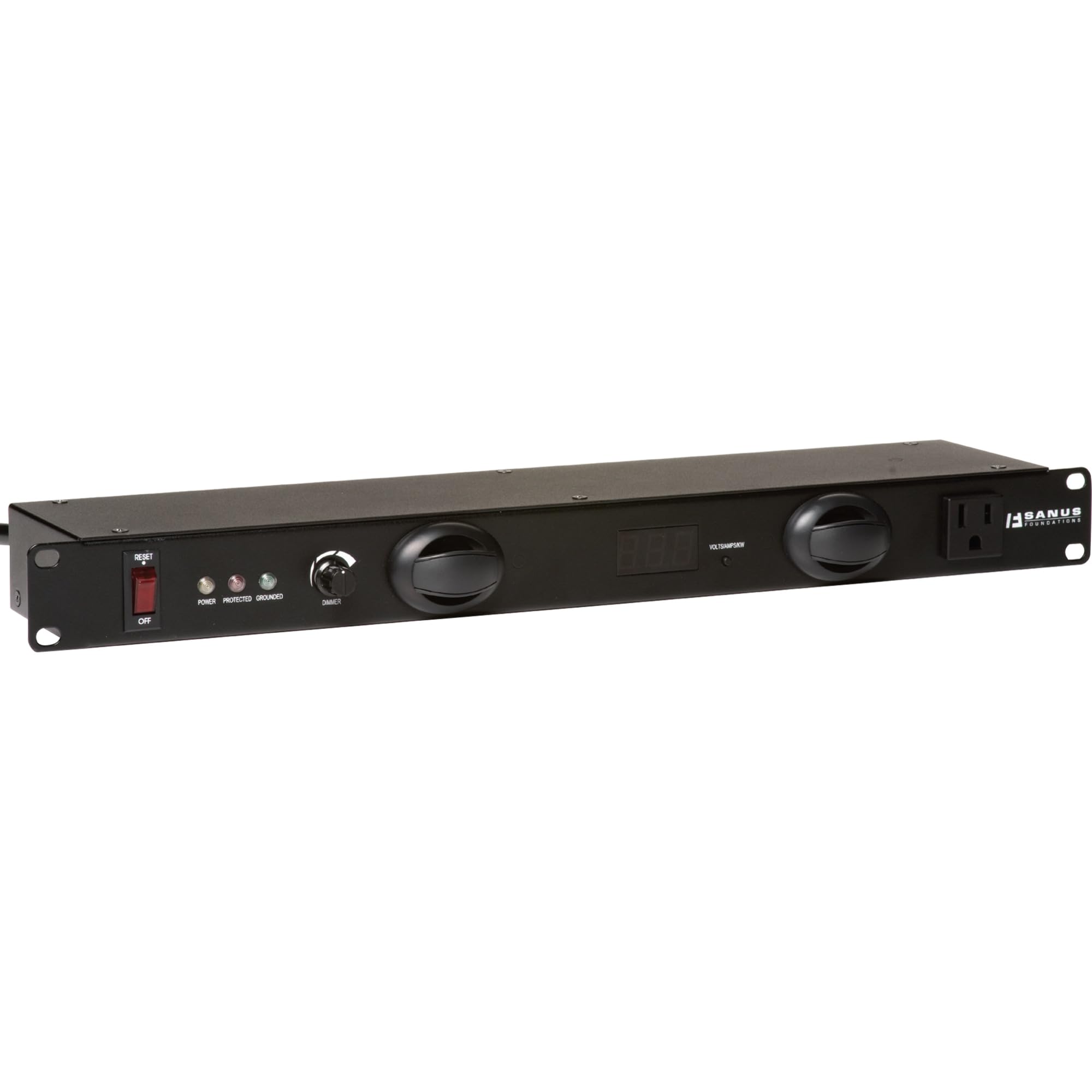
Figure 1: Front view of the Sanus CAPC01-B1 Rack Mounted Power Conditioner, showing the LED lights and display.
Setup and Installation
Package Contents
Verify that all components are present:
- Sanus CAPC01-B1 Power Conditioner
- Rack mounting hardware
- User Manual (this document)
Mounting Instructions
- Ensure the rack is stable and properly grounded.
- Align the mounting ears of the CAPC01-B1 with the rack rails.
- Secure the unit to the rack using the provided rack mounting hardware. Ensure all screws are tightened securely.
- Allow adequate space for ventilation around the unit.
Connecting Equipment
- With the power conditioner turned OFF, plug your audio/video equipment into the protected outlets on the rear of the CAPC01-B1.
- Ensure all equipment is properly seated in the outlets.
- Plug the power conditioner's main power cord into a grounded AC wall outlet.
Operating Instructions
Powering On/Off
- To power on the unit, press the main power switch located on the front panel. The LED display will illuminate.
- To power off, press the main power switch again.
Using the LED Lights
- The CAPC01-B1 features dual pull-out LED lights. Gently pull out the lights from the front panel.
- Rotate the lights to adjust their direction.
- Use the dimmer knob on the front panel to adjust the brightness of the LED lights.
- Push the lights back into the unit when not in use.
Monitoring with the Multi-Mode LED Panel
The front panel LED display provides real-time information:
- Voltage: Displays the incoming AC voltage.
- Amperage: Shows the total current draw of connected equipment.
- Power Consumption: Indicates the total power being consumed.
Regularly monitor these readings to ensure your equipment is operating within safe parameters.
Maintenance
Cleaning
- Always unplug the unit from the power outlet before cleaning.
- Use a soft, dry cloth to wipe the exterior surfaces.
- Do not use liquid cleaners, aerosol cleaners, or strong chemicals, as they may damage the finish or internal components.
Ventilation
- Ensure that the ventilation openings on the unit are not blocked by dust or other obstructions.
- Periodically check for dust buildup and gently clean if necessary.
Troubleshooting
| Problem | Possible Cause | Solution |
|---|---|---|
| Unit does not power on. | No power from wall outlet; main power switch off; internal fuse tripped. | Check wall outlet with another device. Ensure main power switch is ON. If unit has a resettable breaker, press it. If not, contact support. |
| Connected equipment not receiving power. | Equipment not plugged in correctly; power conditioner not on; surge protection tripped. | Verify equipment is securely plugged into outlets. Ensure power conditioner is ON. Check for a surge protection reset button (if applicable) or power cycle the unit. |
| LED lights not working. | Lights not pulled out; dimmer knob set to minimum; internal issue. | Gently pull out the LED lights. Adjust the dimmer knob. If still not working, contact support. |
| Display shows unusual readings. | Overload; faulty sensor. | Reduce the load by unplugging some equipment. If readings persist, contact support. |
Specifications
- Model: CAPC01-B1
- Outlets: 11 protected outlets
- Surge Protection: 2,400 Joules
- Noise Filtration: EMI/RFI up to 30 dB
- Dimensions: 20.5 x 8 x 2.6 inches (52.07 x 20.32 x 6.6 cm)
- Weight: 6.55 pounds (2.97 kg)
- Manufacturer: Tjernlund Products – Audio
- Date First Available: March 31, 2011
Warranty and Support
For warranty information and technical support, please refer to the documentation provided with your purchase or visit the official Sanus website. Do not attempt to repair the unit yourself, as this may void your warranty.
Contact Information: Please visit the Sanus official website for the most up-to-date support contact details.
Related documentsCAPC01-B1


Ask a question about this manual
Ask about setup, troubleshooting, compatibility, parts, safety, or missing instructions. Manuals+ will review the question and use this page’s manual context to help answer it.