
1. Introduction
This instruction manual provides essential information for the safe and effective use of your Nikon AF Nikkor 70-210mm 1:4-5.6 Zoom Lens. Please read this manual thoroughly before using the lens to ensure proper operation and to maximize its performance. Keep this manual accessible for future reference.
2. Product Overview
The Nikon AF Nikkor 70-210mm 1:4-5.6 is a versatile telephoto zoom lens designed for Nikon cameras. It features a variable aperture and a zoom range suitable for various photographic situations, from portraits to distant subjects. This lens is compatible with Nikon FX and DX format cameras that possess an internal focus motor.

Figure 2.1: Nikon AF Nikkor 70-210mm 1:4-5.6 Zoom Lens shown with its instruction manual and lens caps.
Key Features:
- Focal Length: 70-210mm zoom range for telephoto photography.
- Aperture: Variable maximum aperture of f/4-5.6.
- Autofocus (AF): Utilizes the camera's internal focus motor for autofocus operation.
- Compatibility: Designed for use with Nikon FX and DX cameras.
- D-Type Lens: Incorporates a chip to transmit distance information to compatible camera bodies, aiding in flash metering.
- Construction: Features a robust construction, often with metal components, for durability.
Lens Components:
Refer to the image below for a visual representation of the lens and its key areas.
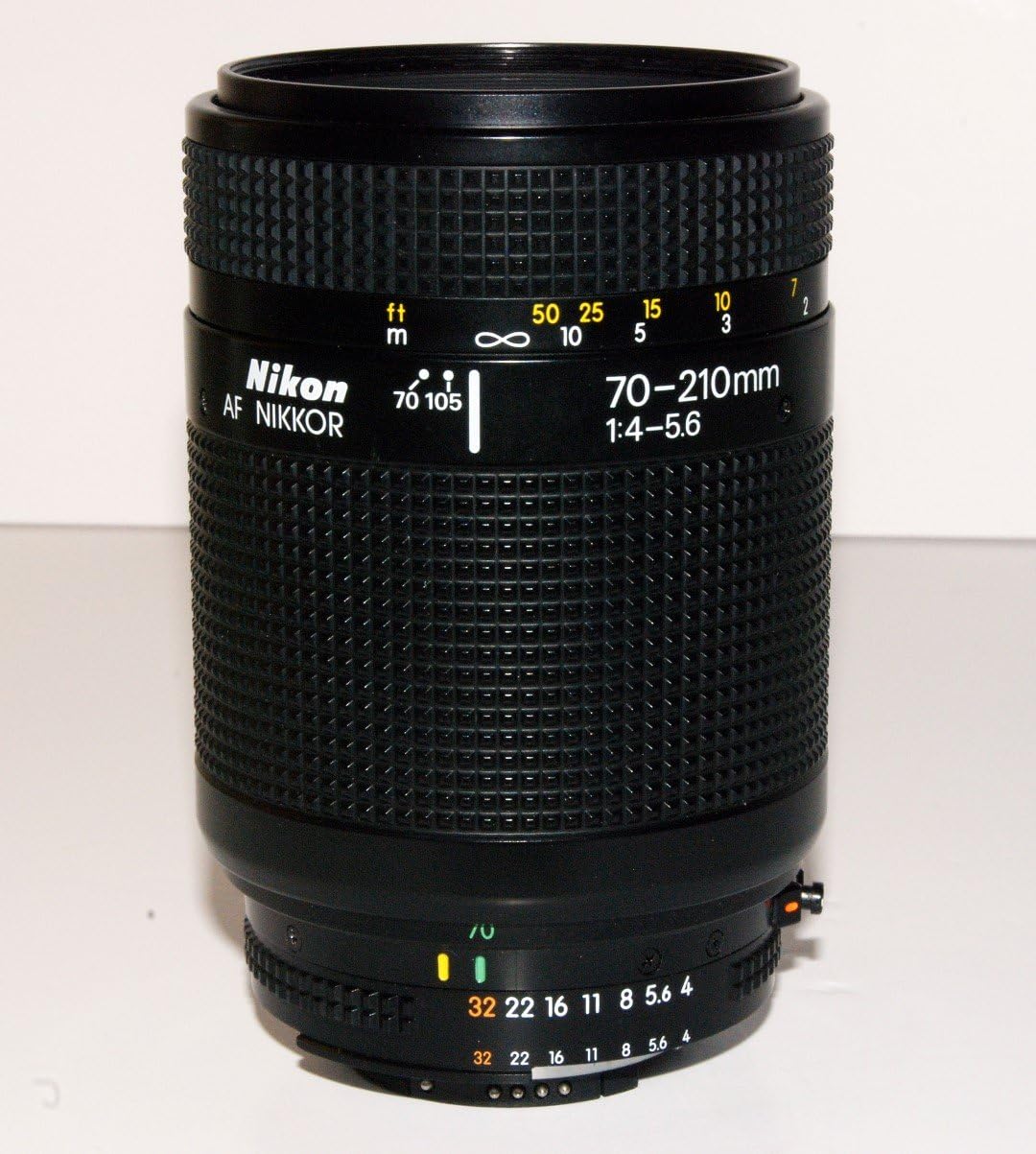
Figure 2.2: Detailed view of the Nikon AF Nikkor 70-210mm 1:4-5.6 Zoom Lens barrel, highlighting focal length and aperture scales.
- Front Element: The outermost glass element at the front of the lens.

Figure 2.3: Front optical element.
- Zoom Ring/Barrel: Used to adjust the focal length (70mm to 210mm). This lens typically features a push-pull zoom mechanism.
- Focus Ring: Used for manual focusing.
- Aperture Ring: Used to set the aperture (f-stop).
- Lens Mount: The rear part of the lens that attaches to the camera body.

Figure 2.4: Rear lens mount and optical element.
- Rear Element: The innermost glass element at the rear of the lens.
3. Setup
Attaching the Lens:
- Ensure both the camera and lens are clean and free of dust.
- Align the mounting index mark on the lens with the corresponding mark on the camera body.
- Rotate the lens counter-clockwise (when viewed from the front) until it clicks into place. Do not force the lens.
- Remove the front lens cap.
Detaching the Lens:
- Attach the front and rear lens caps to protect the lens elements.
- While pressing the lens release button on the camera body, rotate the lens clockwise until it detaches.
- Store the lens in a protective case or pouch.
4. Operating the Lens
Zoom Operation:
The Nikon AF Nikkor 70-210mm 1:4-5.6 lens typically features a push-pull zoom mechanism. To change the focal length:
- To zoom in (increase focal length): Pull the lens barrel forward, away from the camera body.
- To zoom out (decrease focal length): Push the lens barrel backward, towards the camera body.
Adjust the zoom to frame your subject as desired.
Focusing:
This lens supports both autofocus (AF) and manual focus (M).
- Autofocus (AF): For autofocus to function, your Nikon camera body must have an internal focus motor. Set the camera's focus mode to AF. The lens will then use the camera's motor to achieve focus.
- Manual Focus (M): To focus manually, set your camera's focus mode to M. Rotate the focus ring on the lens until your subject appears sharp in the viewfinder or on the camera's LCD screen.
Note: The "D" model of this lens includes a chip that provides distance information to the camera, which can improve flash metering accuracy.
Aperture Control:
The lens features an aperture ring. For modern Nikon cameras, it is generally recommended to set the aperture ring to its smallest aperture (highest f-number, e.g., f/32) and lock it there, allowing the camera body to control the aperture electronically. Consult your camera's manual for specific instructions on using lenses with aperture rings.
5. Maintenance
Cleaning the Lens:
- Lens Elements: Use a lens blower brush to remove dust. For smudges or fingerprints, use a clean, soft lens cloth and a small amount of lens cleaning fluid. Apply fluid to the cloth, not directly to the lens.
- Lens Body: Wipe the lens barrel with a soft, dry cloth. Avoid using harsh chemicals or solvents.
Storage:
- Always attach both front and rear lens caps when the lens is not in use.
- Store the lens in a cool, dry place, away from direct sunlight and extreme temperatures.
- Using a lens pouch can provide additional protection against dust and minor impacts.

Figure 5.1: Black soft pouch with Nikon branding, designed for storing the lens.
6. Troubleshooting
- Autofocus not working:
- Ensure your camera body has an internal focus motor.
- Check that the camera's focus mode is set to AF.
- Verify the lens is securely mounted to the camera body.
- Image appears blurry:
- Check focus settings (AF/M) and ensure proper focus acquisition.
- Verify shutter speed is fast enough to prevent camera shake, especially at longer focal lengths.
- Clean lens elements if smudges or dust are present.
- Lens not attaching/detaching smoothly:
- Ensure alignment marks are correctly matched.
- Do not force the lens. If resistance is met, re-align and try again.
7. Specifications
| Feature | Detail |
|---|---|
| Brand | Nikon |
| Model | AF Nikkor 70-210mm 1:4-5.6 |
| Focal Length | 70-210 mm |
| Maximum Aperture | f/4-5.6 |
| Lens Type | Telephoto Zoom |
| Compatible Mountings | Nikon F-mount (FX, DX with internal focus motor) |
| Item Weight | 1.6 pounds (approximately 725 grams) |
| Package Dimensions | 8.3 x 4.3 x 3.6 inches |
| ASIN | B004LEKIY4 |
8. Warranty and Support
This product is sold without a seller warranty. For any support or service inquiries, please refer to the official Nikon support channels or contact your retailer for assistance regarding product functionality or compatibility.
For official Nikon support, please visit the Nikon Store on Amazon or the official Nikon website.


