Introduction
This manual provides comprehensive instructions for the operation and maintenance of your Canon PowerShot A1200 Digital Camera. The PowerShot A1200 is a 12.1 Megapixel camera featuring a 4x wide-angle optical zoom lens, 720p HD video recording, and a choice between an LCD screen and an optical viewfinder. It is designed for ease of use, offering various shooting modes to capture high-quality images and videos in diverse conditions.

Figure 1: Front view of the Canon PowerShot A1200 Digital Camera. This image displays the camera's silver body, the Canon logo, the lens with 4x optical zoom, and the flash unit.
Setup
Package Contents
Before beginning, ensure all items are present in the package:
- Canon PowerShot A1200 Digital Camera
- AA Batteries (Note: Batteries are not included with all packages and may need to be purchased separately.)
- USB Cable
- Software CD
- Wrist Strap
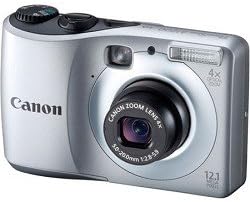
Figure 2: The Canon PowerShot A1200 camera shown with its typical accessories, including AA batteries, a USB cable, a software CD, and a wrist strap.
Battery Installation
The PowerShot A1200 operates on two AA-size batteries.
- Locate the battery compartment cover on the bottom of the camera.
- Slide the cover latch to open the compartment.
- Insert two AA batteries, ensuring correct polarity (+/-) as indicated inside the compartment.
- Close the battery compartment cover securely until it clicks into place.
Memory Card Installation
The camera supports SD, SDHC, SDXC, MMC, MMCplus, and HCMMCplus memory cards.
- Open the battery/memory card compartment cover.
- Insert the memory card into the card slot with the label facing the front of the camera until it clicks.
- Close the compartment cover securely.
Operating Instructions
Powering On/Off
Press the ON/OFF button located on the top of the camera to power it on or off.
Using the LCD Screen and Optical Viewfinder
The PowerShot A1200 offers both a 2.7-inch LCD screen and an optical viewfinder for composing shots.
- The LCD screen provides a live view of your subject and displays camera settings. It is ideal for reviewing images and navigating menus.
- The Optical Viewfinder allows you to compose shots by looking directly through the camera, which can be beneficial in bright sunlight or for conserving battery life.

Figure 3: Rear view of the Canon PowerShot A1200, highlighting the 2.7-inch LCD screen and the arrangement of control buttons for navigation and function selection.
Shooting Modes
Rotate the mode dial to select your desired shooting mode:
- Smart AUTO: Automatically selects optimal settings from 32 predefined scenes.
- P Program: Allows access to advanced exposure compensation while maintaining automatic operation.
- Creative Filters: Apply artistic effects to your photos:
- Fisheye Effect: Creates a classic photo distortion.
- Miniature Effect: Blurs top and bottom to emphasize perspective, making subjects appear miniature.
- Toy Camera Effect: Simulates photos from toy or pinhole cameras with vignette effect.
- Monochrome: Choose from Black-and-White, Sepia, or Blue tones.
- Super Vivid: Intensifies existing hues for bright, saturated colors.
- Poster Effect: Combines similar shades into one color for a poster-like appearance.
- Easy: Maintains high image quality for simple, fail-proof shots.
- Blur Reduction: Boosts sensitivity for faster shutter speeds to reduce camera shake.
- Portrait: Blurs the background to make the subject stand out.
- Landscape: Sets a small aperture for front-to-back sharpness.
- Kids & Pets: Reduces focusing time to capture fast-moving subjects.
- Smart Shutter: Automatically takes a photo when people smile, wink, or enter the frame.
- Low Light: Optimizes for high-quality images in dimly lit situations.
- Beach: Helps capture clear shots at sunny beaches without darkened faces.
- Foliage: Enhances colors for brilliant shots of greenery and blossoms.
- Snow: Ensures clear snow scenes without darkened subjects or blue tint.
- Fireworks: Captures brilliant images of fireworks.
- Long Shutter: Blurs moving subjects for artistic effect, suitable for night photography.
- Discreet Mode: Disables flash, AF assist beam, and all camera sounds for quiet environments.
Still Image Capture
The camera captures 12.1 Megapixel still images, allowing for large prints and flexible cropping without significant loss of quality.
Video Recording
Record high-definition videos in 720p. To start recording, press the dedicated movie button.
Zoom Function
Utilize the 4x optical zoom for clear magnification of distant subjects. The camera also features digital zoom.
Flash Usage
The built-in flash can be set to Auto, On, Off, or Slow Synch mode. Adjust flash settings via the camera menu.
Focusing
The camera features various autofocus technologies including Center, Continuous, Contrast Detection, Face Detection, Live View, Multi-area, Single, and Tracking AF.
Maintenance
Cleaning the Camera
- Use a soft, lint-free cloth to clean the camera body.
- For the lens and LCD screen, use a specialized lens cleaning cloth and solution. Avoid harsh chemicals.
- Gently blow away dust from the lens surface before wiping.
Battery Care
- Remove batteries if the camera will not be used for an extended period to prevent leakage.
- Use high-quality AA alkaline or rechargeable NiMH batteries for optimal performance.
Storage
Store the camera in a cool, dry place away from direct sunlight and extreme temperatures.
Troubleshooting
| Problem | Possible Cause / Solution |
|---|---|
| Camera does not power on. |
|
| Images are blurry. |
|
| Flash does not fire. |
|
| Memory card error. |
|
| Short battery life. |
|
Specifications
| Feature | Detail |
|---|---|
| Model Name | Powershot A1200 |
| Model Number | 5031B001 |
| Effective Still Resolution | 12.1 MP |
| Optical Zoom | 4x |
| Digital Zoom | 4x |
| Video Resolution | HD 720p |
| Screen Size | 2.7 Inches LCD |
| Viewfinder | Optical |
| Photo Sensor Technology | CCD |
| Image Stabilization | Digital, Optical |
| Supported File Format | JPEG, RAW |
| Memory Card Type | SD/SDHC/SDXC/MMC/MMCplus/HCMMCplus |
| Battery Type | 2 x AA batteries |
| Connectivity Technology | USB |
| Item Weight | 0.41 Pounds (approx. 186g) |
| Color | Silver |
Warranty Information
The Canon PowerShot A1200 Digital Camera comes with a ONE YEAR limited warranty from the date of purchase. This warranty covers defects in materials and workmanship under normal use. Please retain your proof of purchase for warranty claims. For full terms and conditions, refer to the warranty card included with your product or visit the official Canon support website.
Support
For further assistance, technical support, or service inquiries, please visit the official Canon support website or contact Canon customer service.
Online Support: www.usa.canon.com/support (Example link, actual link may vary)
Phone Support: Refer to your regional Canon website for local contact numbers.


