1. Introduction
The Sennheiser CXC 700 are premium in-ear canal headphones designed for travelers, featuring NoiseGard / digital active noise cancellation technology and a TalkThrough function. This manual provides essential information for the proper setup, operation, and maintenance of your CXC 700 headphones.
2. Package Contents
Before you begin, please ensure all items listed below are present in your package:
- CXC 700 In-Ear Canal Headphones
- Silicone ear adapter set (sizes S, M, L)
- Inflight adapter (3.5 mm double mono jack)
- 6.3 mm audio adapter
- 1 AAA alkaline battery (1.5 V)
- Pair of diaphragm guards
- Cleaning tool
- Protective storage pouch

Image: Included accessories for the CXC 700 headphones.
3. Setup
3.1. Inserting Ear Adapters
- Select the ear adapter size (S, M, or L) that provides the most comfortable and secure fit, as well as optimal passive noise attenuation.
- Gently push the chosen silicone ear adapter onto the earphone nozzle until it is firmly seated.
3.2. Wearing the Earphones
- Insert the earphones into your ear canals.
- Adjust them slightly to ensure a snug fit. A proper seal is crucial for effective noise cancellation and sound quality.
3.3. Connecting to an Audio Source
Connect the 3.5 mm jack of the CXC 700 to your audio device (e.g., smartphone, tablet, laptop).
- For devices with a 6.3 mm headphone jack, use the supplied 6.3 mm audio adapter.
- For in-flight entertainment systems with dual mono jacks, use the supplied inflight adapter.

Image: The 3.5mm audio jack for connecting to devices.
3.4. Battery Installation
The CXC 700 control box requires one AAA alkaline battery for the active noise cancellation and TalkThrough functions.
- Locate the battery compartment on the control box.
- Open the compartment cover.
- Insert one AAA alkaline battery, ensuring correct polarity (+/-).
- Close the battery compartment cover securely.
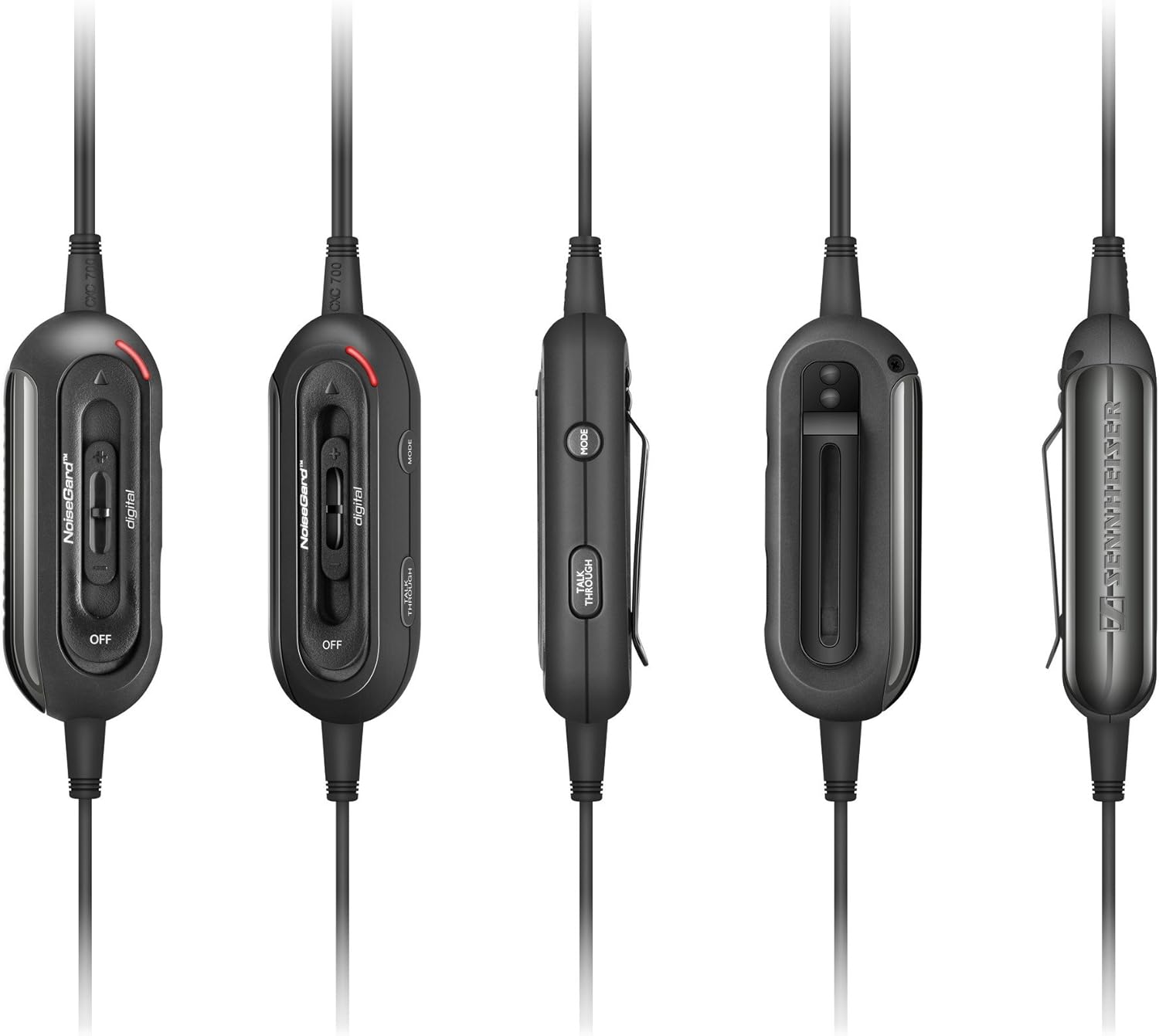
Image: Front view of the control unit, where the battery is installed.
4. Operating Instructions
4.1. Powering On/Off
Use the ON/OFF switch on the control box to activate or deactivate the NoiseGard / digital and TalkThrough functions. The headphones will still function passively for audio playback even when powered off.
4.2. NoiseGard / digital Active Noise Cancellation
The CXC 700 features three distinct NoiseGard / digital modes, optimized for different acoustic environments:
- Mode 1: Optimized for low-frequency noise (100 to 400 Hz), ideal for trains, subways, buses, cars, and short flights. Provides an average of -23dB active noise cancellation.
- Mode 2: Optimized for mid-frequency noise (400 to 3000 Hz), suitable for long-haul flights and air-conditioned rooms. Provides an average of -23dB active noise cancellation.
- Mode 3: Balances low and mid-frequency ranges (100 to 3000 Hz), best for crowded environments or other loud surroundings. Provides an average of -15dB active noise cancellation.
To select a mode, use the mode selection switch on the control box.
4.3. TalkThrough Function
The TalkThrough function allows you to hear your external environment without removing the earphones. This is useful for communicating with others or hearing announcements.
- Activate the TalkThrough function using the dedicated button on the control box.
- When activated, audio input is muted, and external sounds are amplified through the earphones.
4.4. Volume Control
Adjust the audio volume using the volume control slider located on the control box.
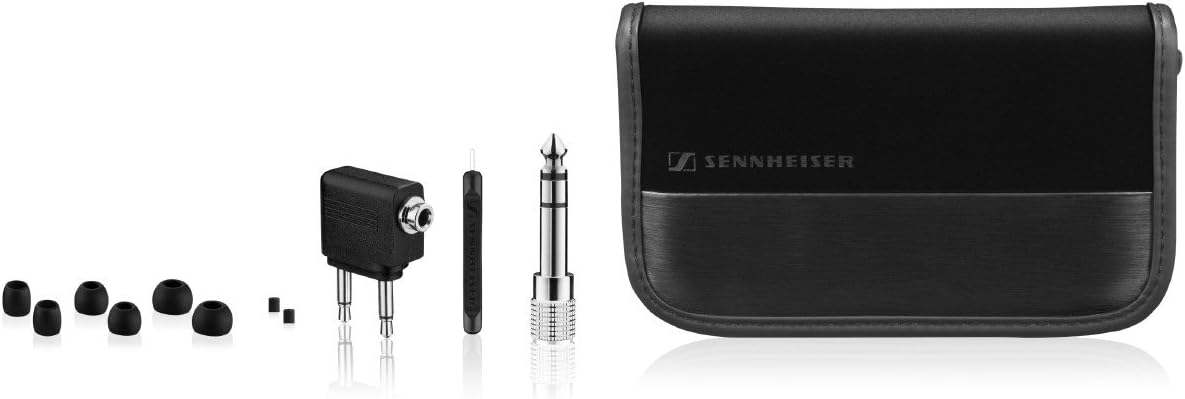
Image: Side view of the control unit, highlighting the volume and TalkThrough controls.
5. Maintenance
5.1. Cleaning
- Ear Adapters: Remove the silicone ear adapters and clean them with mild soap and water. Rinse thoroughly and allow them to dry completely before reattaching.
- Earphones: Use the supplied cleaning tool to gently remove any earwax or debris from the earphone nozzles. Wipe the exterior with a soft, dry cloth.
- Control Unit and Cables: Wipe with a soft, slightly damp cloth. Avoid using harsh cleaning agents.
5.2. Storage
When not in use, store your CXC 700 headphones and accessories in the provided protective storage pouch to prevent damage and tangling.
5.3. Battery Replacement
Replace the AAA alkaline battery when the battery indicator on the control unit signals low power or when the active noise cancellation performance diminishes. Refer to section 3.4 for battery installation instructions.
6. Troubleshooting
If you encounter issues with your CXC 700 headphones, please refer to the following common solutions:
| Problem | Possible Cause | Solution |
|---|---|---|
| No sound or low volume | Incorrect connection, low device volume, dirty earphone nozzles | Ensure the 3.5mm jack is fully inserted. Increase volume on your audio device and the CXC 700 control unit. Clean earphone nozzles. |
| Noise cancellation ineffective | Improper ear adapter fit, low battery, incorrect NoiseGard mode | Ensure ear adapters provide a tight seal. Replace the AAA battery. Select the appropriate NoiseGard mode for your environment. |
| TalkThrough not working | Function not activated, low battery | Press the TalkThrough button on the control unit. Replace the AAA battery. |
| Distorted sound | Volume too high, damaged cable, audio source issue | Reduce volume. Check cable for damage. Test with a different audio source. |
7. Specifications
| Feature | Detail |
|---|---|
| Model | CXC 700 |
| Ear Coupling | Intraaural (In-Ear) |
| Connectivity Technology | Wired |
| Headphone Frequency Response | 20 - 21000 Hz |
| Impedance | 42 Ω |
| Noise Control | Active Noise Cancellation (NoiseGard / digital) |
| Cable Length | 1.4 m |
| Weight | 44 g |
| Battery Type | 1 x AAA Alkaline Battery |
| Battery Average Life | Up to 16 Hours |
| Product Dimensions | 6.35 x 16.51 x 9.91 cm |
| Material | Plastic |
| Color | Black |
8. Warranty
The Sennheiser CXC 700 In-Ear Canal Headphones come with a 2 Years International Manufacturer Warranty. Please retain your proof of purchase for warranty claims. For detailed warranty terms and conditions, refer to the warranty card included in your package or visit the official Sennheiser website.
9. Support
For further assistance, technical support, or service inquiries, please visit the official Sennheiser support website or contact your local Sennheiser service partner. Contact information can typically be found on the Sennheiser website or in the product packaging.


