
Johnson Controls P70AB-2C
Johnson Controls P70AB-2C All-Range Control User Manual
Comprehensive guide for installation, operation, and maintenance of your P70AB-2C pressure control unit.
Product Overview
The Johnson Controls P70AB-2C is an all-range pressure control designed for low pressure applications in commercial refrigeration and air conditioning systems. It is primarily used for low pressure cut-out control, pump-down control, and capacity control. This control is compatible with most common non-corrosive refrigerants and can also be used in other non-corrosive fluid applications. Ammonia-compatible models are also available. The P70AB-2C features a robust all-steel case and cover for durability.

This image displays the complete product package, including the Johnson Controls P70AB-2C pressure control unit, its original box, and a folded instruction manual. Various components like the capillary tube and mounting hardware are also visible.
Key Features
- All-steel case and cover: Built to provide long-lasting, rugged protection for internal components.
- Sight-set calibrated pressure adjustment: Displays a visible pressure scale, fully adjustable through the range without removing the cover (on NEMA 1 enclosure models).
- Micro-set differential option: Allows for precise control on critical low pressure applications.
- Manual reset lockout option: Provides trip-free low pressure lockout that cannot be overridden or reset until pressure returns to specified level.
- Limited knob adjustment option: Restricts control adjustment ranges and deters tampering and over-adjustment.
Setup and Installation
Proper installation is crucial for the optimal performance and longevity of your P70AB-2C control. Always ensure power is disconnected before beginning any installation procedures.
Mounting
The control unit should be mounted securely using the provided mounting bracket. Choose a location that is stable, free from excessive vibration, and allows for easy access for adjustments and maintenance. Ensure the capillary tube can reach the sensing point without kinks or sharp bends.
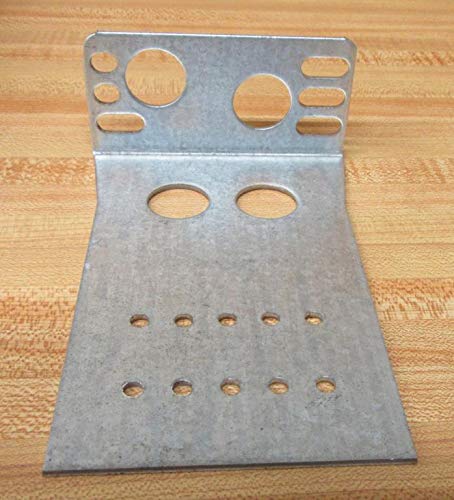
This image shows a sturdy metal mounting bracket, designed with various holes and slots for secure installation of the pressure control unit.
Capillary Tube Connection
Connect the 1/4" flare nut of the 36" capillary tube to the appropriate pressure port of your system. Ensure a tight, leak-free connection. The capillary tube transmits the system pressure to the control's sensing element.
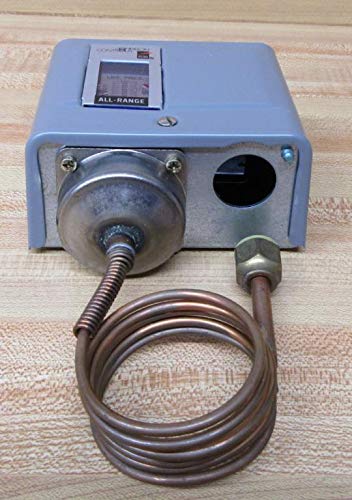
A side perspective of the pressure control unit, highlighting the connection point where the capillary tube enters the main housing. The robust construction of the unit is evident.
Electrical Wiring
Refer to the wiring diagram provided in the full instruction manual for specific electrical connections. The P70AB-2C is a single-pole, single-throw (SPST) control. Ensure all wiring complies with local electrical codes and standards. If you are unsure about wiring, consult a qualified electrician.
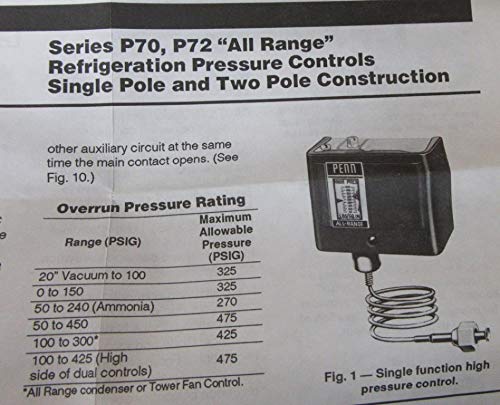
A detailed view of a page from the product's instruction manual. It features the title 'Series P70, P72 'All Range' Refrigeration Pressure Controls Single Pole and Two Pole Construction' and includes a diagram labeled 'Fig. 1 - Single function high pressure control' with an associated table for overrun pressure rating.
Operating Instructions
The P70AB-2C control operates by sensing pressure changes in the system and activating or deactivating a circuit based on set points. The control features a sight-set calibrated pressure adjustment for easy setting.
Setting Pressure Points
To adjust the pressure set points, locate the adjustment mechanism on the control unit. The visible pressure scale allows for precise setting without removing the cover. Rotate the adjustment knob or screw to align with the desired cut-in and cut-out pressure values on the scale. For models with a limited knob adjustment option, the range of adjustment is restricted to prevent tampering.
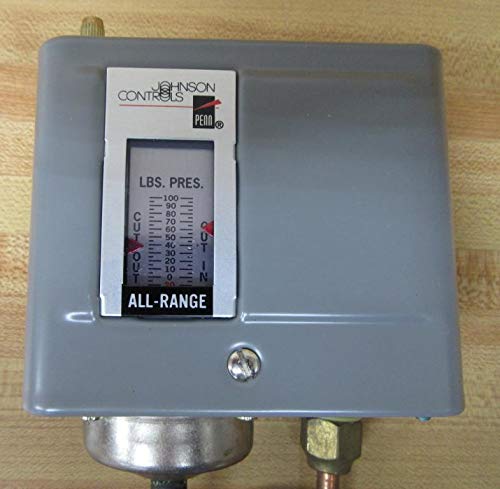
A magnified view of the control unit's display window. The 'LBS. PRES.' scale is clearly visible, indicating pressure values and cut-in/cut-out points. The 'ALL-RANGE' label is also prominent.
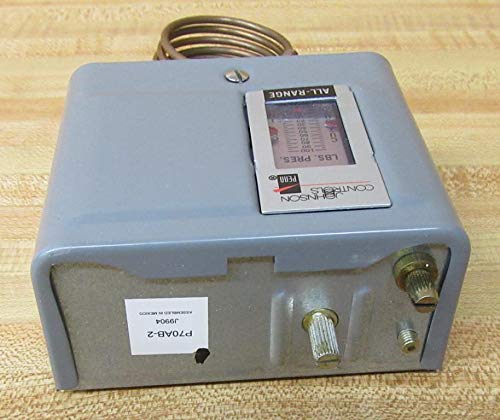
This image presents another front view of the pressure control, with a focus on the internal pressure scale and the 'ALL-RANGE' designation. The robust gray casing and the capillary tube connection are also visible.
Manual Reset Lockout
If your model includes the manual reset lockout option, the control will trip and lock out if the pressure falls below a specified level. To reset, the pressure must return to the specified level, and then the control must be manually reset. This feature prevents continuous cycling under fault conditions.
Maintenance
The Johnson Controls P70AB-2C is designed for reliable operation with minimal maintenance. However, periodic inspection is recommended to ensure continued performance.
- Visual Inspection: Regularly inspect the control unit, capillary tube, and electrical connections for any signs of damage, corrosion, or wear.
- Cleaning: Keep the exterior of the control unit clean and free from dust and debris. Use a soft, dry cloth for cleaning. Do not use abrasive cleaners or solvents.
- Connection Integrity: Periodically check the tightness of the capillary tube flare nut connection to prevent leaks.
Always disconnect power to the unit before performing any maintenance or inspection.
Troubleshooting
If you experience issues with your P70AB-2C pressure control, consider the following common troubleshooting steps:
- Control Not Activating/Deactivating:
- Check power supply to the control.
- Verify that the pressure set points are correctly adjusted for the system's operating range.
- Inspect the capillary tube for kinks, blockages, or leaks that might prevent accurate pressure sensing.
- If equipped with manual reset, ensure it has been reset after a lockout condition.
- Inaccurate Pressure Readings:
- Ensure the capillary tube is properly connected and free of damage.
- Verify the system pressure with a calibrated gauge to cross-reference the control's reading.
- Excessive Cycling:
- Review the differential setting. A very narrow differential might lead to rapid cycling.
- Check for system issues that might cause rapid pressure fluctuations.
For persistent issues or complex problems, it is recommended to consult a qualified HVAC/R technician or contact Johnson Controls technical support.
Specifications
| Specification | Detail |
|---|---|
| Item Model Number | P70AB-2C |
| Product Dimensions | 8 x 4 x 2 inches; 2.2 Pounds |
| Manufacturer | Johnson Controls |
| Capillary Length | 36 inches |
| Flare Nut Size | 1/4 inch |
| Maximum Working Pressure | 100 psi |
| Switch Configuration | Single-Pole, Single-Throw (SPST), Open Low |
Warranty and Support
For information regarding the warranty of your Johnson Controls P70AB-2C unit, please refer to the documentation included with your purchase or visit the official Johnson Controls website. For technical support, service, or replacement parts, contact Johnson Controls customer service or an authorized distributor.
Always ensure that any service or repairs are performed by qualified personnel to maintain product integrity and warranty validity.
Related documentsP70AB-2C


Ask a question about this manual
Ask about setup, troubleshooting, compatibility, parts, safety, or missing instructions. Manuals+ will review the question and use this page’s manual context to help answer it.