Introduction
Thank you for choosing the hjh OFFICE 653010 Ergonomic Swivel Office Chair. This chair is designed to provide optimal comfort and support during long hours of work, featuring a range of adjustable components to suit individual preferences. Please read this manual carefully before assembly and use to ensure proper function and longevity of your chair.

Image: Front view of the hjh OFFICE 653010 ergonomic swivel office chair.
Safety Information
- Ensure all components are securely fastened before use.
- Do not stand on the chair.
- Do not use the chair on uneven surfaces.
- Keep hands and feet clear of moving parts during adjustment.
- This chair is designed for individual use. Do not exceed the maximum weight capacity of 110 kg.
- Regularly inspect the chair for loose screws or damaged parts. Discontinue use if any damage is found.
Package Contents
Upon opening the package, please verify that all components are present and undamaged. While specific part names may vary, a typical package for this chair includes:
- Backrest with mesh
- Seat with leather upholstery
- Headrest
- Armrests (2)
- Gas lift cylinder
- Star base
- Casters (5)
- Mechanism unit
- Hardware kit (screws, washers, Allen key)
- Assembly instructions (separate sheet, if included)
Setup and Assembly
Assembly typically requires no special tools beyond what is provided. Follow the detailed assembly instructions included in your product packaging. General steps include:
- Attach Casters: Insert the five casters into the holes at the end of each leg of the star base until they click into place.
- Insert Gas Lift: Place the gas lift cylinder into the central hole of the star base.
- Attach Mechanism to Seat: Secure the mechanism unit to the underside of the seat using the provided screws. Ensure the front of the mechanism aligns with the front of the seat.
- Attach Armrests: Fasten the armrests to the seat and backrest using the designated screws.
- Attach Backrest: Connect the backrest to the seat and armrests, securing with screws.
- Attach Headrest: Slide the headrest into its designated slot at the top of the backrest.
- Connect Seat to Base: Carefully place the assembled seat and backrest onto the gas lift cylinder.
Once assembled, sit on the chair to properly seat the gas lift and test all adjustments.
Operating Instructions
Your hjh OFFICE 653010 chair offers several adjustment options for personalized comfort:
- Seat Height Adjustment: Locate the lever on the right side under the seat. To raise the seat, lift the lever while taking your weight off the seat. To lower the seat, lift the lever while seated.
- Synchronous Mechanism (Recline and Tilt): The chair features a Syncron mechanism with a wide opening, adjustable in 4 positions. Use the lever on the left side under the seat to lock or unlock the recline function. Adjust the tension of the recline by turning the round knob located under the seat, typically at the front.
- Armrest Height Adjustment: The armrests are adjustable in 5 positions (21 to 29 cm). Press the button on the side of each armrest support and slide the armrest up or down to your desired height. The armrests can also be completely folded up if needed.
- Headrest Adjustment: The headrest height and angle are adjustable. Grasp the headrest and move it up or down, or tilt it forward/backward to find your preferred position.
- Lumbar Support Adjustment: The lumbar support is height adjustable. Locate the lumbar support pad on the backrest and slide it up or down to align with the natural curve of your lower back.
- Weight-Activated Casters: The chair is equipped with weight-activated casters for carpeted floors. These casters lock when no weight is applied to the chair, preventing unwanted movement, and unlock when you sit down.

Image: Side view illustrating chair adjustment points.
Maintenance
Proper maintenance will extend the life of your office chair:
- Cleaning: For the mesh backrest, gently wipe with a damp cloth and mild soap. For the leather seat, use a specialized leather cleaner or a damp cloth. Avoid harsh chemicals or abrasive cleaners.
- Inspection: Periodically check all screws and bolts to ensure they are tight. Re-tighten if necessary.
- Caster Care: Keep casters free of hair and debris to ensure smooth movement.
- Lubrication: If any moving parts begin to squeak, a small amount of silicone-based lubricant can be applied.

Image: Back view of the chair, showing the mesh backrest.
Troubleshooting
| Problem | Possible Cause | Solution |
|---|---|---|
| Chair does not adjust height | Gas lift malfunction or lever not engaged. | Ensure the height adjustment lever is fully engaged. If the problem persists, the gas lift may need replacement. |
| Chair squeaks | Loose connections or lack of lubrication. | Tighten all screws and bolts. Apply silicone-based lubricant to moving parts. |
| Casters not rolling smoothly | Debris in casters or damaged casters. | Clean casters of any hair or debris. Replace damaged casters if necessary. |
| Recline mechanism not working | Recline lock engaged or tension too high. | Ensure the recline lever is in the unlocked position. Adjust the tension knob to a lower setting. |
Specifications
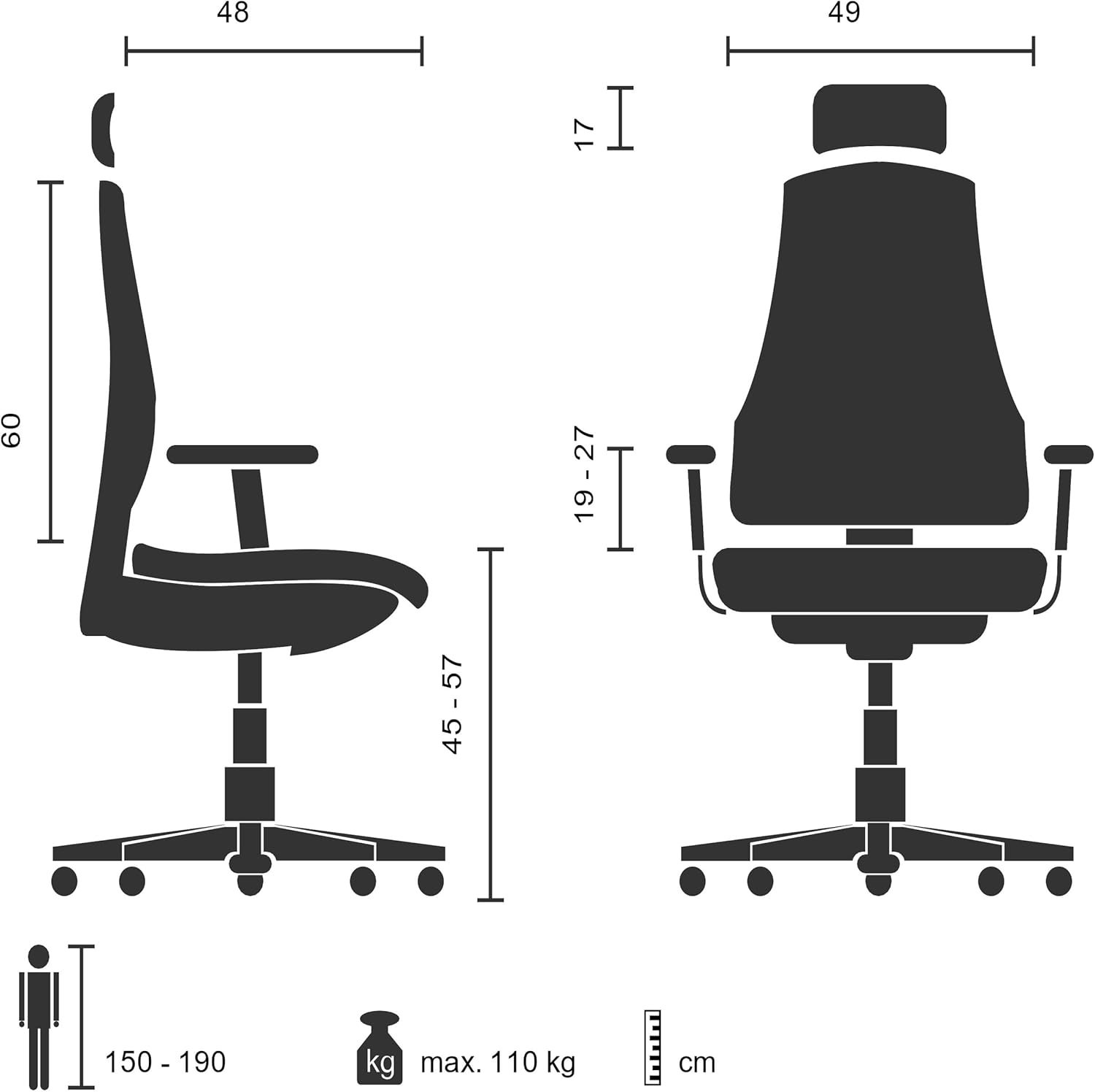
Image: Chair dimensions diagram.
| Feature | Detail |
|---|---|
| Brand | hjh OFFICE |
| Model Number | 653010 |
| Color | Black |
| Product Dimensions (L x W x H) | 48 x 59 x 117 cm |
| Item Weight | 17 Kilograms |
| Material | Mesh/Leather |
| Frame Material | Metal |
| Special Features | Height-adjustable headrest, Ergonomic design |
| Seat Height Range | 45 cm - 57 cm |
| Seat Width | 49 cm |
| Max User Weight | 110 kg |
| Recommended User Height | 150 - 190 cm |
| Armrest Height Adjustment | 5 positions (21 - 29 cm) |
| Casters | Weight-activated for carpeted floors |
| Safety Standard | DIN EN 1335 part 2-3 |
Warranty and Support
This hjh OFFICE 653010 chair comes with a 24-month warranty from the date of purchase, covering manufacturing defects. Please retain your proof of purchase for warranty claims.
For technical support, spare parts, or warranty inquiries, please contact hjh OFFICE customer service. Refer to the contact information provided with your product packaging or visit the official hjh OFFICE website for assistance.
Manufacturer: hjh OFFICE


