
Introduction
This manual provides detailed instructions for the assembly, operation, maintenance, and troubleshooting of your hjh OFFICE 657230 Porto Base Office Chair. Please read this manual thoroughly before assembly and use to ensure proper function and safety. Keep this manual for future reference.
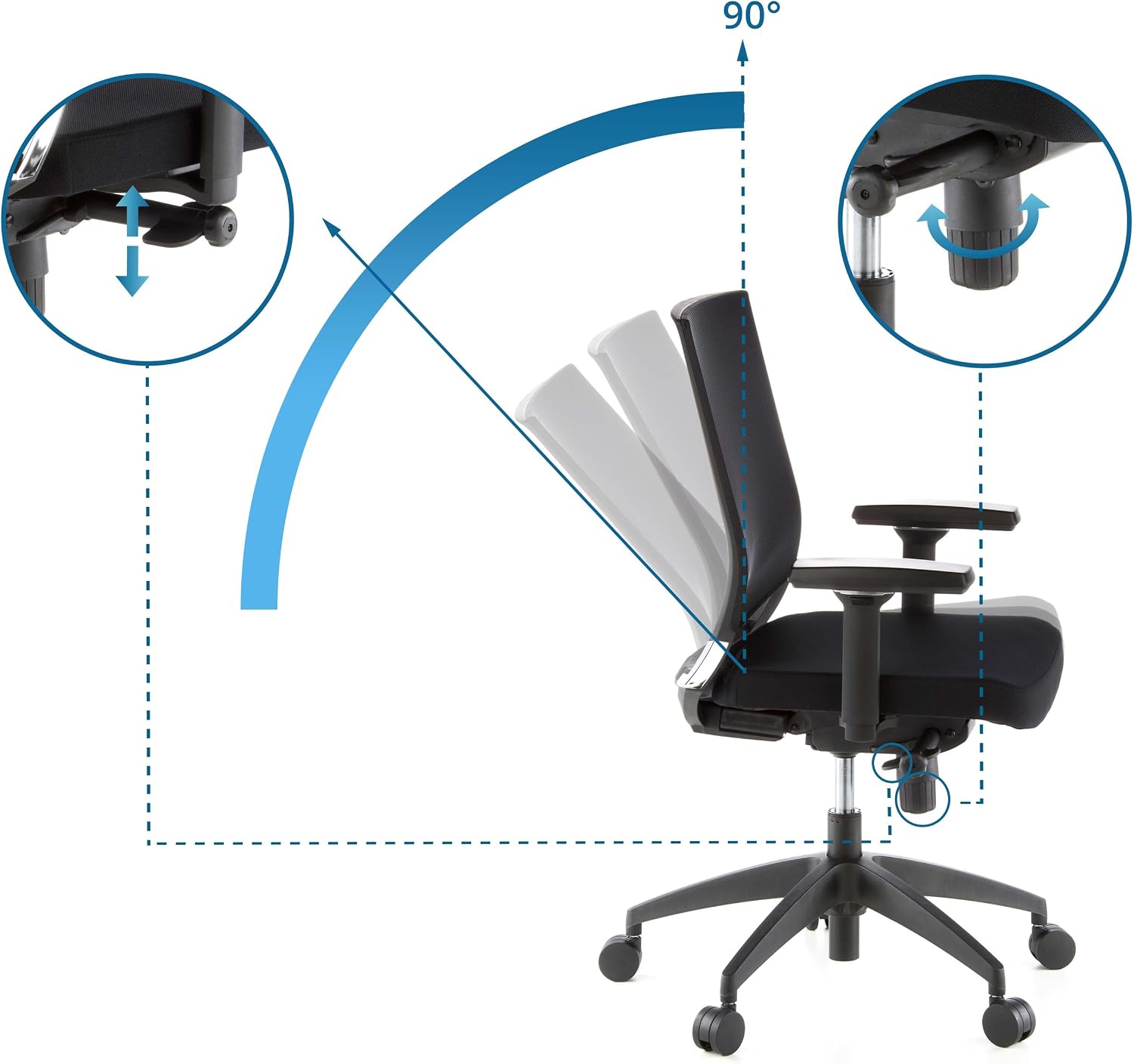
Image: The hjh OFFICE 657230 Porto Base Office Chair positioned in a contemporary office environment, showcasing its design and suitability for professional use.
Safety Information
- Ensure all components are present and undamaged before beginning assembly. Do not use if any parts are missing or damaged.
- Follow assembly instructions carefully. Incorrect assembly can lead to instability and potential injury.
- Do not stand on the chair. Use it only for seating purposes.
- Do not exceed the maximum recommended weight capacity of 110 kg (242 lbs).
- Keep children and pets away from the chair during assembly. Small parts may pose a choking hazard.
- Regularly check all screws and fasteners to ensure they remain tight. Retighten as necessary.
- Avoid exposing the chair to direct sunlight or extreme temperatures for prolonged periods, as this may damage the materials.
Package Contents
Please verify that all the following components are included in your package:
- Seat with fabric cover
- Backrest with mesh fabric
- Base (star base)
- 5 Double safety castors
- Gas lift cylinder
- 2 Armrests (3D adjustable)
- Mechanism unit
- Hardware pack (screws, washers, Allen key)
Assembly Instructions
While this chair is designed for straightforward assembly, it is recommended to have two people for certain steps. Lay out all components on a soft, clean surface to prevent scratches.
- Attach Castors to Base: Insert the five double safety castors into the openings at the end of each leg of the star base. Push firmly until they click into place.
- Insert Gas Lift: Place the gas lift cylinder into the central hole of the assembled star base. Do not remove the red cap from the gas lift piston until instructed.
- Attach Mechanism to Seat: Align the mechanism unit with the pre-drilled holes on the underside of the seat. Ensure the front of the mechanism faces the front of the seat. Secure with the provided screws and tighten them evenly.
- Attach Armrests to Seat: Fasten the armrests to the sides of the seat using the designated screws. Do not overtighten initially, allow for minor adjustments.
- Attach Backrest to Seat: Connect the backrest to the seat assembly. This typically involves aligning brackets and securing with screws. Ensure a firm connection.
- Connect Seat Assembly to Gas Lift: Carefully place the assembled seat and backrest onto the gas lift cylinder, ensuring the central hole of the mechanism unit aligns with the top of the gas lift. Apply gentle downward pressure to secure.
- Final Tightening: Once the chair is fully assembled, go back and tighten all screws firmly. Test all functions before regular use.
Operating Instructions
Your hjh OFFICE 657230 Porto Base Office Chair offers several adjustment options for personalized comfort.
1. Height Adjustment (Toplift)
- To raise the seat: While seated, lift the lever located under the right side of the seat. The seat will rise automatically. Release the lever at the desired height.
- To lower the seat: While seated, lift the lever located under the right side of the seat. Apply your body weight to lower the seat. Release the lever at the desired height.
2. Synchronized Mechanism and Tilt
- The chair features a 4-position adjustable synchronized mechanism, allowing the seat and backrest to tilt together at an ergonomic ratio.
- To activate/deactivate tilt: Use the lever on the left side of the seat. Push it in to lock the tilt in an upright position, pull it out to allow tilting.
- To adjust tilt tension: Rotate the large knob located under the front of the seat. Turn clockwise to increase tension (requiring more force to recline) or counter-clockwise to decrease tension (for easier reclining).
- To lock the tilt in one of the 4 positions: Recline to your desired angle and push the left lever in to lock.

Image: A diagram showing the synchronized recline function, where the backrest and seat tilt together, and how to lock it in one of four positions.
3. 3D Armrest Adjustment
- Height Adjustment: Press the button on the side of each armrest support and move the armrest up or down to one of the 9 available height stages. Release the button to lock.
- Angle Adjustment: The armrest pads can be rotated inwards or outwards to support various working postures.
- Depth Adjustment: The armrest pads can slide forward or backward to provide optimal forearm support.
4. Lumbar Support
- The chair features integrated lumbar support designed to conform to the natural curve of your lower back. While not explicitly adjustable in the provided data, its design aims to provide consistent support.

Image: An overview diagram highlighting key adjustable features such as the breathable mesh backrest, seat height adjustment, multi-directional armrests, and smooth-rolling castors.
Maintenance
Proper care and maintenance will extend the life and appearance of your office chair.
- Cleaning: For the fabric seat and mesh backrest, use dry cleaning methods only. Do not use liquid cleaners, abrasive chemicals, or harsh brushes, as these can damage the material.
- Frame: Wipe the plastic and metal parts with a soft, damp cloth. Avoid using strong detergents.
- Castors: Periodically clean the castors to remove dust, hair, and debris that may hinder smooth movement.
- Fasteners: Regularly check all screws and bolts for tightness. Retighten them as needed to maintain stability and safety.
- Avoid Overloading: Do not place excessive weight on the chair or its components.
Troubleshooting
If you encounter any issues with your chair, refer to the following common problems and solutions:
- Chair does not adjust height:
- Ensure the gas lift lever is fully engaged.
- Check if the gas lift cylinder is properly seated in the base and mechanism.
- Chair feels wobbly or unstable:
- Check and tighten all assembly screws, especially those connecting the mechanism to the seat and the backrest.
- Ensure the castors are fully inserted into the base.
- Castors do not roll smoothly:
- Remove any hair, dust, or debris from the castor wheels.
- Ensure the castors are correctly installed.
- Backrest does not recline or lock:
- Verify that the tilt lock lever is in the correct position (pulled out for recline, pushed in for lock).
- Adjust the tilt tension knob to ensure it's not too tight.
Specifications
| Brand | hjh OFFICE |
| Model Name | PORTO BASE |
| Model Number | 657230 |
| Color | Black |
| Material | Fabric / Mesh fabric |
| Product Dimensions (D x W x H) | 44 x 59 x 108 cm |
| Seat Height | Adjustable, up to 58 cm |
| Seat Depth | 44 cm |
| Product Weight | 15 kg |
| Maximum Recommended Weight | 110 kg |
| Backrest Style | Mesh back |
| Armrests | 3D adjustable with softpad cover |
| Mechanism | 4-position adjustable synchronized mechanism, Tilt function |
| Base Movement | Swivel, with unbraked double safety castors |
| Assembly Required | No (implies minimal assembly or pre-assembled main parts, but for clarity, assembly steps are provided) |
| Country of Origin | China |

Image: A technical diagram illustrating the key dimensions of the office chair, including seat height, depth, and overall chair height and width.
Warranty and Support
Your hjh OFFICE 657230 Porto Base Office Chair is covered by a 4-year warranty from the date of purchase. This warranty covers manufacturing defects and material flaws under normal use.
For warranty claims, technical support, or any questions regarding your product, please contact hjh OFFICE customer service. Please have your proof of purchase and model number (657230) ready when contacting support.
Contact information for hjh OFFICE can typically be found on their official website or through your retailer.
