1. Introduction
The Reiner SCT CYBERJACK RFID STANDARD is a versatile smart card reader designed for secure digital interactions. This device facilitates various applications including electronic identification (eID), online banking (HBCI/FinTS, Secoder, EBICS), and professional electronic signatures. Its robust design and integrated display ensure secure PIN entry and reliable performance.
This manual provides essential information for the proper setup, operation, maintenance, and troubleshooting of your CYBERJACK RFID STANDARD card reader.
2. Safety Information
- Do not expose the device to extreme temperatures, direct sunlight, or high humidity.
- Avoid dropping or subjecting the device to strong impacts.
- Do not attempt to open or modify the device. This will void the warranty and may cause damage.
- Keep the device away from liquids. If liquid enters the device, disconnect it immediately and contact support.
- Use only the provided or recommended cables and accessories.
- Ensure proper ventilation when in use.
3. Package Contents
Please check the package contents upon unboxing. The standard package should include:
- Reiner SCT CYBERJACK RFID STANDARD Card Reader (Model 2718600-000)
- USB Connection Cable
- Quick Start Guide (if included)
If any items are missing or damaged, please contact your retailer or Reiner SCT support.
4. Setup
4.1 Connecting the Device
To set up your CYBERJACK RFID STANDARD card reader:
- Unpack the card reader and the USB cable.
- Connect the smaller end of the USB cable to the USB port on the card reader.
- Connect the larger end of the USB cable to an available USB port on your computer.
- The device's display should illuminate, indicating it is receiving power.
4.2 Driver Installation
For the card reader to function correctly, the necessary drivers must be installed on your computer. Drivers are typically available for Windows, macOS, and Linux operating systems.
- Visit the official Reiner SCT website (www.reiner-sct.com) to download the latest drivers for your operating system.
- Follow the on-screen instructions provided by the installer.
- Restart your computer if prompted after installation.
Once drivers are installed, your computer should recognize the CYBERJACK RFID STANDARD as a smart card reader.
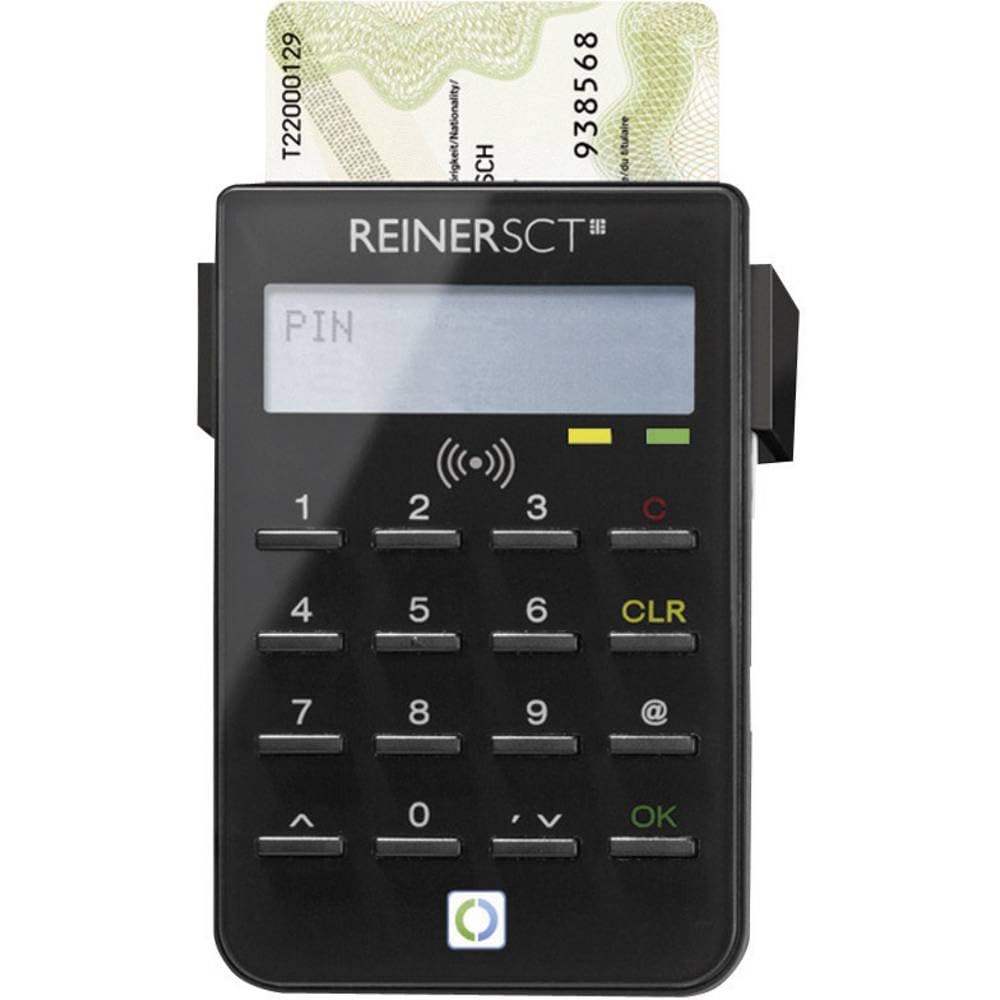
This image displays the Reiner SCT CYBERJACK RFID STANDARD card reader. It is a compact, black device designed for secure smart card and RFID interactions.
5. Operating Instructions
5.1 Inserting a Contact Smart Card
For applications requiring a contact smart card (e.g., some banking cards, health cards):
- Locate the smart card slot on the CYBERJACK RFID STANDARD.
- Insert the smart card with the chip facing upwards and towards the device, until it clicks into place.
- Follow the instructions on your computer screen or the device's display for PIN entry or transaction confirmation.
5.2 Using RFID (Contactless) Cards
For applications requiring contactless interaction (e.g., new eID cards, some payment cards):
- Ensure the application you are using supports RFID functionality.
- Hold your RFID-enabled card directly over the designated RFID area on the CYBERJACK RFID STANDARD.
- Maintain the card's position until the transaction or identification process is complete.
- The device's display may show prompts for PIN entry or status updates.
5.3 Secure PIN Entry
The CYBERJACK RFID STANDARD features a built-in display for secure PIN entry. When prompted for a PIN:
- Enter your PIN directly on the device's keypad, not on your computer keyboard.
- The PIN will be displayed on the device's LCD screen, ensuring it is not visible on your computer.
- Confirm your entry as instructed by the device or application.
6. Maintenance
6.1 Cleaning
To maintain the performance and appearance of your card reader:
- Disconnect the device from your computer before cleaning.
- Use a soft, dry, lint-free cloth to wipe the exterior of the device.
- For stubborn dirt, slightly dampen the cloth with water or a mild, non-abrasive cleaning solution.
- Do not use harsh chemicals, solvents, or abrasive materials, as these can damage the device.
- Avoid getting moisture into any openings.
6.2 Storage
When not in use, store the card reader in a clean, dry place, away from direct sunlight and extreme temperatures.
7. Troubleshooting
7.1 Device Not Recognized by Computer
- Check USB Connection: Ensure the USB cable is securely connected to both the card reader and your computer. Try a different USB port.
- Driver Installation: Verify that the correct drivers for your operating system are installed. Reinstall drivers if necessary from the Reiner SCT website.
- Restart Computer: A simple restart can often resolve connectivity issues.
- Try Another Computer: If possible, test the device on another computer to determine if the issue is with the reader or your system.
7.2 Smart Card Not Read
- Correct Insertion: For contact cards, ensure the card is inserted correctly with the chip facing up and fully seated in the slot.
- Clean Card Chip: Gently clean the chip on your smart card with a soft, dry cloth to remove any dust or debris.
- RFID Positioning: For contactless cards, ensure the card is held directly over the RFID sensing area and remains still during the process.
- Application Compatibility: Confirm that the software or application you are using is compatible with the card and the reader.
7.3 Display Not Working
- Power Check: Ensure the device is properly connected to a powered USB port.
- Restart: Disconnect and reconnect the device.
If these steps do not resolve your issue, please refer to the support section on the Reiner SCT website or contact their customer service.
8. Specifications
| Feature | Specification |
|---|---|
| Brand | ReinerSCT |
| Model Number | 2718600-000 |
| Series | Cyberjack RFID Standard |
| Colour | Black |
| Display Type | LCD |
| Secure PIN Entry | Yes |
| Product Dimensions | 9.5 x 6.2 x 1.4 cm |
| Item Weight | 80 g |
| Processor Count | 1 |
| Batteries Included | No |
| Certification | TÜV-IT BSI |
9. Warranty and Support
The Reiner SCT CYBERJACK RFID STANDARD card reader comes with a manufacturer's warranty. Please refer to the warranty information provided with your purchase or visit the official Reiner SCT website for details regarding warranty terms and conditions.
For technical support, driver downloads, FAQs, and further assistance, please visit the official Reiner SCT support portal:
- Website: www.reiner-sct.com/support
When contacting support, please have your product model number (2718600-000) and a detailed description of your issue ready.