
GBC 1701855
GBC Inspire Thermal Laminator Machine
Model: 1701855
Introduction
This manual provides comprehensive instructions for the safe and efficient operation, maintenance, and troubleshooting of your GBC Inspire Thermal Laminator Machine. Please read this manual thoroughly before using the device to ensure optimal performance and longevity.
Safety Information
Always adhere to the following safety guidelines to prevent injury or damage to the laminator:
- Do not operate the laminator with wet hands or near water.
- Ensure the power cord is not damaged or pinched.
- Keep the laminator away from heat sources and direct sunlight.
- Do not insert objects other than laminating pouches into the machine.
- Unplug the laminator when not in use or before cleaning.
- This device is designed for home use and features a finger-safe design.
Package Contents
Verify that all items are present in the packaging:
- GBC Inspire Thermal Laminator Machine
- Instruction Manual (this document)
- Starter pack of laminating pouches (may vary by region)
Product Overview
The GBC Inspire Thermal Laminator is a compact and efficient device designed for protecting documents and photos. It features a sleek black design and a convenient landing tray to reduce page curl.

Image: The GBC Inspire Thermal Laminator in operation, laminating a photograph.
Key components include the power switch, ready indicator light, document entry slot, and exit tray.
Setup
- Unpack the Laminator: Carefully remove the laminator and all accessories from the packaging.
- Placement: Place the laminator on a flat, stable, and heat-resistant surface. Ensure there is enough clear space behind the machine for laminated items to exit freely.
- Connect Power: Plug the power cord into a standard electrical outlet.
- Power On: Turn on the laminator using the power switch. The ready indicator light will illuminate, typically red or amber, indicating the machine is warming up.
- Warm-up Time: Allow approximately 7 minutes for the laminator to reach its optimal operating temperature. The ready indicator light will turn green when the machine is ready for use.

Image: The GBC Inspire Thermal Laminator placed on a clean, flat surface, ready for setup.
Operating Instructions
- Prepare Document: Place the document or photo you wish to laminate inside a thermal laminating pouch. Ensure the document is centered and aligned within the pouch, leaving a small margin on all sides.
- Select Pouch Thickness: The Inspire laminator supports 3 mil pouches for letter or legal size documents and 5 mil pouches for items up to 4" x 6" photo size. No carrier is required.
- Insert Pouch: Once the green ready light is illuminated, carefully insert the sealed edge of the laminating pouch into the document entry slot. The laminator will automatically feed the pouch through.
- Lamination Process: The laminator operates at a speed of 10 inches per minute. Allow the machine to fully process the pouch. Do not pull or force the pouch through the laminator.
- Cool Down: Once the laminated item exits the machine, place it on a flat surface to cool and set. Avoid handling it excessively until it has cooled to prevent bending or warping.
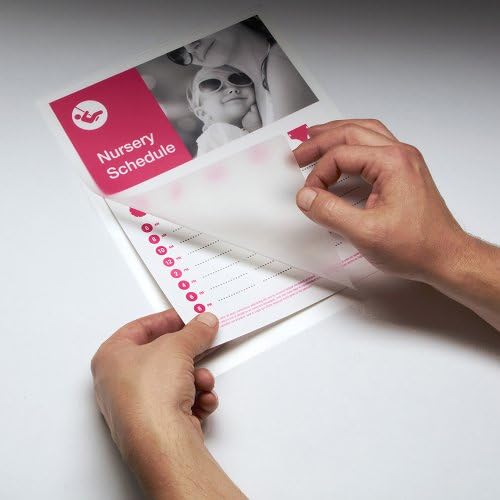
Image: A user carefully placing a document into a laminating pouch before insertion into the machine.

Image: The GBC Inspire Thermal Laminator actively feeding a document through its rollers.
Maintenance
- Cleaning: Ensure the laminator is unplugged and completely cool before cleaning. Wipe the exterior with a soft, dry cloth. Do not use abrasive cleaners or solvents.
- Roller Cleaning: Periodically run a cleaning sheet (available separately) through the laminator to remove any adhesive residue from the rollers.
- Storage: Store the laminator in a cool, dry place when not in use.
Troubleshooting
| Problem | Possible Cause | Solution |
|---|---|---|
| Laminator not turning on. | No power supply. | Check power cord connection and wall outlet. |
| Laminator not heating up (no green light). | Insufficient warm-up time. | Allow the full 7 minutes for warm-up. |
| Pouch jams. | Pouch inserted incorrectly or too thick. | Ensure pouch is inserted sealed-edge first. Use correct pouch thickness (3 mil or 5 mil). |
| Laminated item is cloudy or has bubbles. | Laminator not hot enough or incorrect pouch. | Wait for the green ready light. Ensure correct pouch type for thermal laminators. |
Specifications
- Model: 1701855
- Laminating Type: Thermal
- Warm-up Time: Approximately 7 minutes
- Laminating Speed: 10 inches per minute
- Maximum Document Width: 9 inches
- Pouch Thickness Compatibility: 3 mil (for Letter/Legal size), 5 mil (for up to 4" x 6" photo size)
- Dimensions: 4.33 x 14.96 x 4.25 inches
- Weight: 2.61 pounds
- Color: Black
Warranty and Support
The GBC Inspire Thermal Laminator is backed by a limited 90-day warranty. For warranty claims, technical support, or additional product information, please contact GBC customer service through their official website or the retailer where the product was purchased.
For more information, visit the GBC Store on Amazon.
Ask a question about this manual
Ask about setup, troubleshooting, compatibility, parts, safety, or missing instructions. Manuals+ will review the question and use this page’s manual context to help answer it.